SAP & Oracle partner and support companies

Loading

SAP

SAP MM Consultant resume 3 years experience

Landing Your Dream Job: The Ultimate Guide to SAP MM Consultant resume 3 years experience

SAP MM Consultant resume 3 years experience

So you’ve spent the past three years honing your skills in the dynamic world of SAP MM (Material Management). You’ve grasped the intricacies of procurement, mastered material master data, and streamlined inventory control processes. Now, it’s time to take the next step: landing your dream job as an SAP MM Consultant. But before diving headfirst into applications, a powerful resume that showcases your expertise is essential. After all, your resume is the first impression you make on potential employers. This comprehensive guide will equip you with the knowledge and strategies to SAP MM Consultant resume 3 years experience that gets you noticed by recruiters and hiring managers.

Understanding the Search Intent: What Recruiters Look For

When crafting your resume, it’s crucial to understand what recruiters are actively seeking in an SAP MM Consultant with 3 years of experience. Here are some key aspects they’ll be looking to uncover:

  • Solid SAP MM Foundation: A firm grasp of core functionalities like material master data management, procurement processes (purchase requisitions, purchase orders, vendor management), inventory control (goods receipts, issues, transfers), and invoice verification.
  • Configuration Expertise: Experience in configuring the SAP MM module to meet specific business needs, including customizing material groups, pricing procedures, and account assignment rules.
  • Data Migration and Integration Skills: The ability to migrate data from legacy systems to SAP using tools like LSMW (Legacy System Migration Workbench) or BDC (Batch Data Communication). Additionally, knowledge of integrating SAP MM with other modules like FI (Finance) and CO (Controlling) is a plus.
  • Reporting and Analytics: Understanding how to generate reports that provide valuable insights into procurement activities, inventory levels, and overall supply chain performance.
  • Communication and Collaboration: Excellent communication skills to collaborate effectively with cross-functional teams (procurement, finance, logistics), as well as strong analytical and problem-solving abilities.

Top Skills Required to Excel as a SAP MM Consultant | Top SAP MM Consultant Interview Questions

Optimizing Your Resume for Search Engines (SEO): Keywords are Key

In today’s digital age, Applicant Tracking Systems (ATS) play a significant role in screening resumes. To ensure yours gets past the initial hurdle, optimize it with relevant keywords. Here’s how:

  • Research Industry Keywords: Utilize industry-specific job postings and online resources to identify the most commonly used keywords for SAP MM Consultant positions with 3 years of experience.
  • Targeted Keywords Throughout: Strategically incorporate these keywords throughout your resume, including your profile summary, skills section, and work experience descriptions. However, avoid keyword stuffing that can appear unnatural.
  • Highlight Achievements with Quantifiable Data: When detailing your accomplishments, use quantifiable metrics to showcase the impact you’ve made. For example, “Reduced procurement lead time by 15% through process optimization.”

Structuring Your Resume for Success

Now that you understand the search intent and SEO best practices, let’s delve into the key sections of your resume:

1. Compelling Profile Summary

Craft a concise yet impactful summary that highlights your 3 years of SAP MM experience and key strengths. Briefly mention your expertise in specific areas like configuration, data migration, or reporting.

2. Skills Section:

Showcase your SAP MM skillset in a dedicated section. Utilize bullet points to list relevant skills, including:

  • Technical Skills: SAP MM Core Functionality (material master, procurement, inventory), Configuration, Data Migration Tools (LSMW, BDC), Reporting Tools (e.g., SAP Query)
  • Soft Skills: Communication, Collaboration, Problem-Solving, Analytical Thinking

3. Work Experience:

This section is where you bring your accomplishments to life. For each relevant SAP MM Consultant role, include:

  • Company Name, Dates of Employment, Job Title
  • 2-3 Bullet Points Detailing Achievements: Focus on quantifiable results and the impact you made. Emphasize successful implementations, streamlined processes, or cost-saving initiatives through your SAP MM expertise.
  • Specific Tools and Technologies Used: Mention the specific SAP versions, modules, and tools you’ve utilized in your projects.

4. Certifications (Optional):

If you hold relevant SAP MM certifications, list them in a dedicated section.

5. Educational Background:

Include your educational background, highlighting any degrees or relevant coursework related to supply chain management, business administration, or information technology.

Additional Tips for Standing Out

  • Tailor Your Resume: Don’t send a generic resume. Adapt your resume to each specific job application by highlighting the skills and experiences most relevant to the position’s requirements.
  • Proofread Meticulously: Typos and grammatical errors can create a negative impression. Ensure your resume is polished and error-free.

Explore our latest posts:

Cloud Application Development: Building Scalable and Secure Solutions

How to steps Automating Oracle Database Startup on Linux

SAP MM Functional: Streamlining Materials Management

SAP MM Consultant Trainer

Cloud Application Development

Cloud Application Development: Building Scalable and Secure Solutions

Cloud application development has revolutionized how businesses build, deploy, and scale their software solutions. This blog explores the key concepts, tools, and best practices involved in developing cloud applications.

Introduction to Cloud Application Development

In today’s digital landscape, cloud computing offers unparalleled advantages in terms of scalability, flexibility, and cost-efficiency. Cloud application development leverages cloud infrastructure and services to create applications that can be accessed and operated over the internet from anywhere, on any device.

Key Components of Cloud Application Development

  1. Cloud Infrastructure: Understanding the foundational components such as virtual machines, containers, and serverless computing (e.g., AWS EC2, Docker, AWS Lambda).
  2. Cloud Services: Utilizing managed services like databases (e.g., AWS RDS, Azure SQL Database), storage (e.g., AWS S3, Google Cloud Storage), and messaging (e.g., AWS SQS, Azure Service Bus) to offload operational tasks and focus on application logic.
  3. Microservices Architecture: Designing applications as a collection of loosely coupled services that communicate through APIs, promoting agility, scalability, and resilience.

Tools and Technologies for Cloud Application Development

  • Platform as a Service (PaaS): Using platforms like AWS Elastic Beanstalk, Heroku, or Google App Engine to simplify application deployment and management.
  • Container Orchestration: Leveraging Kubernetes for automating deployment, scaling, and management of containerized applications.
  • DevOps Practices: Implementing CI/CD pipelines (e.g., Jenkins, GitLab CI/CD) to automate build, test, and deployment processes, ensuring faster time to market.
  • Serverless Computing: Developing event-driven applications without managing infrastructure (e.g., AWS Lambda, Azure Functions), optimizing costs and scalability.

Best Practices for Cloud Application Development

  • Security: Implementing strong authentication, encryption, and access control mechanisms (e.g., IAM roles, SSL/TLS) to protect data and applications.
  • Scalability: Designing applications to handle varying workloads by scaling horizontally (adding more instances) or vertically (increasing resources per instance).
  • Resilience: Building applications with fault tolerance and disaster recovery mechanisms (e.g., replication, backups) to ensure high availability.
  • Monitoring and Logging: Using tools like AWS CloudWatch, Azure Monitor, or ELK Stack (Elasticsearch, Logstash, Kibana) for real-time monitoring, performance optimization, and troubleshooting.

Case Studies and Real-World Examples

  • Netflix: Utilizes microservices architecture on AWS to deliver seamless streaming experiences globally.
  • Slack: Leverages AWS Lambda and serverless architecture for real-time messaging at scale.
  • Spotify: Uses Google Cloud Platform for data analytics and machine learning to personalize music recommendations.

Conclusion

Cloud application development empowers businesses to innovate rapidly, scale efficiently, and deliver superior user experiences. By embracing cloud-native architectures and leveraging advanced cloud services, developers can focus more on building features and less on managing infrastructure. Stay updated with evolving cloud technologies to stay competitive in the dynamic digital landscape.

you may be interested in this blog here:-

Fun and Educational Hindi Rhymes for UKG Class Competition..

An Ultimate Guide To All Salesforce Career Path 2024

Learn SAP Course Duration & Fees Explained

how to connect to oracle database in linux

How to steps Automating Oracle Database Startup on Linux
how to connect to oracle database in linux, Greetings, database adventurers! Today’s expedition equips you to configure your Oracle database for automatic startup during a system reboot on your Linux machine. This will ensure your database is up and running without manual intervention, saving you valuable time.

Chapter 1: The Oracle Prerequisite

Before we embark, ensure you have created your Oracle database instance. If not, consult the official Oracle documentation for your specific version.

Chapter 2: The Initiation Script

We’ll be crafting a system script (for Oracle 12c and later) or an init script (for older versions) to handle the automatic startup.

  • Systemd (Oracle 12c and later):
  1. As root, create a new file named /etc/systemd/system/dbora.service (replace dbora with your database name).
  2. Paste the following content, replacing bracketed placeholders with your details:
[Unit]
Description=Oracle Database Service - dbora
After=network.target

[Service]
Type=simple
User=oracle
Group=dba
Environment="ORACLE_BASE=/u01/app/oracle"
Environment="ORACLE_HOME=$ORACLE_BASE/product/19.0.0/dbhome_1"  # Replace with your version
ExecStart=$ORACLE_HOME/bin/dbstart $ORACLE_SID=$SID  # Replace with your SID
Restart=always
Nice=10

[Install]
WantedBy=multi-user.target
  • Init Script (For older Oracle versions):
  1. As root, create a new file named /etc/init.d/dbora.
  2. Paste the following content, replacing bracketed placeholders with your details:
#!/bin/sh
# chkconfig: 2 3 4 5
# description: Oracle Database Service - dbora

ORACLE_BASE=/u01/app/oracle
ORACLE_HOME=$ORACLE_BASE/product/12.2.0/dbhome_1  # Replace with your version
SID=dbora  # Replace with your SID

case "$1" in
  start)
    su -p -s /bin/bash oracle -c "$ORACLE_HOME/bin/dbstart $SID"
    ;;
  stop)
    su -p -s /bin/bash oracle -c "$ORACLE_HOME/bin/dbshut $SID"
    ;;
  *)
    echo "Usage: /etc/init.d/dbora {start|stop}"
    exit 1
    ;;
esac

exit 0

Chapter 3: Script Sorcery

  1. Systemd: Run sudo systemctl daemon-reload to reload the systemd configuration.
  2. Init Script: Set the script permissions with sudo chmod 750 /etc/init.d/dbora.

Chapter 4: Enabling the Service

  • Systemd: Use sudo systemctl enable dbora.service to enable the service at boot.
  • Init Script: Use sudo chkconfig --add dbora to enable the service for specific run levels (check your distro’s documentation for details).

Chapter 5: Auto-Start Verification (Optional)

  1. Edit the /etc/oratab file (as root).
  2. Change the auto-start flag for your database to Y.

Chapter 6: Reboot and Rejoice!

Now, reboot your system using sudo reboot (cautiously!). Upon successful reboot, your Oracle database should automatically start.

Bonus Chapter: Verifying Success

Use the ps -ef | grep ora_pmon command to check if the Oracle database processes are running.

The End

how to connect to oracle database in linux, With this automated setup, your Oracle database will be ready to serve requests as soon as your Linux system boots up. Now go forth and conquer your database tasks with newfound efficiency!tunesharemore_vert

you may be interested in this blog here:-

Embracing Collaboration and Growth: The UKG Community

Traditional vs Salesforce CRM: A Comparative Analysis

rapid application development model

Exploring the Rapid Application Development Model: Speed

In the ever-evolving landscape of software development, the Rapid Application Development (RAD) model stands out as a beacon of efficiency and innovation..

iterative development, and close collaboration between developers and stakeholders. Join us as we delve into the essence of RAD, uncovering its principles, benefits, and real-world applications that are transforming the way software is built and delivered today.


What is the Rapid Application Development Model?

The RAD model is a progressive approach to software development that prioritizes rapid prototyping and iteration over traditional sequential processes. Unlike the waterfall model, which follows a linear progression of phases, RAD emphasizes flexibility and responsiveness to change throughout the development lifecycle. This methodology enables teams to quickly build and deploy software by focusing on user feedback and iterative improvements, ultimately delivering functional prototypes at accelerated speeds.

Benefits of Using RAD:

  1. Speed and Time-to-Market: RAD significantly reduces development time by allowing teams to quickly prototype and iterate based on user feedback. This agility translates into faster time-to-market for new products and features, giving organizations a competitive edge in dynamic markets.
  2. Enhanced Collaboration: RAD fosters close collaboration between developers, stakeholders, and end-users throughout the development process. By involving stakeholders early and often, RAD ensures that the final product meets user expectations and business objectives effectively.
  3. Flexibility and Adaptability: The iterative nature of RAD allows teams to adapt to changing requirements and market conditions swiftly. Developers can prioritize features based on user feedback and business needs, ensuring that the software remains relevant and aligned with organizational goals.

Real-World Applications of RAD:

In industries such as fintech and e-commerce, where rapid innovation and user-centric design are paramount, RAD has proven invaluable. Companies leverage RAD to swiftly prototype and launch new digital products, from mobile applications to online platforms, while continuously refining features based on real-time user data and market insights.

Challenges and Considerations:

While RAD offers numerous advantages, it also presents challenges, particularly in maintaining documentation and ensuring scalability as projects grow in complexity. Effective project management, clear communication, and robust testing strategies are essential to mitigate risks and maximize the benefits of RAD.

Conclusion:

The Rapid Application Development model represents a paradigm shift in software development, empowering teams to innovate faster, respond to user feedback more effectively, and deliver solutions that drive business growth. By embracing RAD, organizations can accelerate their digital transformation initiatives, enhance collaboration across teams, and stay ahead in today’s competitive landscape. Whether you’re launching a new product or enhancing existing software, adopting RAD principles can revolutionize your approach to development, enabling you to achieve rapid, sustainable success in the digital age.

you may be interested in this blog here:-

Enhance Learning With UKG Hindi Worksheet with Answers

Our Comprehensive Services

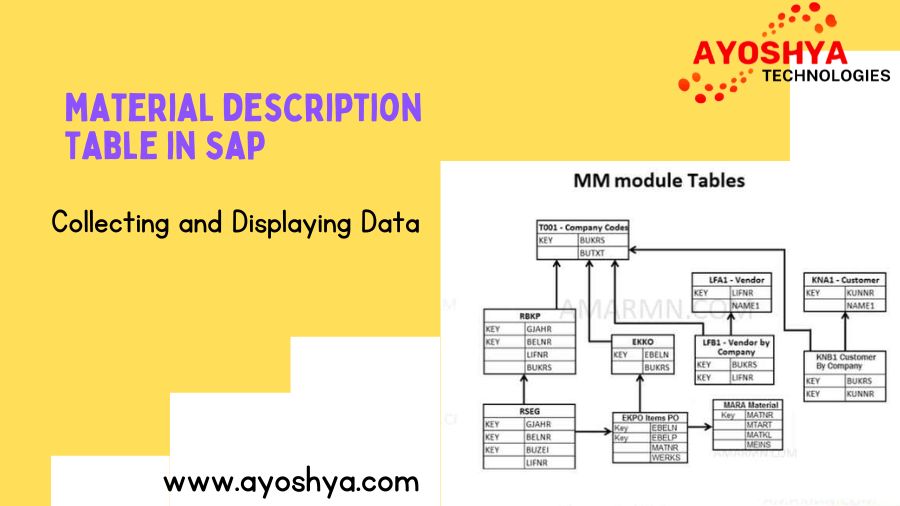
material description table in sap

Navigating SAP Data: material description table in sap 2024

Material description table in sap, In the world of SAP (Systems, Applications, and Products in Data Processing), mastering the structure and location of key….

One such crucial table is the SAP Material Description Table (MAKT), which stores vital information about material descriptions within SAP systems. In this blog post, we’ll guide you through the process of discovering and utilizing the MAKT table, empowering you to harness its potential for enhanced data management and operational efficiency.

Understanding the Importance of MAKT

The MAKT table plays a pivotal role in SAP’s data architecture by storing material descriptions associated with unique material numbers (MATNR). Each entry in MAKT provides a detailed description (MAKTX) that helps users and applications identify and understand the purpose and characteristics of various materials used in business operations.

Steps to Find MAKT

  1. Accessing SAP Transaction SE11:
    • Start by logging into your SAP system.
    • Navigate to transaction code SE11, the SAP Data Dictionary.
  2. Entering Table Name:
    • In the Data Dictionary: Initial Screen, enter MAKT in the Table Name field and click Display.
  3. Exploring Table Details:
    • Upon accessing the MAKT table, you’ll see fields such as MATNR (Material Number) and MAKTX (Material Description).
    • Use the Where-Used List option (Shift+F6) to identify where MAKT is referenced across different SAP applications, providing insights into its usage and impact.

Alternative Method: Using Transaction SE16

For a more direct approach to view the contents of MAKT:

  1. Access Transaction SE16:
    • Enter transaction code SE16 in the SAP command field.
  2. Entering Table Name:
    • Input MAKT in the Table field and execute (F8).
  3. Reviewing Material Descriptions:
    • Browse through the list of material descriptions stored in MAKT, ensuring accuracy and consistency in how materials are identified and cataloged within your SAP system.

Practical Applications of MAKT

Understanding and effectively utilizing MAKT enhances various aspects of SAP operations:

  • Inventory Management: Accurately identifying and describing materials streamlines inventory tracking and management processes.
  • Procurement and Purchasing: Ensures clarity in procurement activities by specifying material characteristics and usage.
  • Reporting and Analytics: Facilitates data-driven decision-making by providing comprehensive material insights for reporting and analysis purposes.

Conclusion

Mastering the SAP Material Description Table (MAKT) empowers SAP users and administrators with critical insights into material management and data governance. By leveraging MAKT, organizations can optimize processes, improve data accuracy, and drive operational efficiency within their SAP environments.

Explore the potential of MAKT and unlock new possibilities in SAP data management. Start your journey towards enhanced material description management and operational excellence today!

you may be interested in this blog here:-

Embracing Collaboration and Growth: The UKG Community

Unlocking SAP Implementation Partners Success: The Essential Role

Online SQL Editor

Exploring Online SQL Editor – Bright-Minds

Online SQL Editor, In the realm of data management and analysis, SQL (Structured Query Language) stands as a fundamental tool for querying, manipulating, and extracting insights from databases. Whether you’re a seasoned database administrator, a data analyst, or a student learning the ropes of SQL, having access to a reliable online SQL editor can significantly enhance productivity and flexibility.

What Are They?

Imagine you’re working remotely on a project that requires querying a database, but you don’t have direct access to your local database management tools. An online SQL editor comes to your rescue, providing a web-based platform where you can write, execute, and debug SQL queries from any device with an internet connection.

These editors typically offer an intuitive interface resembling traditional SQL environments, complete with syntax highlighting, query execution buttons, and result visualization panels. They cater to a wide range of users, from beginners honing their SQL skills to professionals managing complex data workflows.

Benefits of Using an Online SQL Editor

  1. Accessibility: One of the key advantages of online SQL editors is their accessibility. Users can log in from anywhere, whether they’re at home, in the office, or traveling, without the need for installing software or configuring database connections. This accessibility is particularly valuable for collaborative projects involving remote teams.
  2. Ease of Use: Many online SQL editors are designed with user-friendly interfaces that simplify the process of writing and executing SQL queries. Features like autocomplete, error highlighting, and query history make it easier for users to navigate through complex database structures and troubleshoot issues efficiently.
  3. Instant Feedback: Immediate feedback on query execution results is another standout feature of online SQL editors. Users can quickly see how their queries perform against the database and iterate as needed to refine their data retrieval or manipulation strategies.
  4. Integration and Sharing: Some advanced online SQL editors offer integration with cloud databases or local instances, allowing seamless connectivity for data exploration and analysis. Additionally, features for sharing queries or query results enhance collaboration among team members, fostering knowledge sharing and faster decision-making processes.

Popular Online SQL Editors

Several online SQL editors have gained popularity among SQL enthusiasts and professionals alike:

  • SQLFiddle: Known for its simplicity and ease of use, SQLFiddle supports multiple database systems and offers a sandbox environment for experimenting with SQL queries.
  • db<>fiddle: This editor supports a wide range of SQL dialects and allows users to share their fiddles with others for collaborative troubleshooting or learning.
  • SQLPad: Ideal for teams, SQLPad provides a robust interface for querying databases and sharing query results securely within an organization.
  • DBeaver Cloud: An extension of the popular DBeaver desktop application, DBeaver Cloud offers web-based SQL editing capabilities with powerful features for database management and visualization.

Conclusion:

Embracing the Future of SQL Development

In conclusion, online SQL editors represent more than just convenient tools for querying databases; they embody the evolution of SQL development towards greater accessibility, collaboration, and efficiency. As businesses and individuals increasingly rely on data-driven insights to make informed decisions, the role of online SQL editors in facilitating seamless data management and analysis will continue to grow.

you may be interested in this blog here:-

How Does Flow Builder Relate to Salesforce Flow?

Digraphs आणि Diphthongs शिकवण्याचे सोपे मार्ग | Bright-Minds

Professional AI Will Take A Few Years To Develop, With 225 Gen AI Program : Nilekani

oracle architecture diagram

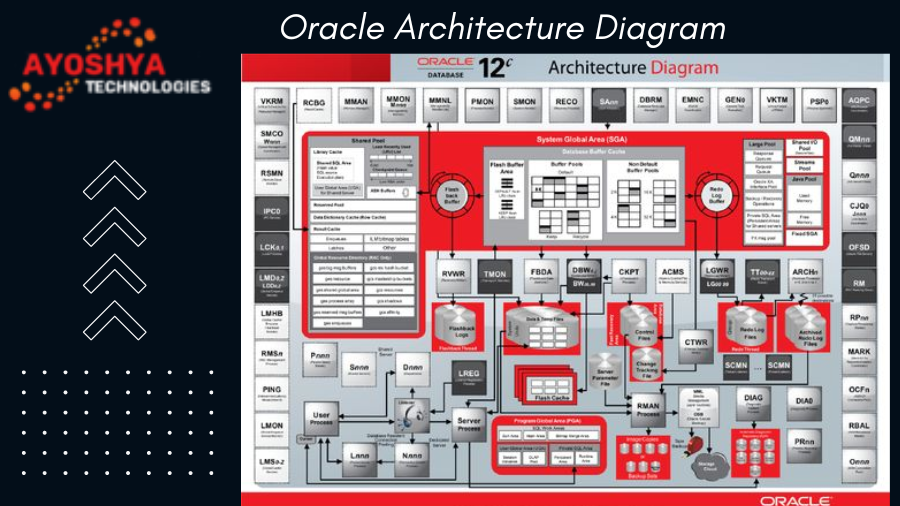
Navigating oracle architecture diagram:Comprehensive Guide

oracle architecture diagram database, a leading enterprise-grade relational database management system, underpins critical business applications worldwide……

Developers, and IT professionals to leverage its capabilities effectively. Let’s explore Oracle’s architecture through a detailed diagram and explanation.

Introduction to Oracle’s Architecture

Oracle’s architecture is designed to ensure reliability, scalability, and performance while accommodating diverse business needs. At its core, Oracle Database consists of several interconnected components that work together seamlessly to manage data storage, processing, and retrieval.

Key Components of Oracle’s Architecture

  1. Instance:
    • SGA (System Global Area): This is a shared memory region that stores data and control information for the Oracle instance. It includes the buffer cache (for storing data blocks), the shared pool (for SQL statements and data dictionary cache), and the redo log buffer (for storing redo entries before they are written to the redo log files).
    • PGA (Program Global Area): This is a private memory region allocated to each Oracle session/process. It contains information specific to that session, such as private SQL areas, session variables, and stack space.
  2. Database:
    • The database consists of physical data files (containing actual data), control files (metadata about database structure), and redo log files (records changes made to data).
    • Oracle’s data files are organized into tablespaces, which logically group related data.
  3. Processes:
    • Oracle Processes: These include background processes (like DBWn for writing dirty buffers to data files, LGWR for writing redo log entries, etc.) and server processes (handling client connections and executing SQL statements).
    • User Processes: These are created when users connect to the database and perform operations like querying or updating data.
  4. Networking:
    • Oracle’s architecture supports various network protocols (e.g., TCP/IP, Oracle Net) for communication between clients and the database server.
    • Listener processes (part of Oracle Net Services) listen for incoming connection requests and establish communication channels.

Diagram Explanation

The architecture diagram illustrates how these components interact within Oracle Database:

  • Instance Layer: At the top, representing the Oracle instance with its SGA and PGA components. The SGA includes the buffer cache, shared pool, and redo log buffer, crucial for managing memory-intensive operations and ensuring data consistency.
  • Database Layer: This layer includes data files (holding actual data), control files (storing metadata), and redo log files (recording changes). These components collectively define the structure and integrity of the stored data.
  • Processes Layer: Oracle’s architecture relies on a variety of processes: background processes (responsible for maintenance tasks) and server processes (handling client connections and executing SQL). User processes initiate interactions with the database server through SQL commands or application queries.
  • Networking Layer: Oracle Net Services facilitate communication between clients and the database server, ensuring secure and efficient data transmission over networks.

Conclusion

Understanding Oracle’s architecture empowers IT professionals to optimize database performance, ensure data integrity, and support mission-critical applications effectively. By visualizing the interconnectedness of its components—instance, database, processes, and networking—organizations can leverage Oracle Database’s robust features to meet evolving business demands.

Whether you’re a seasoned Oracle administrator or exploring database management systems for your enterprise, mastering Oracle’s architecture is crucial for achieving scalability, reliability, and performance. As Oracle continues to innovate, its architecture remains a cornerstone of modern data management solutions, supporting businesses across industries in driving operational excellence and achieving strategic goals.

You may be interested in this blog here:-

Streamlining Customer Success: Case Management in Salesforce

तुमच्या प्रीस्कूलरच्या कुतूहलाला कसे प्रोत्साहन द्यावे

Mastering the P2P Cycle in SAP MM: A Comprehensive Guide

Deloitte Careers for Freshers

Deloitte Careers for Freshers: Opportunities and Insights… 

Deloitte Careers for Freshers: Opportunities and Insights , a global leader in consulting, audit, tax, and advisory services, offers a wealth of career chances.

A commitment to innovation and client service excellence, Deloitte provides a dynamic environment for young professionals to launch their careers. Here’s a comprehensive look at Deloitte careers for freshers, including key insights and pathways to success.

Why Choose Deloitte?

  1. Global Presence and Impact: Deloitte operates in over 150 countries, serving a diverse range of clients from multinational corporations to startups and governments. This global footprint offers freshers exposure to varied industries and international opportunities.
  2. Learning and Development: Deloitte invests heavily in training and development programs to nurture talent. From technical skills to leadership development, freshers benefit from structured learning paths and mentorship.
  3. Innovative Projects: Deloitte is at the forefront of industry trends, tackling complex challenges such as digital transformation, cybersecurity, and sustainability. Freshers can contribute to cutting-edge projects that shape the future of business.

Career Paths at Deloitte:

  • Consulting: Join Deloitte Consulting to advise clients on strategy, operations, technology, and more.
  • Audit and Assurance: Work in audit and assurance services, ensuring financial integrity and regulatory compliance for clients.
  • Tax and Legal Services: Help clients navigate tax complexities and legal challenges, providing strategic advice and solutions.
  • Risk Management: Assist clients in identifying and managing risks through innovative risk management solutions.

How to Start Your Career at Deloitte:

  1. Explore Opportunities: Visit the Deloitte Careers website or attend recruitment events to learn about available roles and internships.
  2. Apply Online: Submit your application through the Deloitte Careers portal, ensuring your resume highlights relevant skills and experiences.
  3. Prepare for Interviews: Practice common interview questions and research Deloitte’s values and culture to align your responses.
  4. Network: Connect with Deloitte professionals through LinkedIn and networking events to gain insights and expand your professional circle.

Conclusion:

Deloitte offers a rewarding career path for freshers looking to make an impact in the professional services industry. Whether you aspire to become a consultant, auditor, tax advisor, or specialize in risk management, Deloitte provides the platform and resources to develop your skills and grow professionally.

By joining Deloitte, freshers can embark on a journey of continuous learning, innovation, and collaboration, contributing to meaningful projects that drive business success globally. Embrace the opportunity to build a fulfilling career at Deloitte and make a difference in the world of business.

you may be interested in this blog here

CTET Admit Card 2024 Download Link: Step-by-Step Guide

How to Execute a Batch Class in Salesforce: A Step-by-Step

SAP HANA

sap ibp full form

What is SAP IBP Full Form | How Can It Help Your Business?

Unveiling the power of sap ibp full form! Explore what it is, its core functionalities, and how it can revolutionize your supply chain… optimize inventory.

Benefits of Using SAP IBP

In today’s dynamic business environment, having a clear and comprehensive plan is no longer enough. Companies need a system that allows them to adapt to changing market conditions, optimize processes, and make data-driven decisions in real-time. This is where SAP Integrated Business Planning (IBP) comes in. SAP IBP offers a powerful suite of functionalities that can significantly improve your business’s planning and execution capabilities. Let’s delve into the key benefits of using SAP IBP:

1. Enhanced Demand Forecasting Accuracy

Accurate demand forecasting is the cornerstone of effective supply chain management. Traditional forecasting methods often rely on historical data alone, which can be misleading in a constantly evolving market. SAP IBP goes beyond just historical trends. It incorporates a variety of data sources, including:

  • Market intelligence: External data on industry trends, competitor activity, and economic factors can provide valuable insights into future demand patterns.
  • Customer sentiment analysis: By analyzing customer reviews and social media conversations, businesses can gain a better understanding of changing consumer preferences.
  • Point-of-sale (POS) data: Real-time sales data from stores and online retailers can provide a more accurate picture of current demand.

Is SAP IBP Right for Your Business?

SAP Integrated Business Planning (SAP IBP) is a powerful cloud-based solution designed to streamline and optimize your organization’s planning processes. But with a vast array of business planning tools available, is SAP IBP the right fit for your company? This section will delve into the key considerations to help you make an informed decision.

Here are some crucial factors to evaluate when determining if SAP IBP aligns with your business needs:

1. Complexity of Your Supply Chain:

  • Does your business operate with a single product line or a diverse range of products? Companies with a high volume of SKUs (Stock Keeping Units) and intricate production processes benefit greatly from SAP IBP’s ability to handle complex data and planning scenarios.
  • Do you manage a global supply chain with multiple manufacturing locations and suppliers? SAP IBP’s integrated functionalities can bridge geographical divides, fostering better collaboration and visibility across your entire network. Conversely, if your supply chain is relatively straightforward, a simpler planning solution might suffice.

FAQ

How can I help my child learn letter sounds?

Here are some engaging activities to introduce and reinforce letter sounds with your kindergartener:

  • Sing Phonics Songs: Many catchy children’s songs focus on letter sounds. Singing along helps children associate the visual symbol (letter) with the auditory component (sound).
  • Play Sound Games: There are numerous sound games that make learning fun. Try playing “I Spy” with sounds instead of letters (“I spy something that starts with the /b/ sound… a ball!”). Another option is to have your child sort objects based on their beginning sounds.
  • Make It Multisensory: Incorporate manipulatives like letter tiles, play dough, or even cereal pieces to create letters and practice their sounds. This hands-on approach caters to different learning styles and keeps children engaged.

Conclusion

In conclusion, beginner phonics worksheets are a fantastic resource to jumpstart your kindergartener’s reading adventure. Engaging activities like matching, coloring, cutting, and identifying sounds make learning letters and their connections to sounds enjoyable and interactive. By incorporating these worksheets alongside other phonics activities and plenty of positive reinforcement, you’ll be well on your way to fostering a strong foundation in phonemic awareness and setting your child up for reading success. Remember, learning should be fun! So grab some crayons, download some worksheets, and get ready to watch your child blossom into a confident reader. After all, a love of reading can open up a world of possibilities!

you may be interested in this blog here:-

Beginner Phonics Worksheets For Kindergarten – Bright-Minds

What is SAP BW Full Form – Technicalgyanguru

Demystifying Salesforce Products

deloitte sap consultant salary
SAP

Deloitte sap consultant salary मध्ये SAP सल्लागार नियुक्ती  

Deloitte हे जागतिक स्तरावर अग्रणी व्यावसायिक सेवा कंपनी आहे, ज्याची ख्याती मुख्यतः सल्लागार सेवा, लेखा, कर सल्ला आणि धोरणात्मक सल्ला यासाठी आहे. 2024.

Deloitte मध्ये SAP सल्लागार म्हणून करिअर:

Deloitte मध्ये SAP सल्लागार म्हणून काम करणे हे अनेकांसाठी एक आकर्षक आणि फायदेशीर करिअर पर्याय आहे. Deloitte विविध उद्योगातील कंपन्यांना SAP (Systems, Applications, and Products) उपाय प्रदान करण्यात मदत करते आणि SAP सल्लागार हे या यशामध्ये महत्त्वपूर्ण भूमिका बजावतात. ते ग्राहकांना त्यांच्या व्यवसाय प्रक्रिया सुव्यवस्थित करण्यात, कार्यक्षमता वाढवण्यात आणि अधिक स्पर्धात्मक बनण्यात मदत करतात.

जर तुम्हाला तंत्रज्ञान, व्यवसाय आणि समस्या सोडवण्याच्या कौशल्यांमध्ये रस असेल तर Deloitte मध्ये SAP सल्लागार म्हणून करिअर तुमच्यासाठी योग्य असू शकते.

या लेखात, आपण Deloitte मध्ये SAP सल्लागार बनण्यासाठी आवश्यक कौशल्ये, शिक्षण आणि अनुभव, तसेच नियुक्ती प्रक्रिया आणि संभाव्य वेतन याबद्दल अधिक जाणून घेऊ.

आवश्यक कौशल्ये आणि शिक्षण:

  • SAP सोल्यूशन्सचे मजबूत ज्ञान: SAP ERP, CRM आणि SCM सारख्या SAP मॉड्युल्ससह सखोल समज आवश्यक आहे.
  • तंत्रज्ञान कौशल्ये: डेटाबेस व्यवस्थापन, प्रोग्रामिंग भाषा आणि नेटवर्किंग सारख्या तंत्रज्ञान कौशल्यांची आवश्यकता आहे.
  • व्यवसाय प्रक्रियेची समज: वेगवेगळ्या उद्योगांमधील व्यवसाय प्रक्रिया आणि त्या कशा कार्य करतात याची समज आवश्यक आहे.
  • विश्लेषणात्मक आणि समस्या सोडवण्याचे कौशल्य: डेटाचे विश्लेषण करण्यास आणि व्यवसाय समस्यांचे निराकरण करण्यास सक्षम असणे आवश्यक आहे.

डेलॉइटमध्ये करिअर संधी: SAP सल्लागार म्हणून काम करण्याचे अनेक फायदे

डेलॉइटमध्ये SAP सल्लागार म्हणून काम करणे हे एक आव्हानात्मक आणि पुरस्कृत करिअर आहे. SAP हे जगातील सर्वात लोकप्रिय एंटरप्राइज रिसोर्स प्लॅनिंग (ERP) सॉफ्टवेअर आहे आणि डेलॉइट हे जगभरातील अनेक कंपन्यांना SAP अंमलबजावणी आणि सपोर्टमध्ये मदत करते.

डेलॉइटमध्ये SAP सल्लागार म्हणून काम करण्याचे काही फायदे येथे आहेत:

  • आपल्या ज्ञान आणि कौशल्यांचा विकास करा: SAP सल्लागारांना ERP सॉफ्टवेअर, व्यवसाय प्रक्रिया आणि प्रकल्प व्यवस्थापन यांच्यामध्ये व्यापक ज्ञान विकसित करण्याची संधी मिळते.
  • विविध उद्योगांमध्ये काम करा: डेलॉइट विविध उद्योगांमधील कंपन्यांना सेवा देते, म्हणून SAP सल्लागारांना अनेक प्रकारच्या व्यवसायांशी संपर्क साधण्याची आणि त्यांच्याबद्दल जाणून घेण्याची संधी मिळते.
  • जगभरात प्रवास करा: डेलॉइटमध्ये SAP सल्लागारांना अनेकदा जगभरातील ग्राहक साइटवर काम करण्यासाठी प्रवास करावा लागतो. हे नवीन संस्कृतींचा अनुभव घेण्याची आणि नवीन लोकांना भेटण्याची उत्तम संधी आहे.
  • स्पर्धात्मक पगार आणि फायदे मिळवा: डेलॉइट SAP सल्लागारांना स्पर्धात्मक पगार आणि फायदे देते.
  • आपल्या करिअरमध्ये प्रगती करा: डेलॉइटमध्ये SAP सल्लागारांना अनेक प्रगतीच्या संधी उपलब्ध आहेत. ते वरिष्ठ सल्लागार, व्यवस्थापक आणि भागीदार बनू शकतात.

डेलॉइटमध्ये SAP सल्लागार म्हणून करिअर कसे सुरू करावे:

जर तुम्ही डेलॉइटमध्ये SAP सल्लागार म्हणून करिअर करण्यात स्वारस्यी असाल, तर तुम्हाला खालील आवश्यकता पूर्ण करणे आवश्यक आहे:

  • कॉम्प्युटर सायन्स, माहिती प्रणाली किंवा संबंधित क्षेत्रात पदवी
  • SAP सॉफ्टवेअरचे ज्ञान
  • मजबूत विश्लेषणात्मक आणि समस्या सोडवण्याची कौशल्ये
  • उत्कृष्ट संवाद आणि पारस्परिक कौशल्ये
  • टीम प्लेयर असणे

निष्कर्ष :

Deloitte मध्ये SAP सल्लागार म्हणून काम करणे हे एक उत्तम करिअर पर्याय आहे. उत्कृष्ट वेतन, व्यवसाय विकासाच्या संधी आणि आंतरराष्ट्रीय अनुभव मिळण्याची संधी यामुळे Deloitte एक आकर्षक नियोक्ता आहे. तुम्ही SAP सल्लागार बनण्याची इच्छा ठेवत असाल तर Deloitte मध्ये तुमच्यासाठी उत्तम संधी असू शकते. Deloitte मध्ये SAP सल्लागार म्हणून नियुक्ती होण्यासाठी आणि त्यांचे वेतनाविषयी अधिक माहिती मिळवण्यासाठी Deloitte च्या अधिकृत वेबसाइटला भेट द्या आणि तिथे उपलब्ध असलेल्या संधींचा लाभ घ्या.

you may be interested in this blog here:-

Maths Lab Manual Class 12 Activities Solutions PDF

LFA1 TABLE in SAP काय आहे? LFA1 टेबल समजून घ्या ?..

Top Salesforce Marketing Cloud Free Training – 2024

× How can I help you?