SAP & Oracle partner and support companies

Loading

RPA

RPA In 5 Minutes | What Is RPA – Robotic Process Automation?

Feeling overwhelmed by repetitive tasks? Explore Robotic Process Automation (RPA) in 5 minutes! Discover its potential to streamline workflows, boost efficiency, and empower your workforce…

Feeling swamped by tedious tasks that drain your time and energy?** Do you ever fantasize about a digital assistant who can handle the mundane and free you to focus on more strategic work? Well, Robotic Process Automation (RPA) might be your productivity game-changer! In just 5 minutes, you can unlock the secrets of this revolutionary technology and discover how it can **streamline your workflows, boost efficiency, and empower your workforce to achieve greater results. So, buckle up and get ready to dive into the world of RPA!

Unveiling the Magic of RPA

Imagine a dedicated and tireless assistant who can handle the repetitive tasks that often bog you down, freeing up your time for more strategic endeavors. This isn’t science fiction; it’s the magic of Robotic Process Automation (RPA). But what exactly is RPA, and how does it work its magic?

1. Defining RPA in Simple Terms:

  • RPA stands for Robotic Process Automation. It utilizes software robots, also known as bots, to mimic human actions within digital environments. These bots can automate a wide range of repetitive tasks, such as data entry, form filling, and even copying and pasting information across various applications.
  • Think of it this way: you train the bot by demonstrating the steps involved in a specific task, like processing an invoice. The bot then memorizes these steps and can replicate them flawlessly every single time, tirelessly and without errors, allowing you to focus on tasks that require human judgment and creativity.

2. Unveiling the Inner Workings of RPA:

  • The process of implementing RPA typically involves three key steps:
    • Identify tasks: The first step is to identify repetitive and rule-based tasks that are suitable for automation. This involves analyzing your workflows and pinpointing areas where RPA can offer the most significant benefits.
    • Record actions: Once you’ve identified suitable tasks, you’ll need to record the steps involved in their execution. This involves using a recording tool that captures your actions on the screen, like keystrokes and mouse clicks. This recording then serves as the blueprint for the bot’s actions.
    • Deploy software robots: Finally, the recorded actions are translated into a script that the software robot can understand. This script is then deployed to automate the identified tasks, freeing up your time and resources.

Where can RPA be applied?

The versatility of RPA allows it to be applied across various industries and departments, streamlining workflows and boosting efficiency in numerous ways. Here are some real-world examples of how RPA is transforming different sectors:

1. Data Entry and Processing:

  • Imagine the time saved by automating the process of entering customer data, processing invoices, or generating reports. RPA bots can extract data from various sources, validate its accuracy, and populate it into different systems, eliminating manual effort and ensuring consistency.
  • This is particularly beneficial in industries like finance, healthcare, and manufacturing, where vast amounts of data need to be processed and managed efficiently. RPA can significantly reduce processing times, minimize errors, and improve data accuracy, leading to better decision-making and cost savings.

2. Customer Service Inquiries:

  • Repetitive customer service inquiries, such as order tracking or password resets, can be handled efficiently by RPA bots. These bots can access relevant information, answer frequently asked questions, and even route complex inquiries to human agents when necessary.
  • This frees up customer service representatives to focus on resolving more intricate issues and providing personalized support to customers, leading to improved customer satisfaction and loyalty. The applications of RPA in customer service extend across various sectors, including retail, telecommunications, and hospitality.

3. Generating Reports and Invoices:

  • Generating reports and invoices can be time-consuming and prone to errors. RPA bots can automate the process of collecting data, formatting reports, and generating invoices, ensuring consistency and accuracy.
  • This not only saves time and resources but also minimizes the risk of errors that can lead to delays and financial implications. RPA is a valuable tool for accounting and finance departments in organizations of all sizes, streamlining their daily operations and improving financial reporting accuracy.

4. Compliance Tasks:

  • Ensuring adherence to various regulations can be a complex and time-consuming process. RPA bots can automate tasks such as data extraction, form completion, and document verification, streamlining compliance processes and reducing the risk of human error.
  • This is particularly beneficial in heavily regulated industries like healthcare, finance, and energy. By automating compliance tasks, organizations can save time, ensure regulatory adherence, and mitigate potential risks associated with non-compliance.

Benefits of Embracing RPA: Unlocking a World of Efficiency and Growth

In today’s fast-paced business environment, maximizing efficiency and productivity is paramount for success. Robotic Process Automation (RPA) emerges as a powerful tool in this pursuit, offering a multitude of benefits that can transform your operations and propel your organization towards growth. Let’s delve deeper into the key advantages you can reap by embracing RPA:

1. Increased Efficiency and Productivity:

  • RPA’s core strength lies in its ability to automate repetitive and rule-based tasks, freeing up your valuable human workforce to focus on more strategic endeavors. Imagine automating tasks like data entry, form filling, or sending emails, tasks that often consume a significant portion of your employees’ time.
  • By offloading these mundane tasks to software robots, you can significantly improve their productivity and efficiency. This allows employees to dedicate their time and skills to higher-value activities, such as creative problem-solving, customer interaction, and strategic planning.

2. Improved Accuracy and Reduced Errors:

  • Human error is an inevitable aspect of manual data entry and processing. However, RPA eliminates this element of human fallibility by automating tasks with flawless precision and consistency.
  • Software robots follow the predefined instructions flawlessly, minimizing errors such as typos, data inconsistencies, and missed deadlines. This not only improves the accuracy of your data but also reduces rework and streamlines your overall operations, leading to smoother workflows and improved outcomes.

3. Enhanced Compliance:

  • Maintaining compliance with various regulations can be a complex and resource-intensive process. RPA can automate compliance tasks, such as data extraction, form completion, and document verification, ensuring adherence to regulations in a timely and accurate manner.
  • This mitigates the risk of non-compliance and associated penalties, while also freeing up your team to focus on other crucial aspects of your business. By automating compliance tasks, you can achieve greater peace of mind knowing that your organization is operating within the boundaries of relevant regulations.

4. Cost Savings:

  • The increased efficiency, improved accuracy, and reduced errors achieved through RPA ultimately translate into cost savings for your organization. By automating repetitive tasks, you can reduce labor costs associated with manual work, while also minimizing rework and streamlining processes, leading to improved resource utilization.
  • Additionally, RPA can help you avoid potential costs associated with errors and non-compliance. The cost savings generated by RPA can be reinvested in other areas of your business, such as innovation, employee training, or expanding your operations.

5. Scalability and Flexibility:

  • As your business evolves and grows, your automation needs may also change. RPA solutions are highly scalable, allowing you to easily add or remove bots as your requirements evolve. This flexibility ensures that your RPA solution can adapt to your changing needs and continue to deliver value over time.

By embracing RPA, you can unlock a multitude of benefits that enhance efficiency, accuracy, compliance, and cost-effectiveness within your organization. As you explore the potential of RPA, remember that it’s not about replacing humans with robots; it’s about empowering your workforce and unlocking their full potential by freeing them from repetitive tasks, allowing them to focus on higher-value contributions that drive innovation and growth.

1. Is RPA replacing jobs?

A common concern surrounding RPA is the potential for job displacement. However, it’s crucial to understand that RPA is not designed to replace human workers. Instead, it automates repetitive tasks that often consume a significant portion of an employee’s time.

  • By freeing humans from mundane tasks, RPA allows them to focus on more strategic and creative work, such as problem-solving, customer interaction, and innovation. This can lead to upskilling and reskilling opportunities for employees, allowing them to transition into higher-value roles within the organization.
  • Additionally, RPA can create new job opportunities in areas like RPA development, implementation, and maintenance. As RPA technology continues to evolve, the demand for skilled professionals to manage and optimize these solutions will rise, creating new avenues for career growth.

2. What are the limitations of RPA?

While RPA offers a plethora of benefits, it’s essential to acknowledge its limitations:

  • RPA is best suited for automating repetitive, rule-based tasks. It cannot handle tasks that require judgment, creativity, or complex decision-making. These tasks will still require human expertise and oversight.
  • Implementing RPA requires careful planning and consideration. It’s crucial to identify suitable tasks for automation and ensure that your infrastructure can support the integration of RPA solutions. Additionally, change management is critical to ensure successful adoption by your workforce.
  • RPA solutions require ongoing maintenance and updates. As your business processes evolve, you may need to update your RPA scripts to ensure continued effectiveness.

3. How much does RPA implementation cost?

The cost of implementing RPA can vary depending on several factors, including:

  • The size and complexity of your organization
  • The number of bots required
  • The specific features and functionalities needed
  • The chosen implementation partner and their fees

It’s recommended to consult with experienced RPA vendors or solution providers to receive a tailored quote based on your unique needs. While there is an initial investment associated with RPA implementation, the potential cost savings in terms of improved efficiency, reduced errors, and increased productivity can provide a significant return on investment (ROI) over time.

4. What skills are needed to work with RPA?

The specific skills needed to work with RPA can vary depending on your role. However, some general skills that are often sought after include:

  • Understanding of business processes: Identifying the tasks that are suitable for automation is crucial.
  • Basic technical knowledge: Familiarity with computer systems and software is beneficial.
  • Analytical skills: Analyzing data and identifying inefficiencies in workflows is important.
  • Problem-solving skills: Troubleshooting and resolving issues related to RPA implementation is essential.

5. What are the best RPA tools available?

There are numerous RPA tools available on the market, each with its own strengths and weaknesses. Some of the popular RPA platforms include:

  • UiPath
  • Automation Anywhere
  • Blue Prism

Conclusion:

Embracing the Power of RPA: A Stepping Stone to a Transformed Future

Feeling overwhelmed by repetitive tasks?** Robotic Process Automation (RPA) might be your game-changer. In this 5-minute exploration, we unveiled the magic of RPA, showcasing its ability to automate tasks, boost efficiency, and empower your workforce. We delved into real-world use cases across various industries, highlighting how RPA can streamline data processing, enhance customer service, and ensure compliance.

We explored the tangible benefits of RPA, including increased efficiency, improved accuracy, cost savings, and enhanced scalability. We also addressed common PAA queries, demystifying concerns about job displacement and limitations of RPA, while offering guidance on implementation costs, required skills, and popular RPA tools.

Remember, RPA is not a silver bullet, but a powerful tool to complement your human workforce. By carefully evaluating your needs, identifying suitable tasks, and implementing RPA strategically, you can unlock a world of benefits and propel your organization towards a transformed future.

So, take action today! Explore the potential of RPA, consult with experienced professionals, and embrace the future of automation with confidence. With thorough planning and a commitment to continuous improvement, you can harness the power of RPA to unlock greater efficiency, growth, and success for your organization.

you may be interested in this blog here

Is Salesforce high paying?

CDS Development Fundamentals

SAP HANA SQL Function Tutorial: Unleashing the Power of Data Processing
Sap wm Module

sap business process integration

Master SAP Business Process Integration In Complex IT Landscapes

Feeling overwhelmed by your complex IT landscape? Discover how sap business process integration simplifies data exchange, streamlines workflows, and empowers efficient operations…**

Feeling overwhelmed by your complex IT landscape? Data silos hindering your business agility? You’re not alone.

Modern enterprises juggle a multitude of applications and systems, creating a tangled web of information and processes. sap business process integration This intricate IT landscape, while powerful, can quickly become a breeding ground for inefficiencies. Data gets trapped in silos, workflows become sluggish and manual, and errors creep in, leading to delays and frustrated users.

But fear not! There’s a hero in this story, and its name is SAP Business Process Integration (SAP BPI). This powerful tool acts as the conductor of your IT orchestra, harmonizing data exchange, streamlining workflows, and empowering efficient operations across your entire landscape.

sap business process integration Ready to unlock the true potential of your complex IT environment? Dive deeper and discover how SAP BPI can transform your business operations!

sap accounting software, sap one, sap accounting system, sap business one price, sap for small business, sap bydesign, sap business bydesign, sap business network, btp sap, sap pricing, sap store, sap erp modules, sap business one cloud, business one, sap business application studio, sap bi, sap business objects, sap business one demo, sap business 1, ariba network supplier, business objects, sap business one cost, sap 4 hana modules, sap business intelligence, sap consulting companies, sap for small business cost.

The Powerhouse Trio: Key Components of SAP BPI

Think of SAP BPI as a well-oiled machine, with each component playing a crucial role in achieving seamless integration. Let’s delve into the three key components that form the backbone of SAP BPI:

1. Enterprise Services Repository (ESR):

Imagine a central library holding all the blueprints and specifications for your integration needs. That’s precisely the function of the ESR. It acts as a central repository for storing and managing reusable business objects, interfaces, and mappings.

  • Business Objects: These represent the core entities involved in your business processes, such as customers, orders, or products. The ESR defines the attributes and structure of these objects, ensuring consistency across integrations.
  • Interfaces: These blueprints define how data is exchanged between different systems. They specify the format, structure, and communication protocols used for data transfer.
  • Mappings: These act as the translators, transforming data from one format to another to ensure seamless communication between disparate systems. The ESR can store pre-built and user-defined mappings, accelerating development and reducing errors.

By providing a centralized repository for these critical components, the ESR simplifies integration development, promotes consistency, and fosters reusability, ultimately saving you time and resources.

2. Integration Engine:

The magic truly happens in the Integration Engine, the heart of SAP BPI. It acts as the data exchange hub, responsible for processing and routing information between various systems within your landscape.

  • Adapters: These act as bridges, connecting the Integration Engine to different systems in your landscape. Each adapter understands the specific communication protocols and data formats used by its respective system, enabling seamless data exchange.
  • Message Transformations: As data flows through the Integration Engine, it may need to be transformed to match the format and structure expected by the receiving system. The Integration Engine provides powerful tools for performing various transformations, including data mapping, filtering, and enrichment.

The Integration Engine acts as the central conductor, orchestrating data flow, applying transformations, and ensuring smooth communication across your complex IT landscape.

3. System Landscape Directory (SLD):

Imagine having a detailed map of your entire IT landscape, with every system clearly marked and easily accessible. That’s the power of the System Landscape Directory (SLD). It acts as a central registry, storing information about all the systems connected to your SAP BPI environment.

  • System Registration: Each system participating in the integration process is registered in the SLD, providing details like its name, type, communication protocols, and contact information.
  • Discovery and Access: The SLD acts as a single source of truth for discovering and accessing information about connected systems. This simplifies configuration and troubleshooting, as integration processes can easily reference systems by their unique identifiers stored in the SLD.

Implementing SAP BPI in Complex IT Landscapes

Convinced that SAP BPI is the answer to your integration woes? Now comes the exciting part: bringing it to life in your complex IT landscape. Implementing SAP BPI is a strategic journey, requiring careful planning, meticulous execution, and ongoing optimization. Let’s explore the key phases involved:

1. Planning and Design:

This phase lays the foundation for a successful integration project. It’s akin to building a blueprint for your dream home. Here’s what you need to consider:

  • Business Process Modeling: The first step is to map out your existing business processes, identifying areas where integration is needed. This involves analyzing workflows, data flows, and dependencies between different systems.
  • Integration Point Identification: Once you understand your business processes, pinpoint the specific points where data exchange needs to occur between different systems. This could involve customer data flowing from CRM to ERP, or inventory updates being sent from SCM to logistics systems.
  • Technical Specifications: Define the technical details of the integration, including the types of adapters needed, message formats, and transformation requirements. This ensures all systems can understand and process the exchanged data seamlessly.

By dedicating time to thorough planning and design, you can avoid costly mistakes and ensure your SAP BPI implementation aligns with your overall business objectives.

2. Development and Configuration:

With a clear blueprint in hand, it’s time to build the integration bridges. This phase involves:

  • Building Interfaces and Mappings: Developers leverage the ESR to create interfaces that define the data exchange protocols and message structures between systems. Additionally, mappings are created to transform data from one format to another, ensuring compatibility between different systems.
  • Configuration and Testing: The Integration Engine is configured with the defined interfaces, mappings, and adapter connections. Rigorous testing is then conducted to ensure data flows smoothly, transformations are accurate, and error handling mechanisms function correctly.

This phase requires close collaboration between business analysts, developers, and IT specialists to translate the designed integrations into a functional reality.

3. Testing and Deployment:

Before unleashing the full power of SAP BPI into your production environment, rigorous testing is crucial. This phase involves:

  • Unit Testing: Individual components of the integration, such as interfaces and mappings, are tested in isolation to ensure they function as intended.
  • Integration Testing: The entire integration scenario is tested end-to-end, simulating real-world data flows and verifying seamless communication between all connected systems.
  • User Acceptance Testing (UAT): End-users are involved in testing the integration to ensure it meets their needs and expectations. This final step helps identify any usability issues before deployment.

Once all testing phases are successfully completed, the SAP BPI solution can be confidently deployed into your production environment, ready to streamline your business processes.

Bridging the Gaps: SAP BPI for Specific Integration Scenarios

SAP BPI isn’t a one-size-fits-all solution; its true power lies in its versatility. It can be tailored to address a wide range of integration challenges across different business functions. Let’s explore some specific scenarios where SAP BPI shines:

1. Customer Relationship Management (CRM) and Enterprise Resource Planning (ERP) Integration:

Imagine a seamless flow of customer data from your CRM system to your ERP. With SAP BPI, you can achieve this by:

  • Synchronizing customer master data: Ensure consistent customer information across both systems, eliminating duplicate entries and improving data accuracy. This leads to a more personalized customer experience and streamlined order processing.
  • Integrating sales orders and quotes: Streamline the quote-to-cash process by automatically transferring sales orders and quotes from CRM to ERP. This eliminates manual data entry errors and accelerates order fulfillment, ultimately boosting customer satisfaction.

By bridging the gap between CRM and ERP, SAP BPI fosters a unified view of your customers, leading to enhanced customer service, improved operational efficiency, and increased revenue opportunities.

2. Supply Chain Management (SCM) and Logistics Integration:

Gain real-time visibility into your supply chain and optimize logistics with the help of SAP BPI:

  • Integrating inventory management systems: Connect your warehouse management system (WMS) with your ERP, enabling real-time inventory updates and ensuring accurate stock levels. This helps prevent stockouts, optimize production planning, and improve delivery schedules.
  • Automating order fulfillment processes: Automate order fulfillment workflows by integrating your e-commerce platform with your ERP and WMS. This allows for faster order processing, real-time shipment tracking, and improved customer satisfaction.

By streamlining communication between SCM and logistics systems, SAP BPI empowers you to achieve greater supply chain visibility, optimize inventory management, and improve delivery efficiency.

These are just a few examples of how SAP BPI can be leveraged across different business functions. Remember, the possibilities are endless, and SAP BPI can be tailored to address your specific integration needs, unlocking new levels of efficiency and agility within your organization.

Navigating the Roadblocks: Addressing Common Challenges and FAQs

Implementing SAP BPI in your complex IT landscape might raise some questions and concerns. Let’s address some of the most common challenges and frequently asked questions to ensure you feel confident in your integration journey:

1. Security and Compliance:

Security and compliance are paramount concerns in today’s data-driven world. SAP BPI offers robust features to address these concerns:

  • Secure Communication Protocols: Leverages industry-standard encryption protocols like HTTPS and SFTP to ensure the confidentiality and integrity of data during transmission.
  • Role-Based Access Control (RBAC): Implements granular access controls, ensuring only authorized users can access and modify integration processes and sensitive data.
  • Auditing and Logging: Provides comprehensive audit trails and logs to track user activity and data modifications, facilitating compliance with regulations like Sarbanes-Oxley (SOX) and General Data Protection Regulation (GDPR).

By prioritizing security and compliance throughout the integration lifecycle, SAP BPI empowers you to integrate systems and data with confidence, fostering trust and transparency within your organization.

2. Scalability and Performance:

As your business grows and data volumes increase, your integration solution needs to keep pace. SAP BPI is built to scale and handle:

  • Scalable Architecture: The modular architecture of SAP BPI allows for horizontal scaling, enabling you to add additional resources as your integration needs grow.
  • Performance Optimization Tools: Provides tools and techniques for optimizing integration processes, including data compression, caching mechanisms, and load balancing.
  • Monitoring and Alerting: Offers real-time monitoring capabilities to identify performance bottlenecks and proactively address potential issues.

By offering a scalable and performant solution, SAP BPI ensures your integrations remain reliable and efficient, even as your business demands evolve.

3. Future-Proofing:

The IT landscape is constantly evolving, and your integration solution needs to adapt. SAP BPI helps you stay ahead of the curve by:

  • Open Architecture: Leverages open standards and APIs, allowing for seamless integration with new and emerging technologies.
  • Support for New Technologies: Continuously evolves to support new technologies and trends in the integration landscape, such as cloud computing, Internet of Things (IoT), and artificial intelligence (AI).
  • Regular Updates and Enhancements: SAP provides regular updates and enhancements to the SAP BPI platform, ensuring your solution remains compatible and leverages the latest advancements in integration technology.

Conclusion

 Mastering the Maze with SAP Business Process Integration

Feeling overwhelmed by a complex IT landscape no longer needs to be your reality. SAP Business Process Integration (SAP BPI) emerges as your hero, offering a powerful and versatile solution to conquer the challenges of integration.

This comprehensive guide has equipped you with the knowledge to navigate the world of SAP BPI. We explored its key components, the implementation process, and its application in specific scenarios. We also addressed common concerns regarding security, scalability, and future-proofing, ensuring you feel confident in its capabilities.

Remember, SAP BPI isn’t just about connecting systems; it’s about unlocking the true potential of your data, streamlining workflows, and empowering your business to thrive. By embracing integration, you can achieve:

  • Enhanced data consistency and visibility: Make data-driven decisions with confidence.
  • Streamlined business processes and automation: Boost efficiency and reduce manual errors.
  • Improved agility and faster time-to-market: Respond quickly to changing market demands.
  • Reduced integration costs and complexity: Eliminate the burden of siloed systems and manual integrations.

Ready to embark on your integration journey? Don’t hesitate to seek guidance from experienced SAP professionals who can help you tailor SAP BPI to your specific needs and unlock the full potential of your complex IT landscape. Remember, a well-integrated future awaits!

you may be interested in this blog

Top Challenges Faced by Salesforce Administration and How to Overcome Them

Sailing Through Changes: Three Trends Shaping Partner Marketing in 2024

Unlock Your Financial Potential with SAP FI Course: A Guide to the World of SAP Financial Accounting

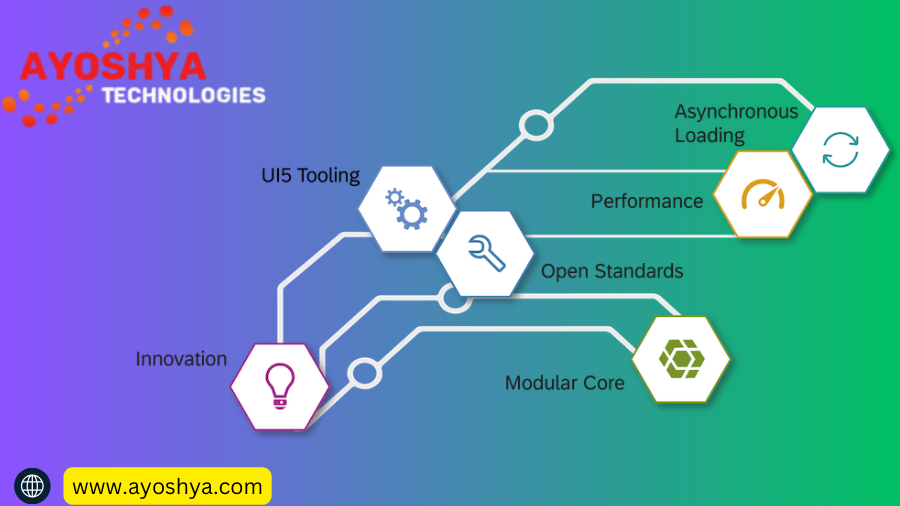
Why sap ui5 sdk?

sap ui5 and fiori, what is sap ui5, sap ui5 and fiori
SAP

Why sap ui5 sdk?

Uncertain about the right framework for your web development project? Explore the compelling reasons to choose sap ui5 sdk(…). Discover its benefits, flexibility, and seamless integration within the SAP ecosystem. Empower your development journey with the power of SAP UI5!

Why Choose Sap ui5 Sdk for Web Development?

In the ever-evolving landscape of web development, choosing the right framework is crucial for efficiency, performance, and user experience. Among the contenders, sap ui5 sdk stands out as a compelling choice, particularly for projects within the SAP ecosystem.

This article delves into the reasons why SAP UI5 is an excellent choice for web development, exploring its advantages, functionalities, and integration capabilities. Whether you’re a seasoned developer or just starting your web development journey, understanding the power of SAP UI5 can empower you to make informed decisions and build exceptional applications. sap ui5 and fiori, what is sap ui5, sap ui5 and fiori

Feeling overwhelmed by the multitude of web development frameworks available, each promising the world?** Are you unsure which one will seamlessly integrate with your existing SAP ecosystemdeliver a captivating user experience, and accelerate your development process? Look no further than SAP UI5, the powerhouse framework specifically designed to empower developers building within the SAP world!

This comprehensive guide unveils the compelling reasons why SAP UI5 is the perfect choice for your next web development project. We’ll explore its seamless integration capabilities, rich UI control set, open-source nature, rapid development tools, and mobile-first approach, equipping you with the knowledge to make informed decisions and build exceptional applications that thrive within the SAP landscape.

So, ditch the confusion and embrace the power of SAP UI5! Let’s embark on a journey to unleash your development potential and unlock the potential of your next web project.

Unveiling the Advantages

Having piqued your interest, let’s delve deeper into the specific reasons why SAP UI5 stands out in the web development landscape:

1. Seamless Integration with SAP Systems:

  • Effortless Data Access: SAP UI5 applications natively integrate with SAP systems, allowing you to easily access and manipulate data without the need for complex integration layers.
  • Streamlined Development Process: This tight integration reduces development time and effort by eliminating the need to develop custom data access logic.
  • Consistent User Experience: Leverage the familiar SAP Fiori design language to ensure a consistent and intuitive user experience across both web and mobile applications within the SAP ecosystem.

2. Rich Set of UI Controls:

  • Delivering a Captivating User Experience: sap ui5 sdk offers a comprehensive library of pre-built UI controls, ranging from basic buttons and text fields to complex charts and interactive tables.
  • Reduced Development Time: These pre-built controls eliminate the need to develop UI components from scratch, saving you significant development time and resources.
  • Responsive Design: SAP UI5 controls are designed to be responsive, ensuring your applications adapt seamlessly to different screen sizes and devices, providing an optimal user experience across desktop, tablet, and mobile devices.

3. Open-Source Development Model:

  • Fostering Innovation: The open-source nature of sap ui5 sdk encourages community collaboration and continuous improvement. This means you benefit from a constantly evolving framework with regular updates, bug fixes, and new features.
  • Flexibility and Customization: The open-source model allows for greater flexibility and customization compared to proprietary frameworks. You can extend or modify the core functionality of SAP UI5 to meet your specific project requirements.
  • Reduced Vendor Lock-in: By choosing an open-source framework, you avoid vendor lock-in, giving you more control over your development process and future technology choices.

Demystifying Common Questions: Frequently Asked Queries about SAP UI5

As you consider SAP UI5 for your web development projects, you might encounter some common questions. This section aims to shed light on these queries and empower you further:

1. What are the learning resources available for SAP UI5?

SAP provides a wealth of learning resources to help you get started with and master SAP UI5:

  • SAP Help Portal: Offers comprehensive documentation, tutorials, and code samples.
  • SAP Learning Hub: Provides online courses and learning journeys for various skill levels.
  • OpenUI5 Playground: An interactive platform to experiment with and learn SAP UI5 controls.
  • Active Community Forums: Engage with other SAP UI5 developers and seek help or share knowledge.

2. What are the pros and cons of using SAP UI5 compared to other web development frameworks?

Pros:

  • Seamless SAP integration
  • Rich UI control set and responsive design
  • Open-source development model
  • Rapid development capabilities
  • Mobile-first approach

Cons:

  • Steeper learning curve compared to some popular frameworks
  • Limited community size compared to some other frameworks
  • May not be the best choice for projects outside the SAP ecosystem

3. Is SAP UI5 a good choice for building mobile applications?

Absolutely! SAP UI5’s mobile-first approach and responsive design principles make it an excellent choice for developing cross-platform mobile applications. You can leverage the same codebase to build web and mobile applications, streamlining your development process and ensuring consistency across platforms.

4. What are some of the career opportunities available for SAP UI5 developers?

With the growing demand for SAP expertise, SAP UI5 developers are in high demand. Career opportunities range from:

  • SAP UI5 Developer: Build and maintain web and mobile applications using SAP UI5.
  • SAP Fiori Consultant: Help organizations implement the SAP Fiori user experience within their SAP landscape.
  • SAP Integration Specialist: Integrate SAP systems with other applications using various technologies.

Conclusion

Empowering Your Web Development Journey with SAP UI5

In the vast landscape of web development frameworks, SAP UI5 stands out as a compelling choice, particularly for projects within the SAP ecosystem. Its seamless integration capabilities, rich UI control set, open-source nature, rapid development tools, and mobile-first approach offer a multitude of advantages for developers.

This comprehensive guide has equipped you with the knowledge to understand the key reasons why SAP UI5 might be the perfect fit for your next project. Remember, SAP UI5 offers:

  • Effortless data access and a consistent user experience within the SAP ecosystem.
  • A rich set of pre-built UI controls to deliver captivating user experiences and reduce development time.
  • The flexibility and innovation that comes with an open-source framework.
  • Rapid development tools to accelerate your development process.
  • A mobile-first approach to ensure your applications adapt seamlessly to any device.

Whether you’re a seasoned developer or just starting your web development journey, consider the power of SAP UI5. Explore the abundant learning resources available, and take advantage of the active community to empower your development skills and build exceptional applications.

So, embrace the potential of SAP UI5 and embark on a rewarding and efficient web development journey within the SAP ecosystem!

you may be interested in this blog here

Top SAP MM Consultant Interview Questions: Prepare for Success

Top Challenges Faced by Salesforce Administration and How to Overcome Them

SAP HANA Flat File Upload Tutorial: CSV, XLS, and XLSX

SAP GST Readiness and Migration

Mastering SAP GST Readiness & Migration: Top IT Strategy Guide for Businesses

Ensure a smooth transition to the Goods and Services Tax (GST) with a strategic SAP GST Readiness and Migration plan. This comprehensive guide explores key considerations, challenges, and best practices to navigate your SAP GST readiness journey…

Imagine waking up on the day of India’s Goods and Services Tax (GST) implementation, only to discover your business is paralyzed by an unprepared SAP system. Transactions are stalled, reports are inaccurate, and compliance is a distant dream. This nightmare scenario is all too real for businesses who haven’t prioritized SAP GST readiness and migration. But fear not! With a strategic plan and the right guidance, you can navigate the GST transition smoothly, ensuring your business thrives in the new tax landscape. This comprehensive guide will equip you with the knowledge and strategies to master your SAP GST readiness journey, from key considerations to best practices, and everything in between. So, buckle up, and let’s get your business GST-ready for success!

Key Considerations for SAP GST Readiness: A Deep Dive

A successful SAP GST migration hinges on several crucial considerations. Let’s delve deeper into each of these aspects to ensure a smooth and compliant transition for your business.

Business Process Alignment with GST Requirements:

The very foundation of GST readiness lies in aligning your internal business processes with the new tax regime. This involves meticulously examining your existing processes for:

  • Identifying GST applicability: Determine which goods and services fall under the purview of GST, and at what rates.
  • Modifying invoicing practices: Update your invoicing system to capture GST details like HSN codes, tax rates, and invoice type (tax invoice, debit note, credit note).
  • Revising accounting procedures: Adapt your accounting practices to handle input tax credit (ITC) claims, reverse charges, and e-way bill generation for interstate movement of goods.

By meticulously aligning your business processes with GST requirements, you lay the groundwork for accurate data capture, efficient reporting, and seamless compliance. sap gst readiness and migration, sap gst report, how to change gst rate in sap, how to change gst in sap.

Data Migration Strategy and Data Cleansing:

Migrating your existing data to the GST-compliant SAP system is a critical step. However, the success of this migration relies heavily on the quality and accuracy of your data. Here’s why:

  • Data cleansing is paramount: Inaccurate or incomplete data can lead to significant issues during migration, hindering reporting accuracy and causing compliance roadblocks. Techniques like data scrubbing, deduplication, and standardization are essential to ensure clean and reliable data.
  • Developing a comprehensive data migration strategy: A well-defined plan outlining the scope, methodology, and tools for data migration is crucial. This strategy should address data mapping between old and new systems, data validation procedures, and contingency plans for handling potential data inconsistencies.

Top IT Strategies for Successful SAP GST Migration: A Roadmap to Success

A well-defined and executed IT strategy is the driving force behind a successful SAP GST migration. Here, we explore the top strategies that will guide you on this crucial journey:

3.1 Early Planning and Assessment:

Proactive planning is the cornerstone of any successful migration. Here’s why starting early is crucial:

  • Gap analysis: Conducting a thorough gap analysis helps identify areas in your existing SAP system that require configuration or customization to comply with GST requirements. This analysis allows you to prioritize essential changes and allocate resources effectively.
  • Project scope definition: Clearly defining the scope of your migration project ensures you focus on essential functionalities and avoid unnecessary complexities. This includes determining the data to be migrated, the functionalities to be implemented, and the timeline for completion.

By initiating early planning and conducting a comprehensive gap analysis, you gain invaluable insights that form the foundation for a smooth and efficient migration process.

3.2 Data Migration Planning:

Data migration is the lifeblood of any system transition. Here’s how to ensure your data journey is smooth and successful:

  • Data mapping strategy: Develop a comprehensive data mapping strategy that defines how data elements from your existing system will be translated and transferred to the new GST-compliant system. This strategy should account for changes in data formats, tax codes, and other relevant fields.
  • Data migration tools and techniques: Utilizing specialized data migration tools and techniques can significantly streamline the process. These tools can automate data mapping, ensure data integrity, and minimize the risk of errors.

Common Challenges and Solutions for SAP GST Migration: Navigating the Roadblocks

While the benefits of SAP GST migration are undeniable, navigating the process can present its own set of challenges. Let’s explore some common hurdles and equip you with effective solutions:

Data Migration Complexities:

Data migration often presents unforeseen complexities, potentially hindering the smooth transition. Here’s what you need to be aware of:

  • Data quality issues: Inconsistent data formats, missing information, and duplicate entries can significantly impact the accuracy and efficiency of the migration process. Addressing these issues through data cleansing techniques is crucial.
  • Mapping challenges: Mapping data elements from the old system to the new GST-compliant system can be intricate, especially when dealing with complex data structures and customized configurations. Utilizing experienced SAP consultants and leveraging data mapping tools can significantly mitigate these challenges.

By acknowledging the potential complexities of data migration and implementing proactive solutions, you can ensure a smooth and accurate transfer of your business data.

System Configuration Expertise:

Successfully configuring your SAP system for GST compliance often requires specific expertise. Here’s why partnering with the right professionals is essential:

  • Understanding of GST regulations: Implementing the necessary system configurations demands a thorough understanding of the intricate nuances of GST regulations and their implications on SAP functionalities.
  • Experience with SAP GST configurations: Partnering with SAP consultants who possess proven experience in configuring SAP systems for GST compliance ensures they are equipped to address specific challenges and optimize your system for efficient GST processing.

What is SAP GST migration?

SAP GST migration refers to the process of adapting and configuring your existing SAP system to comply with the Goods and Services Tax (GST) regime in India. This involves several crucial steps, including:

  • Upgrading your SAP system to a GST-compliant version.
  • Configuring the system to handle new GST functionalities, such as capturing HSN codes, calculating tax rates, and generating e-way bills.
  • Migrating your existing data to the new system, ensuring accuracy and completeness.
  • Testing the migrated system thoroughly to identify and address any potential issues before going live.

By successfully completing these steps, you ensure your SAP system seamlessly integrates with the new tax framework, enabling efficient and compliant business operations.

What are the benefits of SAP GST readiness?

Investing in SAP GST readiness offers numerous benefits for your business:

  • Enhanced compliance: A GST-compliant SAP system ensures accurate tax calculations, reporting, and e-way bill generation, minimizing the risk of penalties and non-compliance issues.
  • Improved efficiency: Streamlined GST functionalities in your SAP system automate manual tasks, allowing your team to focus on more strategic initiatives.
  • Greater transparency: Real-time tax data readily available within your SAP system enhances transparency and facilitates informed decision-making.
  • Reduced administrative burden: Automated processes and reporting capabilities help minimize manual effort and streamline administrative tasks related to GST compliance.

Conclusion

In conclusion, navigating the complex world of SAP GST readiness and migration might seem daunting, but with careful planning and the right guidance, you can transform this challenge into a success story. This guide has equipped you with the key considerations, effective strategies, and practical solutions to overcome potential hurdles and ensure a smooth transition. Remember, early planning, meticulous data management, and expert guidance are the cornerstones of a successful migration. By following the outlined strategies, you can unlock the numerous benefits of SAP GST readiness, including enhanced compliance, improved efficiency, and greater transparency. Don’t wait until the clock strikes GST implementation day to begin your journey. Start planning and take action today to ensure your business thrives in the new tax landscape. Remember, proactive preparation is the key to a smooth and successful SAP GST migration journey.

you maybe interested in this blog

 Download SAP Fiori Client Safe Methods & Alternatives in 2024

What is Gen AI in SAP?

 Is Salesforce Training Institute in Pune Right for You? A B.Tech CS Grad’s Guide

Magic of Oracle Forms: A Comprehensive Guide

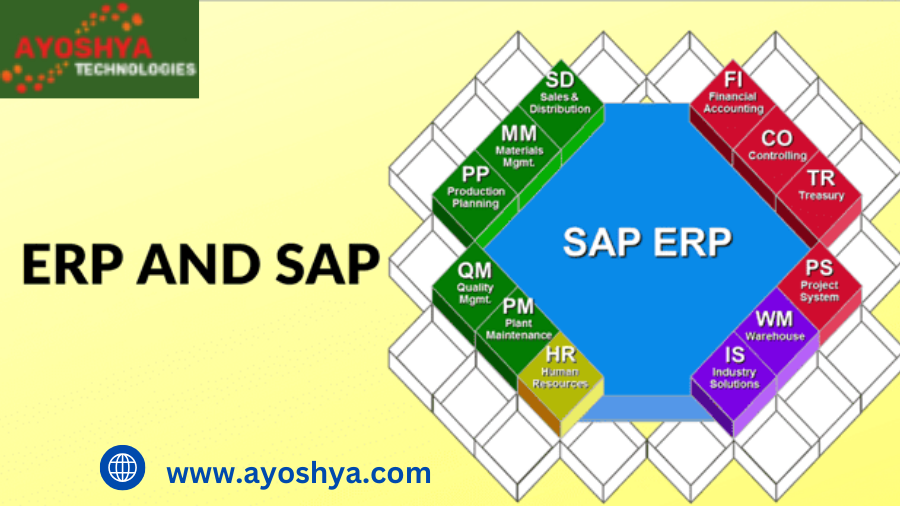
SAP ERP

Success and Failure Factors of sap ERP Implementation

Unlocking the true potential of your business hinges on a successful SAP ERP implementation (…). Explore the key factors that make or break your ERP journey (…). Discover best practices, avoid common pitfalls, and gain valuable insights to ensure a smooth transition and maximize your return on investment.

Feeling overwhelmed by the prospect of implementing a new Enterprise Resource Planning (ERP) system?** You’re not alone. Many businesses embark on this journey with immense hope for improved efficiency, enhanced data visibility, and increased profitability, only to be met with frustration and disappointment due to unforeseen challenges and unsuccessful implementations.

However, navigating the path to successful ERP implementation is not akin to scaling Mount Everest without proper preparation. With the right knowledge and strategic approach, you can conquer the climb and unlock the true potential of your business. This comprehensive guide delves into the key factors that make or break your ERP journey, equipping you with the insights and best practices to avoid common pitfalls and ensure a smooth transition to a streamlined and data-driven future.

Navigating the Path to Success: Key Factors for Effective sap ERP Implementation

Just like any successful expedition, a well-planned and effective ERP implementation requires a clear roadmap and meticulous attention to detail. Here, we explore the key factors that serve as the cornerstones of a smooth and successful transition:

A. Planning and Change Management:

  • Laying the Foundation: Before embarking on the implementation journey, it’s crucial to define the scope of your project with utmost clarity. This involves identifying your specific needs, functionalities you require, and desired outcomes from the new system.
  • Engaging the Stakeholders: Remember, successful implementation is a collaborative effort. Identify key stakeholders from all levels of your organization, including executives, department heads, and end-users. Involve them in the planning process, address their concerns, and ensure their active participation and buy-in throughout the project.
  • Embracing Change Management: Transitioning to a new ERP system can significantly impact your employees’ daily workflows and routines. Implementing a well-defined change management strategy is essential to prepare them for the change, manage resistance, and facilitate smooth user adoption. This includes developing comprehensive training programs, providing ongoing support, and fostering open communication channels to address any questions or concerns that may arise.

B. Selecting the Right System and Partner:

  • Finding the Perfect Fit: The vast array of ERP systems available can be overwhelming. Conduct thorough research to understand the different offerings, compare features, and evaluate each system based on your specific business needs and budget. Consider factors like scalability, industry-specific functionalities, and ease of integration with existing applications.
  • Partnering for Success: Selecting a reliable and experienced implementation partner is crucial for the success of your project. Look for a partner with a proven track record, relevant industry expertise, and a deep understanding of your chosen ERP system. They will provide valuable guidance, technical assistance, and ongoing support throughout the implementation process and beyond.

C. Data Migration and System Integration:

  • Ensuring Data Accuracy: The success of your ERP system hinges on the quality and accuracy of your data. Develop a robust data migration strategy to ensure the efficient and error-free transfer of your existing data to the new system. This may involve data cleansing, mapping, and validation processes to guarantee data consistency and integrity.
  • Building Seamless Connections: Most businesses utilize various software applications to manage different aspects of their operations. Seamless integration of your ERP system with these existing applications is crucial to avoid data silos and ensure consistent information flow across the organization. Explore available Application Programming Interfaces (APIs) or consider consulting with integration specialists to establish robust connections and maintain data synchronization. sap erp, sap erp full form, what is sap erp, sap erp software, sap erp course, sap erp modules.

Common Causes of SAP ERP Implementation Failure

Despite the best intentions, even well-meaning ERP implementation projects can encounter roadblocks and ultimately fail to achieve their desired outcomes. By understanding the common pitfalls that can derail your progress, you can proactively address them and navigate towards a successful implementation:

A. Lack of Executive Buy-in and Clear Vision:

  • Securing Leadership Commitment: Strong executive support and a clear vision from the top are the cornerstones of any successful project. Without the commitment and active involvement of key decision-makers, your ERP implementation may lack the necessary resources, direction, and prioritization to succeed.
  • Aligning with Business Goals: Ensure your ERP implementation is aligned with your overall business goals and strategic objectives. Clearly define the desired outcomes you aim to achieve through the new system, and ensure all stakeholders understand how the implementation contributes to the bigger picture. This helps maintain focus and motivation throughout the project.

B. Insufficient Planning and Resource Allocation:

  • Charting the Course: Underestimating the complexity and scope of the project is a recipe for failure. Thorough planning is essential, including defining clear project timelines, outlining milestones, and establishing a realistic budget. Failing to do so can lead to delays, cost overruns, and a sense of disorganization that can hinder progress.
  • Equipping the Team: Allocate the necessary resources to support the implementation process. This includes assigning skilled personnel, providing them with adequate training, and ensuring they have the time and bandwidth to effectively contribute to the project. Insufficient resources can lead to errors, missed deadlines, and ultimately, project failure.

C. Poor Change Management and User Training:

  • Navigating the Transition: Implementing a new ERP system can significantly impact how employees perform their daily tasks. Neglecting effective change management can lead to employee resistance, low user adoption, and ultimately, the system failing to realize its full potential.
  • Empowering Your Workforce: Invest in comprehensive training programs to equip your employees with the knowledge and skills they need to effectively use the new system. Provide ongoing support, address concerns promptly, and foster a culture of open communication to ensure a smooth user adoption process. Remember, your employees are key to the success of your ERP implementation.

D. Underestimating Data Migration Complexity and System Integration Challenges:

  • The Data Dilemma: Migrating your existing data to the new ERP system can be a complex and time-consuming processUnderestimating the effort and expertise required can lead to data inconsistencies, errors, and delays in the implementation timeline.
  • Bridging the Gaps: Seamless integration with existing applications is crucial to ensure consistent information flow and avoid data silos. Failing to plan for and address potential integration challenges can lead to system inefficiencies and hinder the overall functionality of your ERP system. By proactively addressing these common pitfalls and implementing the key success factors outlined earlier, you can significantly increase your chances of navigating a smooth and successful ERP implementation journey.

1. What is the average cost of ERP implementation?

The cost of ERP implementation varies significantly depending on several factors, including:

  • The size and complexity of your organization: Larger and more complex organizations typically require more extensive customization and integration, leading to higher costs.
  • The chosen ERP system: Different ERP vendors offer varying pricing structures and licensing models. Cloud-based solutions often have subscription fees, while on-premise deployments may involve license purchase costs.
  • The scope of the project: The level of customization, data migration complexity, and the number of users will significantly impact the overall cost.

While it’s challenging to provide a definitive average, costs can range from tens of thousands of dollars for small businesses to millions of dollars for large enterprises. It’s crucial to conduct thorough research, compare pricing models of different vendors, and factor in all associated costs beyond the initial software license to get a realistic picture of your potential investment.

2. How long does a typical ERP implementation take?

The implementation timeline can vary based on several factors, including:

  • The complexity of the chosen system: More complex systems with extensive functionalities typically require longer implementation times.
  • The size and scope of the project: Larger projects involving significant data migration and customization needs will naturally take longer to complete.
  • The resources available: The number of dedicated personnel and their expertise significantly impact the speed of implementation.

Generally, ERP implementations can take anywhere from a few months to several years depending on the factors mentioned above. It’s essential to establish realistic timelines based on your specific project scope and available resources to avoid delays and maintain project momentum.

3. What are the different types of SAP ERP systems available?

The vast ERP landscape offers various types of systems, each catering to specific needs and industries. Here are some prominent categories:

  • Enterprise Resource Planning (ERP) Systems: These comprehensive solutions offer a broad range of functionalities encompassing finance, accounting, human resources, supply chain management, and customer relationship management.
  • Industry-Specific ERP Systems: Tailored to the specific needs of particular industries, such as manufacturing, healthcare, or retail, these systems offer functionalities and workflows optimized for those sectors.
  • Small and Medium-Sized Business (SMB) ERP Systems: Designed for the specific requirements of smaller businesses, these systems are often more affordable and easier to implement compared to their enterprise counterparts.

Choosing the right type of ERP system involves carefully evaluating your specific needs, budget, and industry to ensure the chosen solution aligns with your long-term business goals.

4. What are the benefits of cloud-based ERP systems?

Cloud-based ERP systems offer several advantages, including:

  • Reduced upfront costs: Eliminates the need for significant hardware and software investments, making it accessible to businesses of all sizes.
  • Scalability and flexibility: Cloud solutions easily adapt to changing business needs and user base fluctuations.
  • Automatic updates: The vendor manages system updates and maintenance, ensuring access to the latest features and security patches.
  • Accessibility and remote access: Users can access the system from any location with an internet connection, fostering remote work and collaboration.

Conclusion

SAP ERP: The journey towards a successful ERP implementation, while demanding, can be incredibly rewarding. By understanding the key factors outlined in this guide, including thorough planning, selecting the right system and partner, effective data migration and system integration, and prioritizing user adoption, you can significantly increase your chances of navigating the path to success.

Remember, successful implementation hinges on more than just technology. Securing executive buy-in, fostering a culture of change management, and addressing common pitfalls are equally crucial aspects of this transformative endeavor.

This comprehensive guide has equipped you with the knowledge and insights necessary to embark on your ERP implementation journey with confidence. However, the success story ultimately lies in your hands. Take action by conducting thorough research, carefully evaluating your options, and assembling a skilled team to support you throughout the process.

Remember, a successful ERP implementation is an investment in the future of your business. By embracing a strategic approach, continuous learning, and a commitment to ongoing improvement, you can unlock the true potential of your ERP system and propel your organization towards a streamlined, data-driven, and prosperous future.

you may be interested in this blog

Leading Inspiring Salesforce Developer Case Studies

Using SAP in Telecommunications Sector 2022

Howto SAP OData – Expert Level Overview

My Year with SAP & AI: Top Blog Posts from 2024 & What’s Next! (Expert Insights)

different sub modules in sap finance module
SAP

What is Different Sub Modules in Sap Finance Module?

Unleash the full potential of SAP FICO for efficient financial management! Different Sub Modules in Sap Finance Module Explore its core submodules like General Ledger & Accounts Payable, unlock their functionalities, & discover the benefits of a streamlined financial system. Dive in now!

Feeling overwhelmed by financial chaos? Struggling to gain control of your business’s financial health?** You’re not alone. In today’s fast-paced world, managing finances efficiently can feel like a constant battle. But fear not, there’s a powerful weapon in your arsenal: SAP FICO.

SAP FICO (Financial Accounting and Controlling) is a game-changer for businesses of all sizes, offering a centralized and automated solution to streamline your financial processes. By leveraging its powerful submodules, you can gain unprecedented visibility and control over your finances, unlocking a world of efficiency and informed decision-making. Whether you’re grappling with managing invoices, tracking assets, or generating accurate reports, SAP FICO empowers you to take charge and conquer your financial challenges. Dive deep into this guide as we unveil the secrets of SAP FICO’s submodules and unlock the path towards a brighter financial future for your business.

Unveiling the Submodules of SAP FICO:

The Building Blocks of Financial Strength

At the heart of SAP FICO’s power lies its diverse range of submodules, each specializing in a specific area of financial management. Understanding these submodules and their functionalities is crucial to unlocking the full potential of SAP FICO for your organization. Let’s delve into the core submodules that form the foundation of a robust financial system:

1. General Ledger (GL): The Central Hub of Financial Transactions

Imagine the General Ledger (GL) as the central nervous system of your financial data in SAP FICO. It acts as a giant electronic ledger where all financial transactions, regardless of their origin, are recorded and stored. This comprehensive record-keeping allows you to maintain a clear and audited trail of your financial activities, ensuring transparency and accountability.

The functionalities of the GL go beyond simply storing data. It empowers you to:

  • Manage the Chart of Accounts: This is the foundation of the GL, categorizing your financial activities into various accounts like cash, receivables, payables, and expenses.
  • Post Journal Entries: This function allows you to manually record financial transactions that don’t originate from other modules, ensuring complete and accurate financial data.
  • Perform Reconciliations: Regularly reconciling your GL accounts with external sources like bank statements guarantees the accuracy and integrity of your financial records.

Exploring Additional Submodules:

Beyond the core submodules, SAP FICO offers a range of additional submodules that cater to specific financial management needs, further enriching your financial ecosystem. While not as ubiquitous as the core modules, these additional options demonstrate the comprehensive and adaptable nature of SAP FICO.

different sub modules in sap finance module

oracle consultancy

sap cloud training, sap intelligent robotic process automation, sap integration with other systems, oracle consultant, sap implementation phases, difference between sap and erp, problems in sap implementation, sap what is it, sap pp-pi. sap s/4hana automotive.

1. Bank Accounting: Streamlining Cash Flow Management

The Bank Accounting submodule acts as your virtual bank branch within SAP FICO. It centralizes the management of your bank accounts, enabling you to:

  • Reconcile bank statements efficiently, minimizing manual work and ensuring accurate financial records.
  • Initiate and manage various payment methods, including electronic payments, checks, and automated clearing house (ACH) transactions.
  • Monitor your cash flow in real-time, gaining valuable insights into your organization’s liquidity and enabling informed financial decisions.

By streamlining your bank account management and payment processes, Bank Accounting saves you time and resources, allowing you to focus on strategic financial initiatives.

2. Funds Management: Planning and Controlling Your Financial Future

The Funds Management submodule empowers you to take a proactive approach to your finances. It acts as a financial planning and control center, allowing you to:

  • Create budgets and forecasts: Develop accurate financial projections based on historical data and future expectations, enabling informed resource allocation and risk mitigation.
  • Monitor cash flow: Gain real-time insights into your cash flow situation, allowing you to identify potential shortfalls and make proactive adjustments.
  • Manage liquidity: Optimize your cash flow by implementing strategies like cash pooling and forecasting, ensuring you have the necessary funds to meet your financial obligations.

The Power of SAP FICO Submodules: Unlocking a World of Financial Advantages

By leveraging the diverse functionalities of SAP FICO submodules, organizations can unlock a multitude of benefits that significantly enhance their financial management capabilities. Let’s explore some of the key advantages that implementing SAP FICO submodules brings to the table:

1. Enhanced Financial Visibility and Control

Gone are the days of scattered and siloed financial data. SAP FICO submodules provide a centralized platform for all your financial information, offering real-time visibility into your financial activities. This holistic view empowers you to:

  • Make informed decisions based on accurate and up-to-date financial data.
  • Identify potential financial risks and opportunities early on, allowing for proactive measures.
  • Monitor key financial performance indicators (KPIs) like profitability, cash flow, and solvency, enabling you to track your financial health and measure progress towards strategic goals.

With increased transparency and improved access to financial data, SAP FICO empowers you to make confident and data-driven financial decisions that propel your organization forward.

2. Streamlined Financial Processes and Reduced Errors

Manual financial processes are often prone to errors and inefficiencies, leading to wasted time and resources. SAP FICO submodules automate many repetitive financial tasks, such as:

  • Invoice processing
  • Payment processing
  • Account reconciliation
  • Journal entry posting

This automation not only increases efficiency but also minimizes human error, ensuring the accuracy and integrity of your financial data. By streamlining workflows and eliminating manual processes, SAP FICO allows you to free up your valuable resources for more strategic financial activities.

Conclusion

 Embrace the Power of SAP FICO Submodules for a Brighter Financial Future

We’ve embarked on a journey through the world of SAP FICO submodules, exploring their functionalities and the power they hold to transform your financial management. From the central hub of the General Ledger to the streamlined cash flow management of Bank Accounting, and the future-oriented planning capabilities of Funds Management, SAP FICO empowers you to take control of your financial destiny.

The enhanced visibility, streamlined processes, and data-driven decision-making enabled by SAP FICO submodules lead to a multitude of benefits, including increased efficiency, reduced errors, and improved compliance. By leveraging this powerful tool, you gain the ability to make informed financial decisions with confidence, navigate financial challenges effectively, and ultimately propel your business towards a brighter financial future.

Remember, the key to unlocking the full potential of SAP FICO lies in understanding its submodules and their functionalities. Consider seeking professional guidance from experienced SAP FICO consultants to ensure a smooth and successful implementation, paving the way for a more robust and efficient financial management system within your organization.

you may be interested in this blog

Top SAP MM Interview Questions & Answers for 3 Years Experienced…

SAP ERP Uppcl

Crack the Salesforce Admin Certification Syllabus Breakdown and Study Tips

sap kya hai

SAP Kya Hai? A Beginner’s Guide

 Unveiling the world of SAP! This beginner-friendly guide explores SAP kya hai (what is SAP), its functionalities, benefits, and various modules (ERP, CRM, etc.). Demystify SAP in Hindi and discover its potential for businesses.

“SAP kya hai?” (What is SAP?)** Confused by this abbreviation popping up everywhere in the business world? You’re not alone! But worry not, because this beginner-friendly guide is here to demystify SAP in clear, simple Hindi.

We’ll delve into the world of SAP, a global leader in software solutions, and explore its functionalities, various modules, and how it can revolutionize your business. So, whether you’re a curious entrepreneur or simply want to understand the tech buzz, buckle up and get ready to unlock the secrets of SAP!

What is SAP? (SAP Kya Hai?)

Have you ever wondered what the acronym “SAP” stands for and why it seems to be everywhere in the business world? Well, wonder no more! SAP stands for Systems Applications and Products, and it’s not just another piece of tech jargon. It’s the name of a multinational software company headquartered in Germany, renowned for developing and selling cutting-edge software solutions that cater to various aspects of business operations.

Think of SAP as a powerful digital toolbox that empowers businesses of all sizes and across diverse industries to streamline their operations, optimize their performance, and gain valuable insights to make informed decisions. From manufacturing giants to retail chains and even healthcare organizations, SAP solutions have become an integral part of their success stories.

While SAP offers a wide range of software products, its core strength lies in its modular approach. This means SAP breaks down its functionalities into individual modules, each specializing in a specific area of business management. This allows businesses to choose and implement the modules that best suit their specific needs and budget. Let’s delve deeper and explore some of the most popular SAP modules in the next section.

Understanding SAP Modules: Building Blocks for Business Success

As mentioned earlier, one of the key strengths of SAP lies in its modular structure. Imagine SAP as a vast library, and each module is a specialized book dedicated to a specific subject. Businesses can pick and choose the modules most relevant to their needs, creating a customized solution that perfectly aligns with their operational requirements. Let’s explore some of the most popular SAP modules:

1. SAP ERP (Enterprise Resource Planning):

Considered the cornerstone of many SAP solutions, SAP ERP acts as the central nervous system of your organization. It seamlessly integrates and manages various core business processes like:

  • Finance: Streamlines financial management, including accounting, budgeting, and forecasting.
  • Human Resources (HR): Manages employee data, payroll processing, and talent management.
  • Supply Chain Management (SCM): Optimizes inventory management, procurement processes, and logistics.
  • Customer Relationship Management (CRM): (Discussed in the next section)

By providing a centralized platform for managing these crucial functions, SAP ERP improves efficiency, eliminates data silos, and fosters collaboration across different departments within an organization. sap kya hai, what is btp in sap

2. SAP CRM (Customer Relationship Management):

In today’s customer-centric world, building strong relationships with your customers is paramount. This is where SAP CRM comes into play. This module empowers businesses to:

  • Manage customer interactions: Track customer inquiries, complaints, and feedback through various channels.
  • Gain customer insights: Analyze customer data to understand their preferences and buying behavior.
  • Personalize customer experiences: Tailor marketing campaigns and sales strategies based on individual customer needs.

Benefits of Using SAP: Unleashing the Power of Business Transformation

Implementing SAP solutions can be a game-changer for businesses of all sizes. By leveraging its comprehensive functionalities and modular approach, organizations can unlock a multitude of benefits that can propel them towards greater efficiency, improved performance, and a competitive edge. Let’s explore some of the key advantages businesses experience by incorporating SAP into their operations:

1. Enhanced Efficiency and Productivity:

SAP streamlines various business processes, automating repetitive tasks and eliminating manual data entry. This reduces administrative burden, minimizes errors, and frees up valuable resources that can be directed towards more strategic initiatives. Additionally, with all essential information integrated within a single platform, employees can access accurate and up-to-date data readily, enabling them to make faster and more informed decisions.

Imagine a scenario where managing inventory levels across multiple warehouses was a tedious and time-consuming process. With SAP, businesses can automate stock control, track real-time inventory levels, and even predict potential stock shortages. This not only improves operational efficiency but also helps save costs associated with overstocking or understocking.

2. Improved Data Management and Reporting:

Traditionally, businesses might rely on various disconnected systems to manage different aspects of their operations. This often leads to data silos and inconsistencies, making it challenging to gather comprehensive insights and generate reliable reports. By consolidating data from various departments into a single central platform, SAP enhances data consistency and accessibility. This empowers businesses to generate accurate and real-time reports that provide valuable insights into their performance, identify trends, and inform strategic decision-making.

For instance, with SAP’s powerful reporting capabilities, a sales team can analyze sales data by region, product category, or customer segment. This allows them to identify areas performing well, understand customer preferences, and tailor their sales strategies for better results.

Who Uses SAP? (SAP Kaun Istramaal Karta Hai?)

The reach and versatility of SAP solutions extend far and wide, catering to a diverse range of organizations across various industries. Here’s a glimpse into the different types of businesses that leverage the power of SAP:

1. Small and Medium-sized Enterprises (SMEs):

While SAP is often associated with large corporations, its scalable and modular solutions make it equally beneficial for SMEs. By implementing specific modules tailored to their specific needs, SMEs can experience significant improvements in areas like:

  • Financial management: Gaining greater control over finances and streamlining processes like accounting and budgeting.
  • Inventory control: Optimizing stock levels, minimizing stockouts, and reducing storage costs.
  • Customer relationship management: Enhancing customer interactions, fostering better communication, and improving customer satisfaction.

For example, a growing retail chain can utilize SAP to manage their inventory across multiple stores, track sales trends, and personalize customer experiences. This empowers them to compete effectively in the market despite their size.

2. Large Corporations:

For large corporations with complex operations and vast amounts of data, SAP provides a comprehensive suite of solutions that cater to every aspect of their business. From managing global supply chains to streamlining complex financial processes, SAP empowers them to:

  • Boost operational efficiency: Automate tasks, eliminate redundancies, and optimize resource allocation across various departments.
  • Gain real-time insights: Leverage data analytics capabilities to understand market trends, identify potential risks, and make informed strategic decisions.
  • Enhance collaboration: Foster seamless communication and collaboration between diverse teams located across different geographical locations.

Imagine a multinational manufacturing company managing production processes across several countries. SAP’s integrated platform allows them to centralize data, synchronize operations, and ensure consistent quality standards across all their production facilities.

People Also Ask (PAA) Section: Diving Deeper into the World of SAP

Now that you’ve gained a solid understanding of what SAP is and its potential benefits, you might have some lingering questions. This section addresses some frequently asked questions (FAQs) to equip you with even more valuable information:

1. SAP ka full form kya hai? (What is the full form of SAP?)

The answer is simple: SAP stands for Systems Applications and Products. It’s not just a brand name; it reflects the core essence of what SAP offers – a comprehensive suite of software applications and products designed to cater to various business needs.

2. SAP kaise sikhe? (How to learn SAP?)

Learning SAP opens doors to exciting career opportunities. Here are some ways to embark on your SAP learning journey:

  • Online courses: Numerous online platforms offer comprehensive SAP courses, ranging from beginner-friendly modules to advanced certifications.
  • Training institutes: Enroll in specialized SAP training institutes that provide instructor-led courses and hands-on experience.
  • Official SAP certifications: Earning official SAP certifications validates your expertise and makes you a highly sought-after candidate in the job market.

3. SAP ka kya fayda hai? (What are the benefits of SAP?)

As discussed earlier, implementing SAP solutions offers a multitude of benefits for businesses:

  • Enhanced efficiency and productivity through automation, streamlined processes, and improved data accessibility.
  • Improved data management and reporting with centralized data, consistent information, and real-time insights.
  • Streamlined business processes by eliminating redundancies, fostering collaboration, and optimizing resource allocation.
  • Better decision-making with real-time insights enabled by data analytics and comprehensive reporting capabilities.

4. Kya SAP mein career hai? (Is there a career in SAP?)

Absolutely! The SAP domain offers lucrative career opportunities for individuals with the right skills and knowledge. Here are some promising career paths:

  • SAP consultants: Advise businesses on implementing and optimizing SAP solutions.
  • SAP developers: Develop and customize SAP applications to meet specific business needs.
  • SAP system administrators: Manage and maintain SAP systems to ensure smooth operation and security.

With the increasing demand for SAP expertise, pursuing a career in this domain can be a rewarding and fulfilling choice.

Remember, this is just the beginning of your SAP journey. By exploring the resources mentioned above and continuously upskilling yourself, you can unlock exciting opportunities in the dynamic world of SAP!

Conclusion

Demystifying SAP and Unlocking its Potential for Your Business

So, there you have it! This comprehensive guide has shed light on the mystery of “SAP kya hai” (what is SAP) in clear and concise Hindi. We’ve explored its core functionalities, delved into popular modules like ERP and CRM, and unveiled the transformational benefits it offers for businesses of all sizes.

Remember, SAP is not just another software; it’s a powerful tool that can revolutionize your business operations, empower your employees, and equip you with valuable insights for informed decision-making. Whether you’re a seasoned entrepreneur or an aspiring professional, understanding SAP opens doors to exciting possibilities and paves the way for sustainable growth and success.

Take action today! Explore the resources mentioned in the People Also Ask (PAA) section, consider pursuing SAP training or certifications, and embark on your journey to mastering the world of SAP. With dedication and continuous learning, you can unlock the true potential of SAP and propel your business towards a brighter future!

you may be interested in this blog

Accelerate Your Career with Learning Salesforce Development with Apex Pdf

Top SAP MM Interview Questions & Answers for 3 Years Experienced Professionals

Difference Between Manual Tester and Automation Tester

sap implementation steps

How do you SAP implemention Steps successfully?

Embark on your SAP implementation steps journey with confidence! Explore a comprehensive guide outlining the crucial steps, best practices, and valuable tips… Navigate challenges, ensure success, and unlock the full potential of SAP in your business, click here to learn more!

Feeling overwhelmed by the thought of Embark on your SAP implementation steps journey with confidence! Explore a comprehensive guide outlining the crucial steps, best practices, and valuable tips… Navigate challenges, ensure success, and unlock the full potential of SAP in your business, click here to learn more! ? Visions of endless tasks, complex configurations, and potential roadblocks clouding your mind? You’re not alone! Navigating the SAP implementation journey can be a daunting climb, but fear not, fellow adventurer! This comprehensive guide equips you with the knowledge and tools to conquer the climb and unlock the transformative power of SAP within your business. We’ll delve into the crucial steps, explore best practices to overcome common challenges, and unveil valuable tips for a successful and empowering implementation. So, grab your metaphorical climbing gear, because with this guide as your compass, you’re well on your way to reaching the summit of SAP success!

II. Understanding the SAP Implementation Journey: A Roadmap to Success

Before embarking on your SAP implementation steps journey, it’s crucial to gain a clear understanding of the roadmap that lies ahead. This journey typically unfolds through five distinct phases, each playing a vital role in laying the foundation for a successful transformation:

1. Project Preparation: Charting the Course:

  • This initial phase involves setting the stage for your implementation project. Here, you’ll:
    • Define your vision and goals: Clearly articulate what you aim to achieve with SAP, outlining specific business processes and desired outcomes.
    • Establish the project scope: Determine the functionalities, modules, and user groups that will be included in the implementation, ensuring a focused and manageable project.
    • Assemble your team: Build a cross-functional team with expertise in business process mapping, SAP configuration, project management, and change management. Consider partnering with an experienced SAP implementation consulting firm to bridge any skill gaps and leverage their expertise.

2. Business Blueprint: Mapping Your Business Landscape:

  • The business blueprint phase focuses on mapping your current business landscape and defining future business needs within the context of SAP. This involves:
    • As-is analysis: Analyze and document your existing business processes, identifying inefficiencies and areas for improvement.
    • To-be definition: Define how you want your business processes to function after implementing SAP, outlining the desired functionalities and workflows within the system.
    • Gap analysis: Identify the gaps between your current state and your desired future state, highlighting areas where SAP can address inefficiencies and optimize your operations.

3. Realization: Bringing Your Vision to Life:

  • This phase is the construction stage of your SAP implementation, where the system is configured, customized, and developed to meet your specific needs. This involves:
    • System configuration: Configure the core functionalities of the chosen SAP modules based on your business blueprint and specific requirements.
    • Customization: Develop any necessary customizations or extensions to tailor the system to your unique business processes and workflows.
    • Integration: Integrate SAP with any existing systems you utilize to ensure seamless data flow and avoid information silos.
    • sap implementation steps,
    • sap service cloud,
    • sap hana xsa, what is sap software used for,sap oracle, erp modules list,

4. Final Preparation: Gearing Up for Launch:

  • Before launching your new SAP system, it’s crucial to ensure everything is in place for a smooth transition. This phase focuses on:
    • User training: Provide comprehensive training to all users on how to navigate and utilize the new SAP system effectively.
    • Testing: Conduct rigorous testing of all functionalities, user workflows, and integrations to identify and rectify any issues before go-live.
    • Data migration: Carefully plan and execute the migration of data from your existing systems to SAP, ensuring data accuracy and consistency within the new system.

5. Go-Live and Support: Embracing the Journey:

  • Go-live marks the official launch of your SAP system, signifying the culmination of your implementation efforts. However, the journey doesn’t end here. This final phase involves:
    • Post-implementation support: Provide ongoing support to users as they adjust to the new system and address any initial challenges that arise.
    • Monitoring and optimization: Continuously monitor system performance and user feedback to identify areas for improvement and optimize the system based on evolving business needs.

 Key Steps for Scaling the Summit: A Guide to Successful SAP Implementation

Now that you’ve familiarized yourself with the roadmap, it’s time to delve deeper into the key steps that will equip you to conquer the climb of a successful SAP implementation. Remember, these steps serve as a compass throughout your journey, guiding you towards a smooth and efficient system launch:

1. Define Clear Goals and Scope:

  • Clarity is key! Before embarking on your implementation, it’s crucial to establish a clear vision of what you aim to achieve with SAP. This involves:
    • Articulating your desired outcomes: Identify the specific business processes you want to optimize and the measurable goals you aim to achieve through SAP implementation. This could include streamlining operations, improving data visibility, or enhancing customer service.
    • Defining the project scope: Clearly outline the functionalities, modules, and user groups that will be included in the implementation. This helps you stay focused and avoid scope creep, which can lead to delays and budget overruns.

2. Assemble a Capable Project Team:

  • Building a strong team is like assembling a skilled mountaineering expedition – each member plays a crucial role in reaching the summit. Your project team should possess diverse expertise in various areas:
    • Business process mapping: Individuals who understand your current business processes and can effectively translate them into the SAP system.
    • SAP configuration and development: Experts with the technical skills to configure and customize the SAP system to your specific needs.
    • Project management: A skilled project manager who can keep the project on track, manage resources effectively, and ensure timely completion.
    • Change management: Individuals who can lead the change management strategy, address employee concerns, and foster user adoption of the new system.

Conquering the Obstacles: Overcoming Common SAP Implementation Challenges

Even the most meticulously planned SAP implementation journey may encounter unforeseen challenges. However, by understanding these roadblocks and equipping yourself with effective strategies, you can navigate them with confidence and ensure a smooth ascent to the summit:

1. Taming the Beast of Scope Creep:

  • Scope creep occurs when the initial project scope expands beyond its original boundaries, often leading to increased costs, delays, and potential system instability. Here’s how to keep it under control:
    • Clearly define and document the project scope at the outset, outlining the functionalities, modules, and user groups involved.
    • Establish a change management process that requires formal approval for any proposed changes to the scope. This ensures that additions are carefully evaluated for their impact on budget, timeline, and overall project success.
    • Communicate the scope clearly to all stakeholders and manage their expectations. Be transparent about potential challenges and potential impacts of any proposed scope changes.

2. Bridging the Gap of Change Resistance:

  • Implementing a new system like SAP can often trigger resistance and anxiety among employees accustomed to existing processes. To foster user adoption and minimize resistance:
    • Develop a comprehensive change management strategy that addresses employee concerns, communicates the benefits of the new system, and provides opportunities for feedback and participation.
    • Involve key stakeholders and end-users in the implementation process from the beginning. This fosters a sense of ownership and increases buy-in for the new system.
    • Provide comprehensive training and ongoing support to equip users with the necessary skills and knowledge to utilize SAP effectively. Addressing their concerns and demonstrating the value of the new system is crucial for overcoming resistance.

3. Navigating the Rapids of Data Migration Issues:

  • Data migration is the crucial process of transferring data from your existing systems to SAP. Inaccurate or incomplete data can significantly hinder system performance and user adoption. To ensure smooth data migration:
    • Thoroughly assess and clean your existing data before migration. This involves identifying and rectifying any inconsistencies, duplicate entries, or missing information.
    • Develop a comprehensive data migration plan that outlines the specific data sets to be migrated, the migration sequence, and the tools and techniques to be used.
    • Test the data migration process thoroughly in a non-production environment before migrating data to the live system. This allows you to identify and address any potential issues before they impact real-world operations.

4. Integrating the Peaks of Existing Systems:

  • Integrating SAP with your existing systems is crucial for ensuring seamless data flow and avoiding information silos. However, integration complexity can pose a challenge. To overcome this:
    • Carefully assess your integration needs and identify the specific systems that require integration with SAP.
    • Leverage industry best practices and available integration tools to connect SAP with your existing systems effectively.
    • Thoroughly test all integrations to ensure data accuracy and consistency across all connected systems.

V. Conclusion:

Reaching the Summit of SAP Success

The journey of implementing SAP, while challenging, can be incredibly rewarding. By equipping yourself with the knowledge, tools, and strategies outlined in this comprehensive guide, you can conquer the climb and unlock the transformative power of SAP within your business.

We’ve explored the crucial phases of the implementation journey, delved into key steps for success, and equipped you with strategies to overcome common challenges. Remember, a successful implementation hinges on:

  • Clearly defined goals and scope to ensure focused efforts and avoid project creep.
  • A capable project team with diverse expertise to navigate the complexities of the process.
  • Meticulous planning and open communication to keep everyone informed and on track.
  • Effective change management to address user concerns and foster adoption of the new system.
  • Rigorous testing and data migration to ensure system accuracy and data integrity.

Ready to embark on your SAP implementation journey? Leverage the resources provided, seek professional guidance if needed, and remember: with careful planning, proactive problem-solving, and a commitment to continuous optimization, you can reach the summit of SAP success and unlock a world of enhanced efficiency, improved decision-making, and sustainable growth for your business. So, take the first step today, and witness the transformative power of SAP unfold within your organization!

you maybe interested in this blog

Sap Fi Sd integration Amplifying Business Impact

is SAP course useful for MBA?

sap vs erp

SAP vs. ERP: Choosing the Right Fit for Your Business

Uncertain about sap vs erp? We’ve got you covered! Explore the key differences, functionalities, and ideal use cases. Discover which solution empowers your business growth…

Feeling overwhelmed by the maze of acronyms in the business world?** Struggling to decipher the difference between sap vs erp and how they can impact your organization? You’re not alone! Many businesses grapple with this very confusion, unsure of whether SAP is synonymous with ERP or if there’s a hidden world of options beyond this industry giant. But fear not, weary entrepreneur! This comprehensive guide will demystify the maze, shedding light on the key distinctions between SAP and ERP. We’ll explore their functionalities, ideal use cases, and empower you to choose the right fit to ** propel your business growth**. So, buckle up and get ready to unveil the secrets behind these powerful acronyms!

Understanding ERP: The Backbone of Integrated Business Management

Imagine a central hub where all your crucial business operations, from finance and accounting to inventory management and customer relationships, seamlessly interact and share information. This is the essence of Enterprise Resource Planning (ERP), a powerful software solution designed to streamline operations, improve efficiency, and empower data-driven decision-making.

Core Functionalities of ERP Systems:

  • Financial Management: ERP systems consolidate and automate various financial tasks, including accounts payable and receivable, general ledger, budgeting, and financial reporting. This ensures real-time financial visibility and facilitates informed financial decision-making.
  • Supply Chain Management: From procurement and inventory control to production planning and logistics, ERP systems orchestrate the flow of goods and materials throughout your supply chain. This enables optimized inventory levels, reduced costs, and improved delivery times.
  • Customer Relationship Management (CRM): ERP systems integrate customer data and interactions, fostering improved customer service, targeted marketing campaigns, and enhanced sales opportunities.
  • Human Capital Management (HCM): Some ERP systems also encompass functionalities like payroll processing, talent management, and employee self-service, streamlining human resource processes and improving employee engagement.

Beyond the Core: Industry-Specific Solutions:

While the core functionalities mentioned above form the foundation of most ERP systems, many vendors offer industry-specific solutions tailored to address the unique needs of different sectors. These solutions often include pre-configured workflows, industry-specific reporting tools, and integrations with specialized industry applications. For example, an ERP solution for a manufacturing company might include functionalities for production planning, quality control, and shop floor management, while a solution for a healthcare organization might focus on patient record management, billing, and claims processing.

Unveiling SAP: The Powerhouse Player in the ERP Landscape

While ERP represents a broader category of software solutions, SAP stands out as a prominent vendor within this domain. SAP offers a comprehensive suite of ERP products catering to various business sizes and industry needs. However, it’s crucial to understand that SAP is not synonymous with ERP. Let’s delve deeper into the unique characteristics of SAP solutions:

Depth and Industry-Specific Focus:

Unlike generic ERP systems that offer a broader range of functionalities across various departments, SAP solutions often go deeper in specific areas. They provide industry-specific features and functionalities tailored to address the unique challenges and requirements of different sectors. For example, SAP offers specialized solutions for manufacturing, healthcare, retail, and many other industries. These solutions leverage industry best practices and deep domain expertise to optimize processes, improve efficiency, and deliver tangible business value within specific contexts.

A Spectrum of Products for Diverse Needs:

Recognizing that businesses come in all shapes and sizes, SAP offers a spectrum of ERP products catering to different levels of complexity and budget constraints. Some popular examples include:

  • SAP S/4HANA: A next-generation ERP suite built on the SAP HANA in-memory database platform, offering real-time insights, improved performance, and advanced analytics capabilities for large enterprises.
  • SAP Business One: A cloud-based ERP solution designed for small and mid-sized businesses, providing core functionalities like financials, CRM, and inventory management in a user-friendly interface.
  • SAP Business ByDesign: Another cloud-based ERP solution targeted towards mid-sized businesses, offering pre-configured industry-specific processes and functionalities.

Key Differences Between SAP and ERP: Choosing the Right Fit

Now that we’ve explored both ERP and SAP in detail, it’s time to shed light on the crucial distinctions between these two entities. Understanding these differences is paramount for making informed decisions when selecting the most suitable solution for your organization’s needs. sap vs erp

1. Vendor vs. Category:

  • ERP: Stands for Enterprise Resource Planning and represents a broad category of software solutions offered by various vendors like SAP, Oracle, Microsoft, and others. These solutions aim to integrate and automate various core business functions across departments.
  • SAP: Represents a specific software vendor within the ERP landscape. SAP offers a comprehensive suite of ERP products catering to diverse business needs, but it’s not the only player in the market.

2. Functionalities:

  • ERP: Generally offers a broader range of functionalities across various departments, including finance, accounting, supply chain, CRM, HCM, and more. However, the depth and specific features may vary depending on the vendor and chosen product.
  • SAP: Often provides deeper functionalities in specific areas, particularly within industry-specific solutions. These solutions cater to the unique needs of different sectors and may offer more advanced features and functionalities compared to generic ERP offerings in those areas.

3. Scalability and Customization:

  • ERP: Offers varying degrees of scalability and customization depending on the chosen vendor and product. Some generic ERP systems may be highly customizable to fit specific business needs, while others may offer limited customization options.
  • SAP: While SAP products offer a certain level of customization, they generally require more expertise and resources to implement and adapt to specific needs compared to some generic ERP systems. However, SAP’s industry-specific solutions often come pre-configured with industry best practices, reducing the need for extensive customization.

4. Cost and Implementation:

  • ERP: The cost of ERP systems can vary significantly depending on the vendor, chosen product, and required customizations. Implementation complexity can also vary, with some generic ERP systems offering easier and faster deployment compared to others.
  • SAP: SAP solutions are generally considered more expensive than some generic ERP options, particularly for larger and more complex implementations. Additionally, due to the depth and industry-specific nature of SAP solutions, implementation can involve greater complexity and require specialized expertise.

Unveiling the Mysteries of SAP vs. ERP

Your exploration into the world of sap vs erp has opened doors to valuable insights. But you might still have lingering questions. To ensure you have all the information necessary to make informed decisions, let’s delve into some frequently asked inquiries:

1. What are the benefits of using an ERP system?

Implementing an ERP system can bring a multitude of advantages to your organization, including:

  • Improved efficiency and productivity: Streamlined processes, automated tasks, and real-time data visibility empower your team to work smarter and faster.
  • Enhanced data accuracy and consistency: Eliminating data silos and manual entry ensures consistent and reliable information across all departments.
  • Better decision-making: Data-driven insights from integrated information empower informed choices for strategic growth and improved performance.
  • Increased collaboration and communication: A unified platform fosters seamless communication and collaboration between departments, breaking down information barriers.
  • Reduced costs: Optimized inventory management, improved resource allocation, and streamlined processes can lead to significant cost savings.

2. What are some popular alternatives to SAP?

While SAP is a prominent player, the ERP landscape offers various alternatives to consider:

  • Oracle NetSuite: A cloud-based ERP solution known for its scalability and flexibility, catering to a wide range of industries.
  • Microsoft Dynamics 365: A suite of cloud-based business applications, including ERP functionalities, offering integration with other Microsoft products.
  • Infor CloudSuite: A comprehensive cloud-based ERP suite with industry-specific solutions and strong financial management capabilities.
  • Epicor ERP: A popular choice for manufacturing companies, offering robust production planning, inventory management, and shop floor control functionalities.

The best alternative for your organization depends on factors like your industry, budget, specific needs, and existing technology infrastructure.

3. Is SAP too complex for small businesses?

While SAP offers powerful solutions, its complexity and cost can be daunting for smaller businesses. However, SAP Business One addresses this concern by providing a user-friendly, cloud-based ERP solution specifically designed for the needs of small and mid-sized businesses. It offers core functionalities like financials, CRM, and inventory management in a scalable and cost-effective package.

4. What are the implementation challenges associated with ERP systems?

Implementing an ERP system requires careful planning and consideration of potential challenges:

  • Data migration: Transferring existing data to the new system accurately and efficiently can be complex and time-consuming.
  • Change management: Encouraging user adoption and adapting to new processes can require effective communication, training, and support.
  • Integration with existing systems: Ensuring seamless integration with existing software applications can involve technical complexities.
  • Cost and budget management: Implementing and maintaining an ERP system requires careful budgeting and resource allocation.

Conclusion

Charting Your Course Towards Optimal Business Operations

The journey through the maze of SAP vs. ERP has hopefully shed light on the distinctions, functionalities, and ideal use cases of each. You’ve explored the core functionalities of ERP systems, encompassing everything from financial management to customer relationship management. You’ve unveiled the depth and industry-specific focus of SAP solutions, catering to diverse business needs. Most importantly, you’ve gained insights into the key differences between these two entities, empowering you to make informed decisions for your organization.

Remember, the ideal solution hinges on your specific business size, industry, budget, and unique requirements. Carefully consider the benefits of ERP systems, including improved efficiency, enhanced data accuracy, and better decision-making. Explore the spectrum of options available, including SAP solutions and popular alternatives. If embarking on an ERP implementation, acknowledge the potential challenges and develop a strategic plan to ensure success.

As you navigate this crucial decision, remember that investing in the right solution can be a game-changer for your business. Embrace the power of integrated data, streamlined processes, and data-driven insights to propel your organization towards sustainable growth and long-term success. Don’t hesitate to seek guidance from experienced professionals to gain tailored recommendations and ensure a smooth implementation journey. With the knowledge gleaned from this exploration and a proactive approach, you can confidently chart your course towards optimal business operations in the ever-evolving technological landscape.

you may be interested in this blog

Adding Process Controls & Approval Form

Bridging the Gap Guide to FI-SD Integration in SAP

Unleash the Power of Your Salesforce Inspector Extension

S/4HANA 2024 Future Roadmap Expert Insights

how to implement sap note

Don’t Fear the Update: Navigating the Challenges of how to implement sap note

Feeling overwhelmed by how to implement sap note? Fear not! This guide equips you with the knowledge & tools to navigate every step, from identification to testing & go-live. Master the process & unlock the full potential of your SAP system! 

Struggling to scale your SAP mountain? Feeling buried under an avalanche of [SAP notes]?** Don’t panic, fellow climber! This comprehensive guide is your survival kit for conquering the treacherous terrain of SAP note implementation. Whether you’re battling time constraints, resource limitations, or the fear of system meltdowns, fear not! We’ll equip you with the knowledge and tools to navigate every step from identifying the right notes to celebrating a smooth go-live. So, ditch the stress and grab your pickaxe – it’s time to transform those intimidating notes into stepping stones for SAP success!

This guide will unravel the mysteries of SAP note implementation, guiding you through the key stages: identifying and prioritizing notes, meticulous planning, careful implementation and testing, and a confident go-live. We’ll also explore additional considerations like security, vendor support, and best practices to ensure your journey is safe, efficient, and ultimately, victorious!

Remember, mastering how to implement sap note isn’t just about fixing bugs – it’s about unlocking the full potential of your system. So, buckle up, fellow adventurer, and let’s conquer this SAP summit together!

Mapping Your Ascent: The Key Stages of SAP Note Implementation

Imagine scaling a mountain – you wouldn’t just start climbing without a plan, right? The same applies to conquering the challenge of implementing SAP notes. This journey involves distinct stages, each requiring careful attention and preparation. Let’s delve into the key steps to ensure you reach the peak of success:

1. Identification & Prioritization:

Think of this as scouting your route. You wouldn’t just climb any random peak, would you? Identifying relevant how to implement sap note involves various strategies:

  • SAP Solution Manager: This handy tool helps you search for notes based on your specific system configuration and version.
  • OSS Search: Utilize the SAP Service Marketplace (OSS) to search for notes by keyword, symptom, or area of impact.
  • Industry Resources: Consult industry forums, blogs, and communities to discover notes others have found beneficial.

Once you’ve identified potential notes, it’s time to prioritize the climb. Consider factors like:

  • Urgency: Are there critical fixes or security patches needed immediately?
  • Impact: Will the note address a major bottleneck or improve key functionalities?
  • Availability: Do you have the resources and expertise to implement the note?

By carefully assessing these factors, you’ll create a prioritized list of notes that address your specific needs and ensure you tackle the most crucial ones first. sap edi, sap edi full form, smart data integration, what does crm stand for?, sap industry solutions, how to implement sap note.

2. Preparation & Planning:

Now, it’s time to pack your backpack for the ascent. This stage involves meticulous planning for a smooth journey:

  • Resource Allocation: Assemble a team with the necessary expertise (ABAP developers, BASIS consultants, etc.) to handle the implementation.
  • Testing Environment Setup: Create a dedicated test environment to simulate your production system and safely test the impact of the note.
  • Change Management Activities: Inform users about potential changes and involve them in testing to minimize disruption.

Beyond the Essentials: Additional Considerations for a Secure and Successful Climb

Scaling your SAP note mountain isn’t just about having the right gear and planning your route. Consider these additional factors for a safe and successful ascent:

1. Security and Compliance:

Think of this as securing your climbing harnesses before starting the ascent. Security vulnerabilities are no joke, and SAP notes can sometimes introduce them. Here’s what to keep in mind:

  • Security Impact Analysis: Before implementing any note, thoroughly assess its potential security implications. Consult SAP security advisories and leverage security testing tools during implementation.
  • Compliance Considerations: Ensure the note doesn’t introduce compliance issues related to industry regulations or data privacy laws. Conduct thorough compliance checks before deploying the note to your production environment.

Remember, security and compliance are not optional add-ons – they’re essential safeguards for your system and data. Don’t compromise on these aspects during your SAP note implementation journey.

2. Vendor Support & External Expertise:

Sometimes, even the most experienced climbers need a helping hand. Consider these options for additional support:

  • SAP Support: Leverage official SAP support channels for guidance on complex notes or troubleshooting unexpected issues.
  • External Consultants: Partner with experienced SAP Basis consultants or specialized implementation firms for tailored advice and assistance.

While seeking external support adds cost, it can be invaluable for navigating complex notes, ensuring compliance, and achieving a smooth implementation process, especially for large-scale deployments or organizations lacking internal expertise.

3. Best Practices & Lessons Learned:

Every climber learns from their experiences, and the SAP note implementation world is no different. Here are some valuable insights to keep in mind:

  • Document EVERYTHING: Maintain detailed documentation of your implementation process, including testing results, issues encountered, and solutions applied. This will be invaluable for future reference and knowledge sharing.
  • Start small, scale gradually: Don’t try to tackle the most complex notes right away. Begin with smaller, low-risk notes to gain experience and confidence before progressing to more challenging ones.
  • Communication is key: Keep all stakeholders informed throughout the process, from initial planning to post-implementation monitoring. This fosters collaboration and helps mitigate potential issues.

By incorporating these best practices and learning from others’ experiences, you can avoid common pitfalls and ensure your SAP note implementation journey is a successful and rewarding one.

Conquering Curiosity: Answering Your Lingering Questions about SAP Note Implementation

Scaling the SAP note mountain might leave you with some lingering questions. Fear not, fellow adventurer! This section delves into frequently asked questions to equip you with the knowledge you need to navigate your journey with confidence:

1. How long does it typically take to implement an SAP note?

Unfortunately, there’s no one-size-fits-all answer. The duration hinges on several factors, like:

  • Complexity of the note: Simple bug fixes might take hours, while major functionality changes could require weeks or months.
  • Available resources: A well-staffed team with relevant expertise can implement notes faster than a smaller team.
  • Testing and validation: Thorough testing is crucial, and the scope and complexity of testing can significantly impact the overall timeframe.

2. What are the common risks associated with SAP note implementation?

Like any climb, there are potential risks involved. Be aware of these common pitfalls:

  • Data loss: Accidental data loss is a major concern. Implement robust backup and rollback strategies before proceeding.
  • System downtime: Unexpected issues during implementation could lead to system downtime, impacting business operations. Thorough testing and contingency plans are essential.
  • Functional disruptions: The note might introduce unintended side effects or disrupt existing functionalities. Rigorous testing and user involvement help mitigate these risks.

3. How can I measure the success of an SAP note implementation?

Success goes beyond simply implementing the note. Here are key metrics to consider:

  • Improved performance: Did the note address bottlenecks and enhance system efficiency? Monitor key performance indicators (KPIs) to measure improvements.
  • Reduced errors: Did the note fix bugs or mitigate security vulnerabilities? Track error rates and security incidents to gauge effectiveness.
  • User feedback: Did users experience positive changes and find the new functionalities helpful? Gather feedback through surveys and user testing sessions.

4. What are the latest trends in SAP note management?

The SAP note landscape is constantly evolving. Stay ahead of the curve with these trends:

  • Automated tools: Leverage automation for tasks like note identification, impact analysis, and testing to streamline the process.
  • Cloud-based solutions: Cloud-based tools offer scalability, accessibility, and real-time updates for efficient note management.
  • Predictive analytics: Utilize predictive analytics to identify potential issues and proactively address them before implementing notes.

5. Where can I find more information about SAP note implementation?

Your journey doesn’t end here! Explore these valuable resources:

  • SAP Help Portal: The official source for documentation and tutorials on SAP notes and implementation processes.
  • SAP Community: Connect with other SAP users and experts to share experiences, ask questions, and gain insights.
  • Certified SAP Consultants: Seek guidance from experienced professionals who can tailor advice and support to your specific needs.

Conclusion

Reaching the Summit: A Final Call to Action and Words of Wisdom

Congratulations, adventurer! You’ve scaled the treacherous terrain of this guide, equipped with the knowledge and tools to navigate the challenging world of SAP note implementation. Remember, this journey starts with strategic identification and prioritization of notes, followed by meticulous planning and preparation. Every step, from testing and implementation to go-live and post-implementation monitoring, requires careful attention to security, compliance, and best practices.

Embrace the additional support offered by vendor resources or external consultants when needed. Remember, learning from others’ experiences can be invaluable, so actively seek out industry best practices and lessons learned. By incorporating these elements into your approach, you’ll transform those daunting SAP notes into stepping stones for a more efficient, secure, and future-proof SAP system.

Don’t let fear or uncertainty hold you back! Take action today and start your SAP note implementation journey with confidence. Utilize the wealth of resources available online, connect with the SAP community, and seek guidance from experienced professionals when needed. Remember, the rewards of a successful implementation are well worth the effort: enhanced performance, reduced errors, and a system that truly supports your business needs.

So, go forth, fellow adventurer, and conquer your SAP note mountain! Remember, the key is to approach each step with knowledge, preparation, and a willingness to learn. With the right mindset and the tools provided in this guide, you’ll reach the summit and unlock the full potential of your SAP system. Happy climbing!

you maybe interested in this blog

Manual testing course in Pune

Top RPA Trends in 2023 and Forecasts for 2024

Charting a Course to ROI: Navigating Intent Data Challenges Effectively

Master Your Product Journey with SAP PLM (2024 Guide)

× How can I help you?