SAP & Oracle partner and support companies

Loading

How to Reduce Oracle Support Fees
SAP

How to Reduce Oracle Support Fees in 2024 – Top 4 Strategies

Unlocking Cost Savings: Navigating the Fees Landscape in 2024

In the dynamic realm of technology, staying ahead involves not only embracing innovations but also optimizing costs effectively. For enterprises leveraging Oracle solutions, the challenge of escalating support fees has become a critical financial consideration. As we step into 2024, organizations are actively seeking strategic approaches to minimize these expenses without compromising operational efficiency. This blog explores the evolving landscape of Oracle support fees, the challenges faced by enterprises, and strategic solutions to achieve substantial cost reductions.

The Rising Costs of Support Fees:

Oracle’s support fees have been on a steady rise, presenting a financial burden for many organizations. The annual increases, often around 8%, are designed to incentivize the adoption of Oracle’s cloud solutions. While Oracle’s offerings are robust, the escalating costs can strain IT budgets, prompting enterprises to explore alternative strategies.

Potency of Oracle Software: A Deep Dive into Digital Innovation

Strategies for Reducing Support Fees in 2023 and 2024:

In response to the escalating support fees, organizations are strategically exploring avenues to optimize costs while maintaining the quality of service. Here are some curated strategies based on market trends and the decisions of forward-thinking enterprises:

  1. Third-Party Support:
    • Especially beneficial for Oracle applications like Siebel, JDE, E-Business Suite, and Peoplesoft.
    • Opting for third-party support can result in significant savings, potentially up to 50%.
  2. Transition to Oracle Cloud-Based Solutions:
    • Particularly impactful for large Oracle customers, especially those under an Unlimited License Agreement (ULA).
    • Shifting to Oracle’s cloud-at-customer solutions can lead to a significant cost reduction, potentially up to 60% over four years.
  3. Negotiate Renewal Caps:
    • Given the consistent yearly support fee hikes, negotiating becomes crucial.
    • Committing to Oracle for a specified number of years allows organizations to secure multi-year renewals with 0% or even lower caps, providing better control over costs.
  4. Migrate to Oracle OCI Public Cloud:
    • A strategic move involving transitioning to the Oracle Cloud Infrastructure (OCI) public cloud.
    • Terminating on-premise support contracts not only modernizes infrastructure but also opens the door for further cost reductions.

A Deep Dive into Oracle Procurement Solutions

Challenges in Oracle Support Fee Reduction for 2023 and 2024:

While the strategies outlined above offer significant cost-saving potential, navigating the landscape of Oracle support fees is not without its challenges:

  1. Large Oracle Customer with Unused Licenses:
    • Managing numerous licenses, often unused, becomes complex for significant Oracle customers.
    • Reducing costs becomes intricate when these licenses are part of broader contracts.
  2. Navigating the Oracle ULA Landscape:
    • For organizations with active Oracle Unlimited License Agreements (ULA), planning certification is pivotal.
    • Redress Compliance offers assistance in ULA certification and subsequent support reduction strategy planning.
  3. Lack of Awareness of Available Options:
    • The market offers a myriad of options for support reduction, from transitioning to cloud-based solutions to license adjustments.
    • Being informed about these avenues is essential. Redress Compliance provides a comprehensive overview, ensuring well-informed decision-making.

What Is Oracle Database Used For?

Embracing the Future:

As organizations look towards 2024, the key lies in adopting a proactive stance towards Oracle support fees. By strategically implementing cost-saving measures and staying informed about available options, enterprises can not only weather the challenges but also position themselves for a future of financial optimization and operational excellence.

In conclusion, the landscape of Oracle support fees is evolving, and enterprises must navigate it strategically. The curated strategies, coupled with an understanding of challenges and proactive planning, can unlock substantial cost savings in the dynamic tech landscape of 2024.

Oracle ULA Certification Process
SAP

Oracle ULA Certification Process: Your 10-Step Plan

Navigating the Oracle ULA Certification Process: A Comprehensive Guide

Embarking on the Oracle ULA Certification Process is a transformative journey for organizations seeking seamless transitions, compliance assurance, and strategic decision-making. In this insightful blog, we delve deep into the intricacies of Oracle Unlimited License Agreements (ULA) and the crucial certification process that follows.

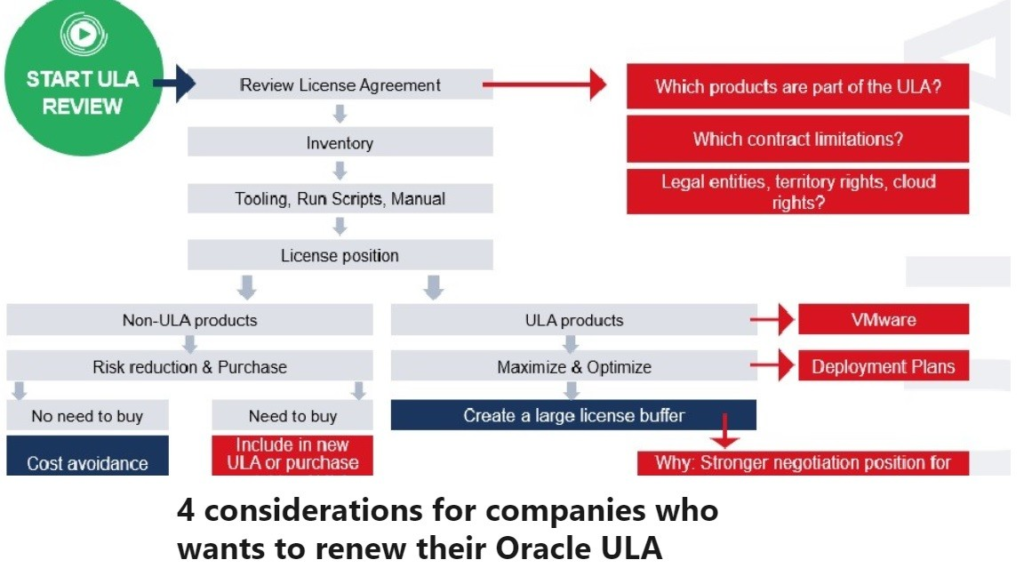
Conducting a Thorough Inventory: Assess and document all deployments of Oracle products within the ULA.

Declaration of Deployments: Provide Oracle with a detailed declaration outlining the used licenses.

Preparing for Verification: Be ready for Oracle’s review and potential audit of the declared deployments.

Finalizing Certification: Ensure all deployments are certified to transition to perpetual licenses.

Planning Next Steps: Decide on renewing the ULA, continuing with certified licenses, or transitioning to another agreement.

3 TYPES OF ORACLE UNLIMITED LICENSE AGREEMENTS

Oracle ULA Certification Process Demystified:

At the conclusion of an Oracle Unlimited License Agreement (ULA) term, organizations enter the ULA Certification process. Here’s a brief breakdown:

  1. Inventory Assessment: Conduct an internal audit to assess and document all Oracle product deployments covered under the ULA.
  2. Declaration to Oracle: Provide Oracle with a detailed declaration, specifying the licenses deployed and in use.
  3. Verification by Oracle: Oracle may choose to verify the declared deployments, involving a review of provided data, requests for additional information, or even an audit.
  4. Certification Completion: Upon Oracle’s satisfaction with the declaration and verification, the organization’s deployment is certified, resulting in ownership of perpetual licenses.

Post-ULA Transition:

Transition to Perpetual Licenses: Move from an unlimited deployment model to owning a fixed number of perpetual licenses based on the certified quantity.

Support Costs: Annual support fees are now based on the number of certified licenses, no longer tied to ULA terms.

No More Unlimited Deployments: Additional deployments beyond the certified quantity will require additional license purchases after the ULA ends.

Renew, Exit, or Transition: Organizations have the choice to renew the ULA, continue with certified licenses, or transition to another agreement type based on their needs.

Oracle enterprise Data management (EDMCS)

Checklist for Oracle ULA Certification Process:

  1. Understand Your ULA Contract:
    • Review contract specifics to ensure compliance and avoid fines.
  2. Maintain Proper Deployment Records:
    • Document every Oracle product deployment for a smooth certification process.
  3. Engage Oracle Licensing Expertise:
    • Collaborate with experts to navigate the intricacies of Oracle licensing.
  4. Conduct an Internal Oracle License Audit:
    • Assess Oracle deployments before official certification to proactively address compliance issues.
  5. Plan for ULA Exit:
    • Strategize next steps for renewal, exit, or transition to another agreement type.
  6. Understand Oracle’s Compliance Rules:
    • Stay informed about Oracle’s compliance rules to adapt to policy changes.
  7. Consider Future Business Changes:
    • Anticipate how business changes might impact ULA compliance.
  8. Negotiate Effectively:
    • Be prepared for negotiations with clear objectives aligned with business needs.
  9. Certify Deployments in Public Cloud Platforms:
    • Ensure Oracle deployments in public clouds comply with specific licensing rules.
  10. Complete the Certification Process:
    • Engage with Oracle to finalize certification, providing necessary documentation promptly.

Oracle ULA Certification FAQ:

  1. What is Oracle ULA Certification?
    • It’s the process at the end of a ULA term where an organization declares its total usage of Oracle products covered by the ULA.
  2. Why is ULA Certification important?
    • Ensures compliance with Oracle licensing terms and avoids unexpected costs or non-compliance.
  3. When should I start the ULA Certification process?
    • Ideally, begin preparations 6-12 months before the ULA term ends.
  4. What happens if I don’t certify?
    • The ULA needs renewal with new license fees, or the agreement will terminate.
  5. How do I count my licenses for certification?
    • Use Oracle’s approved tools or seek expert help to ensure accurate counting.
  6. What if I’ve underused my ULA products?
    • Underuse doesn’t result in refunds, but correct certification is crucial to avoid future issues.
  7. Can I reduce my Oracle support costs post-certification?
    • Yes, you can evaluate support needs after certification and potentially reduce costs.
  8. What challenges can I expect during certification?
    • Challenges include contractual ambiguities, measuring usage, and ensuring all deployments are covered.

You may be interested in:

IMPORTANCE OF SAP TRAININGs AND CERTIFICATION

What is SAP Certification Process ?

WHAT IS A ORACLE ULA – UNLIMITED LICENSE AGREEMENT ?

TYPES OF ORACLE UNLIMITED LICENSE
SAP

3 TYPES OF ORACLE UNLIMITED LICENSE AGREEMENTS

Introduction to Types of Oracle Unlimited License

Types of oracle Unlimited License Agreements (ULA) are comprehensive contracts that redefine how organizations engage with specific Oracle products.

  1. Contracts for Unrestricted Use: Oracle ULAs grant organizations the freedom of unlimited deployment of specific Oracle products within a defined timeframe, typically 2 to 3 years, with a few exceptions.
  2. Diverse Types with Varied Terms: ULAs come in three distinct types: Oracle ULA (time-limited), ELA (volume-based), and PULA (perpetual). Each type caters to different organizational needs and preferences.
  3. Ends with Certification: The culmination of a ULA involves certification, a process where organizations determine the number of perpetual licenses they own. This step is crucial for continued support.
  4. Tailored for Large-Scale Deployments: Designed with large-scale deployments in mind, ULAs provide a framework for organizations planning extensive Oracle product usage.

WHAT IS A ORACLE ULA – UNLIMITED LICENSE AGREEMENT ?

Unpacking the Three Types of Oracle Unlimited License Agreements

Oracle ULAs:

  • Offer unrestricted deployment for a specified duration.
  • Culminate with a certification process to lock in perpetual licenses.
  • Present challenges in active management and end-of-term certification.

Oracle ELAs:

  • Operate on a volume-based model with initial cost-effectiveness.
  • Introduce processor caps, restricting deployment.
  • Pose challenges in managing support costs and deployment limitations.

Oracle PULAs:

  • Provide perpetual rights without time constraints.
  • Require a potentially higher upfront investment.
  • Lack a certification process, emphasizing the need for effective deployment management.

What Does CRM Stand For and What Does it Mean for My Business?

Comparing the Agreements:

  • Oracle ULA: Ideal for large corporations with extensive deployment plans.
  • Oracle ELA: Suited for organizations seeking volume discounts but willing to work within deployment limitations.
  • Oracle PULA: Tailored for those prioritizing long-term deployment without time constraints.

What Is Oracle Database Used For?

FAQs on Oracle Unlimited License Agreements:

  1. Is Oracle ELA genuinely unlimited?
    • No, Oracle ELA has a processor cap, limiting the number of processors deployable.
  2. Which agreement offers the best value?
    • It depends on your organization’s deployment plans, budget, and long-term Oracle strategy.
  3. Can I reduce support costs under any agreement?
    • Challenging, as support contracts consolidate into a single CSI.
  4. Are there different price tags?
    • Not necessarily; ULAs’ pricing is tailored to individual business specifics.
UNLIMITED LICENSE AGREEMENT
SAP

WHAT IS A ORACLE ULA – UNLIMITED LICENSE AGREEMENT ?

What is a Oracle UNLIMITED LICENSE AGREEMENT(ULA)?

Oracle’s UNLIMITED LICENSE AGREEMENT (ULA) is a novel legally binding structure that permits associations to send a limitless number of explicit Oracle items for a foreordained period, ordinarily three years.

Notwithstanding, while the idea sounds direct, exploring the complexities of a Oracle ULA can challenge.

How Does a Oracle UNLIMITED LICENSE AGREEMENT Function?

UNLIMITED LICENSE AGREEMENT

The understanding incorporates a one-time permit expense that awards limitless sending freedoms for a subset of items for a predetermined period, regularly three years.
There are no revealing prerequisites until the arrangement finishes up.
A half year before the ULA’s lapse, Oracle will ask about recharging goals, movement to a PULA (Never-ending ULA), or understanding certificate.
Support costs stay predictable, regardless of the affirmation amounts.

Software Development At SAP: Microservices

Advantages and Downsides of Oracle ULA

Masters:

Practical: Oracle ULA offers a proper expense for buying licenses, making it conservative for associations with broad Oracle programming utilization.
Arrangement Adaptability: Associations can convey in virtual conditions like VMware without permit consistence concerns.
Permitting Terms Improvement: Valuable chance to upgrade permitting terms by incorporating old arrangements into another ULA.

Cons:

Limitations: Oracle ULAs can be prohibitive on consolidations and acquisitions.
Resistance Dangers: Organizations frequently think of themselves as rebellious in the event that they need Oracle authorizing information, prompting constrained recharges or extra permit buys.
FAQs on Oracle ULA.

How to Become a SAP Consultant ?

Frequently Asked Questions about Oracle Unlimited License Agreements (ULA)

What is the primary purpose of an Oracle ULA? An Oracle ULA serves the purpose of enabling organizations to deploy an unlimited number of specific Oracle products for a set period, typically three years.

How does the certification process work? The certification process involves counting and calculating the number of Oracle licenses deployed at the ULA’s end. Oracle’s audit team verifies these deployments.

What challenges might one face with Oracle ULA? Challenges include certifying Oracle deployments in public clouds like AWS and Azure, calculating Oracle licensing in virtual deployments, and identifying all installed products.

How should one prepare for the Oracle ULA exit? To prepare for the Oracle ULA exit, it is advisable to start reviewing Oracle licensing deployments and ULA agreement terms early. Best practices suggest beginning the Oracle licensing assessment six months before the ULA concludes.

What are the common mistakes organizations make with their Oracle ULA? Some top mistakes include not understanding contract terms, failing to maximize ULA’s value, overlooking Oracle’s compliance rules, and not planning for ULA’s exit.

Is there only one type of Oracle Unlimited License Agreement? No, there are three different types of Oracle Unlimited License agreements.

Microsoft Negotiation Strategies
SAP

Navigating Microsoft Negotiation Strategies

Introduction to Microsoft Negotiation Strategies

Microsoft Negotiation Strategies, a worldwide programming and innovation arrangements pioneer, includes something beyond examining costs. This guide expects to give:

  • Knowledge into the Intricacies of Microsoft Exchanges: Grasping the diverse idea of discussions with Microsoft.
  • Techniques for Viable Correspondence and Dealing: How to move toward discussions to accomplish ideal results.
  • The Significance of Key Preparation: The job of exhaustive arrangement in fruitful Microsoft dealings.

How to Negotiate with Microsoft: Insights from Experts

Understanding Microsoft Negotiation Strategies Scene

Microsoft’s exchange procedure has advanced essentially, especially with its attention on cloud-based arrangements and membership models.

Associations should be ready to explore these evolving elements, which incorporate complex agreement terms and forceful deals strategies. Being very much informed about Microsoft’s most recent contributions and legally binding subtleties is essential for haggling really.

Basic Techniques for Microsoft Negotiation Strategies

Effective discussions with Microsoft require a diverse methodology:

  1. Granular Use Detail: Completely figure out your organization’s product use, qualifications, and the genuine worth got.
  2. Vital Item Assessment: Spotlight on important items to Microsoft, for example, Sky blue and Elements 365, to acquire influence.
  3. Grasping Microsoft’s Selling Procedure: Know about Microsoft’s aspirations and the way that they line up with your association’s necessities.
  4. Fostering a Comprehensive Discussion Course of events: Guarantee you possess sufficient energy for planning and exchange to adjust the power dynamic.

SAP vs. Other ERP Systems

Top 5 Strategies for Successful Microsoft Programming Understanding Exchange

To haggle successfully with Microsoft, think about the accompanying strategies:

  1. Extensive Use Examination: Survey your ongoing utilization of Microsoft items to recognize cost-saving open doors.
  2. Influence Programming Confirmation Advantages: Comprehend and arrange the full scope of Programming Affirmation benefits.
  3. Plan In light of Microsoft’s Aspirations: Assess new items or plans that line up with Microsoft’s essential objectives.
  4. Lay out an Unmistakable Course of events: Plan your exchange timetable decisively, taking into account Microsoft’s monetary year and item discharge plans.
  5. Impart Carefully however Immovably: Express any worries productively while keeping a firm position on your association’s requirements.

SAP Consultant Salary in Pune: Decoding Compensation Trends

FAQs on Microsoft Discussion Systems

  • What are the vital components of Microsoft’s exchange methodology?

Microsoft’s methodology frequently spins around its cloud and membership administrations, zeroing in on adjusting these administrations to client needs.

  • How could associations plan for exchanges with Microsoft?

Readiness includes understanding your product utilization Microsoft’s item needs, and fostering an essential exchange approach.

  • What difficulties could emerge during exchanges with Microsoft?

Challenges incorporate complex agreement terms, forceful deals strategies, and adjusting hierarchical objectives to Microsoft’s contributions.

  • How might an association accomplish the best results in exchanges?

Utilizing vital exchange strategies, zeroing in on nitty gritty utilization information, and grasping Microsoft’s item techniques.

End: Dominating Microsoft Exchange for Ideal Results

Effectively haggling with Microsoft requires figuring out their systems, an emphasis on point by point planning, and vital correspondence.

Associations can get good terms by utilizing powerful discussion strategies and lining up with Microsoft’s developing item scene, guaranteeing cost-productivity and arrangement with their innovative objectives.

Microsoft 365 Co-pilot Features
SAP

Microsoft 365 Co-pilot Features: for Enterprise Productivity

Microsoft 365 Co-pilot Highlights

Microsoft 365 Co-pilot addresses a critical jump in big business efficiency, incorporating state of the art computer based intelligence into Microsoft 365 applications.

This article goes further into the elements of Co-pilot, showing how it benefits endeavors by upgrading their Microsoft 365 experience.

Far reaching Usefulness of Co-pilot

Co-pilot is a modern motor joining enormous language models (LLMs) with Microsoft Chart content, including messages, talks, and reports.

This collaboration carries computer based intelligence fueled efficiency to recognizable applications like Word, PowerPoint, and Succeed, all while sticking to severe information security and protection norms .

Unraveling the Power of Oracle Database: A Deep Dive

Highlight Explicit Advantages of Co-pilot in Microsoft 365 Applications

  • Word Reconciliation: Co-pilot in Word changes archive creation. It drafts, alters, and sums up satisfied, fitting the tone from expert to easygoing. Its capacity to produce complete first drafts and give thoughts to further develop composing quality makes it a priceless instrument for archive the board .
  • Succeed Upgrade: In Succeed, Co-pilot goes past customary information examination. It deciphers normal language inquiries, revealing relationships and proposing situations without depending on complex equations. This element enables clients to investigate information powerfully, cultivating a more profound comprehension of business measurements .
  • PowerPoint Help: Changing thoughts into outwardly convincing introductions; Co-pilot in PowerPoint is a strong device for narrating. It productively gathers extensive reports into brief slides, improving on happy and timing activitys, subsequently smoothing out the show creation process .
  • Standpoint Advancement: Co-pilot’s reconciliation into Viewpoint altogether diminishes the time spent on email the board. It can sum up complex email strings, make reactions from brief notes, and adjust the tone and length of messages to suit various settings, improving correspondence proficiency .
  • Groups Joint effort: Inside Groups, the Co-pilot lifts the cooperative experience. It helps with directing compelling gatherings, summing up conversations, and arranging basic focuses for activity. This component guarantees that gatherings are useful and follow-up undertakings are obviously framed .

The Advancing Scene of Co-pilot

Microsoft is focused on the persistent development of Co-pilot, guaranteeing it stays a dynamic and versatile instrument for undertakings.

This obligation to development mirrors’ comprehension Microsoft might interpret the advancing requirements of current organizations and its commitment to figuring out these difficulties .

Top 5 Microsoft Copilot Features – Empowerment

Inside and out See Co-pilot’s Effect on Work processes

The presentation of Co-pilot in Microsoft 365 envoys another time in working environment productivity. Its simulated intelligence driven capacities are not just about mechanizing undertakings yet changing how we work.

Co-pilot’s capacity to comprehend and handle normal language questions and orders across various Microsoft 365 applications exhibits a huge step in simulated intelligence innovation.

It improves on complex errands and brings another degree of knowledge and instinct to regular work processes, making it a basic device for organizations endeavoring to remain ahead in a carefully determined world.

SAP Vs Oracle:Which Is The Best ERP Program

End

Microsoft 365 Co-pilot is something beyond a computer based intelligence device; it’s a change in perspective in big business efficiency.

Its coordination across different Microsoft 365 applications is changing the scene of computerized work processes, making it a urgent resource for any ground breaking undertaking.

As Microsoft proceeds to develop and grow Co-pilot’s abilities, it will without a doubt stay at the cutting edge of the endeavor efficiency upset, molding the fate of how organizations work in the advanced domain.

FAQs:

  1. What is Microsoft 365 Co-pilot, and how does it enhance enterprise productivity?
    • Microsoft 365 Co-pilot is an advanced engine integrating large language models (LLMs) with Microsoft 365 applications, bringing AI-powered efficiency to familiar tools like Word, PowerPoint, and Excel. It significantly enhances productivity by automating tasks and improving work processes.
  2. How does Co-pilot benefit document management in Microsoft Word?
    • Co-pilot in Word revolutionizes document creation by drafting, editing, and summarizing content. Its ability to generate complete first drafts and provide ideas for improved writing quality makes it an invaluable tool for efficient document management.
  3. What advanced features does Co-pilot bring to data analysis in Microsoft Excel?
    • In Excel, Co-pilot goes beyond traditional data analysis by interpreting natural language queries, revealing relationships, and suggesting scenarios without relying on complex formulas. This feature enables dynamic data exploration, fostering a deeper understanding of business metrics.
  4. How does Co-pilot streamline email management in Microsoft Outlook?
    • Co-pilot’s integration into Outlook significantly reduces the time spent on email management. It can summarize complex email threads, generate responses from brief notes, and adapt the tone and length of messages to different contexts, improving communication efficiency.
  5. What role does Co-pilot play in enhancing collaboration within Microsoft Teams?
    • Within Teams, Co-pilot elevates the collaborative experience by assisting in conducting effective meetings, summarizing discussions, and organizing key points for action. This feature ensures that meetings are productive, and follow-up tasks are clearly defined, enhancing overall teamwork efficiency.
Oracle Licensing Benefits
SAP

Oracle Database@Azure – 5 Oracle Licensing Benefits

Oracle Database@Azure – 5 Oracle Licensing Benefits

  • Adaptable present moment permitting choices.
  • Upgraded highlights with existing information base movements.
  • Significant help cost decreases.
  • Adaptable Oracle Cloud Handling Unit (OCPU) adaptability.
  • Further developed review readiness and consistence.

oracle java latest version

  1. Present moment Permitting Adaptability (Oracle Licensing Benefits)

Generally, securing a Oracle data set permit, in any event, for brief terms, involved buying the permit out and out. This was frequently wasteful for momentary necessities. In any case, Prophet Database@Azure reformed this methodology.

Presently, clients can settle on a pay-more only as costs arise model, paying just for the permit span they need. This element is especially valuable for projects with characterized courses of events or organizations exploring different avenues regarding Oracle data sets prior to committing long haul.

  1. Relocating Existing Oracle Information bases effortlessly and Added Advantages

For organizations previously using Oracle on Purplish blue, progressing to Prophet Database@Azure is a sensible step. This help isn’t simply a relocation of existing data sets; it comes loaded with extra highlights like diagnostics and tuning.

These free apparatuses improve execution and give further bits of knowledge, making the Oracle experience on Sky blue more powerful and productive.

  1. Huge Help Cost Decreases

One of the vital monetary advantages of changing to Oracle Database@Azure is the potential for huge help cost decreases.

For instance, on the off chance that an organization burns through $100,000 on Oracle Database@Azure and has a comparable sum in an on-premises innovation programming support charge, they can diminish it by $25,000.

This 25% expense saving is a significant impetus, especially for organizations hoping to improve their IT spending plans.

What Is Oracle Database Used For?

  1. Oracle Cloud Handling Unit (OCPU) Adaptability

The OCPU framework involved by Prophet offers one of a kind adaptability in modifying examples. This versatility can prompt more effective authorizing utilization than customary Microsoft Sky blue examples.

By upgrading the OCPU include, organizations might possibly lessen their permitting prerequisites, making Prophet Database@Azure a more savvy choice.

  1. Improved Review Readiness and Consistence

Consistence and review readiness are basic for organizations utilizing authorized programming. Prophet Database@Azure tends to this by offering a pathway to determine permitting shortages recognized during an evaluation.

By relocating to Prophet Database@Azure, organizations can guarantee they stay agreeable with Prophet’s permitting terms, alleviating the gamble of rebelliousness punishments.

These five authorizing benefits show Prophet Database@Azure’s capacity to offer adaptable, financially savvy, and agreeable information base administration arrangements.

Whether for transient tasks, cost decrease, consistence, or permitting adaptability, Prophet Database@Azure presents a convincing case for organizations thinking about Prophet data sets on a cloud stage.

What Is Oracle Database Used For?

Conclusion:

Oracle Licensing Benefits in Oracle Database@Azure bring a paradigm shift, offering adaptable licensing options, enhanced features, significant cost reductions, flexible OCPU scalability, and improved audit readiness. This strategic move to the cloud not only ensures cost-effectiveness but also addresses compliance concerns, making Oracle Database@Azure a compelling choice for businesses seeking efficient and compliant database management solutions.

Top 5 FAQs:

  1. How does short-term licensing work in Oracle Database@Azure?
    • Oracle Database@Azure introduces a pay-as-you-go model, allowing users to pay only for the duration they require, making it ideal for short-term projects or experimentation.
  2. What advantages come with migrating existing Oracle databases to Oracle Database@Azure?
    • Migration to Oracle Database@Azure includes additional features like diagnostics and tuning tools, enhancing performance and providing valuable insights for a more effective Oracle experience.
  3. How does Oracle Database@Azure contribute to significant support cost reductions?
    • Transitioning to Oracle Database@Azure can lead to substantial support cost reductions, potentially saving up to 25%, providing a considerable incentive for businesses looking to optimize their IT budgets.
  4. What flexibility does the Oracle Cloud Processing Unit (OCPU) offer in Oracle Database@Azure?
    • OCPU flexibility in Oracle Database@Azure allows organizations to customize instances efficiently, optimizing licensing usage and potentially reducing licensing requirements compared to traditional cloud instances.
  5. How does Oracle Database@Azure address compliance and audit readiness?
    • Oracle Database@Azure offers a pathway to resolve licensing shortages identified during an audit, ensuring businesses remain compliant with Oracle’s licensing terms and minimizing the risk of non-compliance penalties.
Microsoft Copilot Features
SAP

Top 5 Microsoft Copilot Features – Empowerment

Introduction to Microsoft Copilot Features in Microsoft Apps

Microsoft Copilot Features are huge progression in the present quickly developing mechanical scene, flawlessly coordinating with different Microsoft applications.

This article aims to provide a detailed insight into the Microsoft Copilot features and how they enhance the functionality of Microsoft apps.

  • The Essence of Microsoft Copilot: Understanding its core functionality and how it revolutionizes work processes.
  • AI and LLMs: Exploring the Role of Artificial Intelligence and Large Language Models in augmenting Microsoft apps.
  • Microsoft Copilot Integration: A look at the specific Microsoft applications incorporating Copilot features.

SAP vs. Competitors: Which ERP Solution Is Right for Your Business?

Top 5 Microsoft Copilot Features

Microsoft Copilot offers a scope of advantages that have essentially influenced how associations work. The following are five key benefits:

  • Expanded Productivity in Report Creation and The executives:

Smoothed out Cycles: Copilot’s incorporation with Microsoft Word and PowerPoint speeds up the creation and altering of reports and introductions, diminishing the time spent on these errands.

Improved Quality: The man-made intelligence driven ideas guarantee the result is delivered quicker and keeps a great norm.

  • High level Information Examination and Revealing with Succeed:

Improved on Information Dealing with: Copilot in Succeed mechanizes complex information examination, making it more straightforward for clients to deal with huge datasets and determine significant experiences.

Robotized Recipe Creation: The device helps with producing equations, consequently diminishing mistakes and expanding the precision of reports and examinations.

  • Further developed Correspondence and Coordinated effort:

Successful Email The executives: In Standpoint, Copilot oversees email correspondences all the more productively, guaranteeing that fundamental messages are tended to quickly and precisely.

Upgraded Group Joint effort: With Copilot in Groups and Circle, groups can team up more actually, no matter what their actual areas, prompting better task results.

  • Upgraded Work process and Errand Robotization:

Mechanizing Routine Errands: Copilot robotizes dreary assignments across different applications, permitting workers to zero in on additional mind boggling and key exercises.

Work process Customization: The capacity to fit Copilot’s help to explicit hierarchical work processes prompts more noteworthy functional proficiency.

  • Helping Innovativeness and Development:

Imaginative Help: Copilot supports the inventive strategy, from drafting archives to planning introductions, encouraging an advancement climate.

Time for Key Reasoning: By dealing with routine assignments, Copilot saves representatives’ time, permitting them to zero in on imaginative and key reasoning.

SAP vs. Other ERP Systems

List of Microsoft Apps Integrated

Microsoft Copilot is not just a tool; it’s a game-changer in how we interact with technology. Let’s explore how it integrates with various Microsoft apps:

  1. Microsoft Word and Copilot:
    • Drafting and Editing: Microsoft Copilot in Word transforms the writing process. It assists in drafting documents from scratch, suggesting edits, and enhancing overall content quality.
    • Summarizing Documents: For professionals who deal with lengthy reports, Copilot can generate concise summaries, making information consumption quicker and more efficient.
  2. Microsoft Excel and Copilot:
    • Data Analysis Enhancement: Excel users benefit from Copilot by getting assistance in complex data analysis tasks. It simplifies the process of identifying trends and patterns.
    • Formula Generation: Copilot aids in creating intricate formulas, making data manipulation and calculations more accessible to users of all skill levels.
  3. Microsoft PowerPoint and Copilot:
    • Engaging Presentations: Copilot elevates PowerPoint by helping users create visually appealing and content-rich presentations, enhancing audience engagement.
  4. Microsoft Outlook and Copilot:
    • Streamlined Email Communication: In Outlook, Copilot helps start email drafts, summarize lengthy email threads, and ensure efficient communication.
  5. Microsoft Teams and Copilot:
    • Effective Meetings: Copilot in Teams enhances meeting productivity, aids in information retrieval, and improves overall team communication.
  6. Microsoft OneNote and Copilot:
    • Note Management: Copilot in OneNote assists in summarizing notes, creating to-do lists, designing plans, and streamlining note-taking and organizational tasks.
  7. Microsoft Loop and Copilot:
    • Collaborative Efforts: Copilot’s integration with Loop makes planning and brainstorming sessions more productive, fostering better team collaboration.
  8. Microsoft Whiteboard and Copilot:
    • Creative Ideation: On the Whiteboard, Copilot aids in organizing and understanding ideas, simplifying the creative process.

Every one of these combinations shows Microsoft Copilot’s capacity to adjust and improve the usefulness of Microsoft’s set-up of utilizations.

The cooperative energy among Copilot and these applications expands efficiency and opens new roads for innovativeness and effectiveness.

Detailed Examination of Copilot in Each Microsoft App

Incorporating Microsoft Copilot Features across different Microsoft applications has reformed how associations approach their everyday undertakings.

Here, we investigate top to bottom models showing the viability of Copilot in improving efficiency and imagination in various expert conditions.

  1. Copilot in Word: Law Firm’s Enhanced Legal Document Drafting
    • Context: A prominent law firm faced challenges in drafting legal documents quickly while maintaining accuracy.
    • Implementation: By integrating Copilot into Microsoft Word, the firm enabled its lawyers to draft complex legal documents more efficiently. Copilot’s AI capabilities offered suggestions for legal terminology, formatting, and compliance with legal standards.
    • Outcome: The integration resulted in a significant reduction in drafting time, improved accuracy, and allowed lawyers to focus on critical aspects of their cases, thereby enhancing overall productivity.
  2. Copilot in Excel: Financial Analysis Team’s Data Mastery
    • Context: A financial analysis team is needed to manage and interpret large datasets to make informed investment decisions.
    • Implementation: With Copilot in Excel, the team could automate data analysis tasks. Copilot helped generate complex formulas, identify trends, and provide data-driven insights.
    • Outcome: The team experienced a substantial increase in efficiency, with quicker insights from data leading to more timely and informed investment decisions.
  3. Copilot in PowerPoint: Marketing Agency’s Presentation Revolution
    • Context: A marketing agency struggled to create impactful presentations within tight deadlines.
    • Implementation: Copilot in PowerPoint enabled the agency to rapidly produce visually appealing and content-rich presentations. It assisted in organizing ideas, designing layouts, and suggesting relevant content.
    • Outcome: The agency delivered high-quality presentations in a fraction of the time, improving client satisfaction and team productivity.
  4. Copilot in Outlook: HR Department’s Efficient Communication Management
    • Context: An HR department was overwhelmed with email communication and scheduling tasks.
    • Implementation: Integrating Copilot in Outlook streamlined email management. It helped start email drafts, summarize long email threads, and schedule meetings efficiently.
    • Outcome: The HR team could manage their communications more effectively, freeing up time for strategic HR initiatives and improving overall department responsiveness.
  5. Copilot in Teams: Project Management Team’s Collaboration Enhancement
    • Context: A project management team needed to improve meeting effectiveness and project coordination.
    • Implementation: Copilot in Teams facilitated better meeting planning, information retrieval, and streamlined communication.
    • Outcome: The team saw improved meeting productivity, more transparent communication, and better coordination, leading to successful project execution.
  6. Copilot in OneNote: Research Team’s Organizational Breakthrough
    • Context: A research team required assistance organizing and summarizing extensive research notes.
    • Implementation: With Copilot in OneNote, the team could quickly summarize notes, create organized to-do lists, and design effective research plans.
    • Outcome: The team achieved greater efficiency in managing their research, leading to quicker analysis and a more comprehensive understanding of their subjects.
  7. Copilot in Loop: Remote Team’s Synchronized Project Collaboration
    • Context: A remote team faced synchronized planning and brainstorming challenges across different time zones.
    • Implementation: Copilot’s integration with Loop enabled real-time collaborative planning, brainstorming, and project management.
    • Outcome: The team experienced enhanced collaboration, leading to more cohesive project outcomes and reduced miscommunication.
  8. Copilot in Whiteboard: Design Studio’s Creative Process Transformation
    • Context: A design studio needed a tool to organize and enhance their creative brainstorming sessions.
    • Implementation: Using Copilot in Whiteboard, the studio could easily organize ideas, create visual representations, and collaborate on designs.
    • Outcome: The design process became more streamlined and creative, resulting in innovative designs and efficient utilization of brainstorming sessions.

Organizational Benefits of Using Copilot in Microsoft Apps

Integrating Microsoft Copilot across various Microsoft applications has brought about many benefits for organizations.

Here, we explore the key advantages that have been consistently observed:

  1. Enhancing Productivity and Efficiency:
    • Accelerated Task Completion: Copilot significantly reduces the time required to complete tasks across different applications, from document drafting in Word to data analysis in Excel.
    • Intuitive Assistance: The AI-driven assistance provided by Copilot streamlines routine processes, allowing employees to focus on more strategic tasks.
  2. Streamlining Workflows and Automating Tasks:
    • Workflow Optimization: Copilot helps optimize workflows by automating repetitive tasks, reducing the likelihood of human error.
    • Customized Solutions: The ability of Copilot to adapt to specific organizational needs means that workflows can be tailored for maximum efficiency.
  3. Facilitating Collaboration and Creativity:
    • Enhanced Collaboration: Tools like Copilot in Teams and Loop foster better collaboration, ensuring that teams can work together seamlessly, regardless of physical location.
    • Boosting Creativity: By handling routine tasks, Copilot frees up time for employees to engage in more creative and innovative work.

How to Create Variant in SAP

Conclusion and Future Outlook

All in all, Microsoft Copilot has obviously changed the Microsoft biological system, bringing another component of proficiency and development to associations’ tasks.

The cooperative energy between man-made intelligence capacities and recognizable Microsoft applications has smoothed out work processes and opened up additional opportunities for imaginative coordinated effort.

Looking ahead, we anticipate:

  • Continued Enhancements: Ongoing developments in AI technology suggest that future versions of Copilot will be even more intuitive and powerful, further enhancing its capabilities.
  • Broader Integration: As Microsoft continues to innovate, we can expect to see Copilot becoming an even more integral part of the Microsoft suite, with broader applications and deeper integration across various platforms.

Innovations like Microsoft Copilot are reshaping the fate of work, and it’s an astonishing time for associations hoping to embrace these headways to drive their development and achievement.

How to Negotiate with Microsoft
SAP

How to Negotiate with Microsoft: Insights from Experts

Navigating Microsoft’s Negotiation Terrain

Dealing with a global software giant like Microsoft comes with its set of challenges. Navigating through these complexities requires finesse and strategic acumen. Understanding the dynamics at play is pivotal for a successful negotiation and skillfully answering this question How to Negotiate with Microsoft ?

Crucial Drivers in Microsoft’s Sales Strategy

Central to Microsoft’s negotiation strategies are the pivotal products – Azure and the coveted E5 license. Recognizing the emphasis placed on these offerings is integral to steering negotiations in a favorable direction. The final decisions on pricing and terms often rest in the hands of Microsoft’s Business Desk.

O DATA and Business Intelligence (BI)

The Power of Preparation and Strategy

A cornerstone of effective negotiation lies in meticulous preparation and strategic foresight. This encompasses:

  1. Comprehensive Utilization Details: Delve into your organization’s entitlements and software usage. This knowledge is the bedrock for discussions on value versus fees paid.
  2. Up-to-date Market Intelligence: Stay abreast of the ever-evolving landscape of Microsoft’s offerings and strategies. Informed decisions are derived from a thorough understanding of the market.

Decoding the Microsoft Contract Landscape

Microsoft’s negotiation strategies are dynamic, revolving around core products. A nuanced approach involves comprehending the landscape of Azure and the E5 license, acknowledging the critical role these components play in negotiations.

Strategies for Seamless Negotiation

Negotiating effectively with Microsoft requires a harmonious blend of knowledge and tactics:

  1. Understanding Sales Focus: Grasp Microsoft’s emphasis on Azure and E5 licenses to align your negotiation strategy.
  2. Strategic Product Evaluation: Identify products valuable to Microsoft for leveraging negotiation advantages.
  3. Holistic Negotiation Approach: Develop a comprehensive strategy balancing organizational needs with Microsoft’s sales goals.

SAP vs. Competitors: Which ERP Solution Is Right for Your Business?

Top 5 Recommendations for Success

Achieving success in Microsoft negotiations entails considering these recommendations:

  1. Granular Utilization Analysis: Scrutinize your current Microsoft product usage in detail.
  2. Alignment with Microsoft’s Goals: Understand how your needs align with Microsoft’s product priorities.
  3. Effective Communication and Bargaining: Articulate your organization’s position effectively and negotiate with finesse.
  4. Long-Term Partnership Perspective: View negotiations as an opportunity to build a sustainable partnership.
  5. Flexibility and Adaptability: Be ready to adjust your strategy based on the ever-evolving dynamics of negotiations.

FAQs in Microsoft Negotiations

  • Primary Considerations: Understand Microsoft’s sales drivers, your software utilization, and strategic alignment with Microsoft’s product priorities.
  • Preparation Time: Begin preparing ideally several months before negotiations to gather necessary data and insights.
  • Negotiating Lower Prices: Yes, with thorough preparation and a strategic approach, negotiating more favorable terms is achievable.
  • Common Mistakes: Inadequate preparation, misalignment of goals with Microsoft’s priorities, and lack of clear negotiation strategies.
  • Negotiating as a Small Business: Absolutely. Small businesses can negotiate effectively by understanding their specific needs and aligning them with Microsoft’s offerings.

Mastering the Art of Negotiating with Microsoft

To learn How to Negotiate with Microsoft, approach the process armed with a well-informed strategy, a crystal-clear understanding of your needs, and an alignment with Microsoft’s ever-evolving product landscape. Effective negotiation unlocks significant benefits – cost savings, improved service terms, and a robust partnership with a global software powerhouse.

ERP implementation cost
SAP

Unseen Expenses of Neglecting ERP implementation cost

Still uncertain about whether your company needs ERP? While estimating the ERP implementation cost is possible, your greater concern should be the expenses incurred by not doing so. But what exactly do we mean by that? Using outdated ERP software or running your business on spreadsheets can pose significant risks. What are the hidden costs that may arise due to not implementing an ERP system? Discover the answers in the article below!

Why should the cost of not installing an ERP solution be considered in your ERP implementation cost? “What will my Return on Investment be when I deploy an ERP solution?” is a common question businesses ask. ROI calculations can be approached in various ways, such as improved cash flow, employee retention, and higher customer satisfaction. The issue is that companies often focus on the costs of using ERP rather than the reverse perspective of ‘what is the cost of doing nothing?’

For what reason should the expense of not introducing an ERP arrangement be remembered for your ERP implementation cost for capital invested estimation?
“What will my Profit from Venture be the point at which I send an ERP arrangement?” is an inquiry that numerous organizations pose.

Computing return for money invested should be possible in various ways, including:

  • Income has gotten to the next level.
  • Maintenance of workers
  • Consumer loyalty is higher.

The issue is that organizations again and again center around the expenses brought about to utilize ERP, not the reverse way around.

‘what is the expense of sitting idle?’

Organizations go to the market looking for and embrace another ERP answer for different reasons:

  • Data islands – There are different arrangements that aren’t associated together. Separate information and data storehouses represent a gamble in this present circumstance. Getting a comprehensive point of view of tasks becomes extreme.
  • Detailing – Limited revealing decisions or manual revealing The need to supplant old frameworks is oftentimes refered to as a reasoning to look for another ERP arrangement.
  • Support – Organizations that utilization a more established ERP application are worried about business congruity and upkeep.
  • Development of the organization – When high-development organizations grow out of their ongoing ERP frameworks, they go to the market for an ERP framework that can uphold and oblige to their quick extension.
  • Innovation progressions – Wishing to exploit mechanical advances (versatility, cloud and enormous information examination are a couple of models).

Other significant variables to consider while taking on an ERP framework incorporate element prerequisites, heritage frameworks, and that’s just the beginning.

Your 9 Red Flags Need an ERP Upgrade, ASAP

Things that organizations typically do while picking an ERP implementation cost

Organizations misconceive the spending plan prerequisites and the work important to embrace ERP when they first join the market for an ERP arrangement. Therefore, organizations choose to “sit idle.”
Organizations who settle on no choice (sit idle) frequently lament their choice and reemerge the ERP market soon after their most memorable choice to sit idle.
Presently the inquiry is “What amount does it cost to sit idle?”

The response to this question will rely upon your organization’s ongoing framework, development example, geology, and plans. Think about the accompanying situation:

  1. The organization has developed at a high speed, outperforming the ongoing framework.

Organizations in this present circumstance much of the time put off taking on an ERP arrangement since they are too bustling developing their business. This is a misuse of cash.

As your organization develops, your requests for better revealing, quicker navigation, and a more far reaching viewpoint of tasks will increment.

The more you pause, the more serious the issue will develop.

The best organizations are those that carry out ERP before the business arrives at the place of despondency and asks for a superior framework.

  1. Needing better help for your ERP arrangement

Your business will be hurt assuming your ERP support is poor or restricted.

There are two components to this:

  • everyday business congruity and
  • passing up the benefits of a very much upheld, current arrangement.

It’s like not having an insurance contract for your business in the event that you don’t have a decent help method and construction set up.

You may not need ERP help for quite a long time or even years, however on the off chance that something turns out badly, your whole organization could be compromised.

Remember that your ERP arrangement deals with your indebted individuals, client associations, providers, workers, and that’s just the beginning – ERP is the foundation of your organization.

Regardless of whether you have a huge framework disappointment that requires crisis support, consider the everyday expenses of not having an ERP accomplice you can depend on to assist you with smoothing out your tasks.

A solid ERP support accomplice will actually want to give new innovation progressions, which will smooth out tasks and financials while likewise setting aside time and cash.

  1. Getting away from data islands

As an organization develops, so does how much inside frameworks it utilizes. Think about the fundamental bookkeeping framework as well as some outsider CRM, producing, assessing, announcing, and different applications.

As your organization develops, so will your requirement for data to improve, quicker choices. These inconveniences are expanded by developing product offerings, new geologies, and extra staff. The more your organization develops, the more you’ll require a solitary wellspring of truth — an ERP framework that combines information across all business gatherings.

  1. Better detailing is expected for independent direction.

Coordinated revealing stages are accessible in present day ERP arrangements. Coordinated KPIs, dashboards, and investigation are possibly essential for the story with regards to breaking down huge information volumes.

Current announcing and examination, which remember for memory innovations, give two critical advantages:

Figuring out enormous informational collections to give ongoing detailing
Pre-composed information investigation permit clients to compose their own reports without requiring progressed specialized aptitude or experience.
On the off chance that you stand by excessively lengthy to take on a cutting edge ERP framework, you will practically reasonable not be able to use present day detailing stages for fast navigation.

  1. Exploit mechanical headways

Innovation is advancing at a quick speed – faster than ever. These enhancements are incorporated into current ERP applications. Think about the accompanying late ERP advancements:

  • Cloud
  • Huge information examination
  • Portability
  • In-memory innovation

If you have any desire to advantage from these and other mechanical progressions, you’ll have to act rapidly and convey a cutting edge ERP arrangement.

  1. Botched open doors

Current organizations are changing their strategic policies at an always expanding rate. As innovation advances, showcasing, deals, detailing, coordinated factors, and creation all change.

You risk passing up new possibilities in the event that you don’t execute current stages for change. All things considered, you don’t place in an ERP framework exclusively to exploit new advancements.

You put in new frameworks in light of the advantages they can give. Think about the accompanying:

  • Income has moved along.
  • Client assistance that is better
  • Maintenance of representatives

Future of ERP : The Next Big thing in ERP

End

Albeit the expense of carrying out an ERP implementation cost is unsurprising, it isn’t the expense of executing an ERP that you ought to stress over. The explanation is straightforward.

For a developing business, utilizing essential administration advancements can bring about execution issues with a critical effect on tasks and income. Also, poor or restricted help choices for your obsolete innovation can genuinely hurt your business.

An innovation framework zeroed in on a solitary ERP stage can assist your business with conquering falsehood and revealing/estimating difficulties, giving you the devices you really want to get a more extensive perspective on your tasks.

To figure out more about how we can assist your organization with exploiting the SAP Business One ERP, click here and you will get a progression of messages in regards to the SAP B1 ERP.

You may like this:

Is it Possible for Your Company to Survive Without an ERP System?

Your Guide to Estimating the ERP Software Development Cost

Operating Concern in SAP: A Comprehensive Guide

Concur Expense Management: A Comprehensive Guide

× How can I help you?