In today’s fast-paced digital economy, one-size-fits-all solutions just don’t cut it anymore—especially when it comes to enterprise resource planning (ERP). That’s where SAP customization steps in, offering businesses the flexibility to mold their SAP environment around their unique operational goals.
Whether you’re a company employee looking to optimize business processes or a curious learner eager to understand how global organizations run smoothly behind the scenes, this beginner-friendly guide will help you understand the value of customizing SAP modules for domain-specific needs.
🌟 What Is SAP and Why Does Customization Matter?
SAP (Systems, Applications, and Products in Data Processing) is one of the world’s leading ERP software providers, used by companies to manage everything from supply chains to human resources.
SAP is structured into various modules—like SAP FI (Finance), MM (Materials Management), SD (Sales and Distribution), and HR (Human Resources)—each designed to handle specific business functions. While the standard modules are robust, they aren’t always tailored to meet the specialized requirements of every industry or business.
Here’s where customization becomes key. Customizing SAP modules means modifying or extending functionalities to better align with the company’s specific goals, industry demands, and workflow processes.
💼 Real-World Example: SAP Customization in the Retail Sector
Let’s say you’re working in retail. The standard SAP Sales and Distribution module might help with order processing and shipping, but what if you also need integration with real-time POS (Point of Sale) data or customer loyalty systems?
A customized SAP solution could:
Track store-level sales in real time
Integrate with mobile apps or customer engagement platforms
Automate inventory restocking based on sales patterns
This kind of customization not only increases operational efficiency but also gives companies a competitive edge by responding to market trends faster than ever.
📊 Market Trends & Industry Insights: Why Now?
The demand for SAP customization is growing rapidly, especially as more industries adopt digital transformation strategies. Here are some reasons:
Industry-Specific Requirements Healthcare, manufacturing, and financial services all have unique compliance and operational standards that generic SAP modules may not fully address.
Customer-Centric Models In sectors like e-commerce and retail, businesses need agile systems that can adapt to personalized customer experiences—something only customization can offer.
Cloud Migration and SAP S/4HANA With SAP’s shift to S/4HANA, companies are revisiting their ERP setups, making now the perfect time to rethink and realign their system architectures.
🛠️ Practical Tips for Getting Started with SAP Customization
You don’t need to be a software engineer to begin exploring the benefits of SAP customization. Here are some actionable steps for beginners:
Understand Your Business Process Begin by mapping out your current workflows. Identify pain points or bottlenecks in your daily operations.
Start Small Begin with a small customization, such as creating a custom report or adding a field to a user screen.
Collaborate with SAP Consultants Work with experienced SAP professionals who understand both the technical and business sides of your industry.
Stay Updated SAP frequently updates its modules. Staying current means your customizations remain compatible and effective.
Use SAP Fiori for Custom UI SAP Fiori is a design system that allows users to create modern, role-based user interfaces—perfect for enhancing usability without altering core functions.
🤝 Who Benefits from SAP Customization?
Customizing SAP modules isn’t just for large corporations. It offers immense value across all business sizes and industries:
Manufacturing: Automate production schedules and quality control processes.
Healthcare: Integrate electronic health records and compliance tracking.
Finance: Tailor financial reporting for international regulations.
Logistics: Customize fleet tracking and warehouse management.
🚀 Unlocking Long-Term Success
When done correctly, SAP customization does more than just meet operational needs—it drives long-term value, increases employee productivity, and enhances customer satisfaction.
Businesses that invest in customized SAP systems often see improved ROI, streamlined workflows, and stronger decision-making through better data analytics.
“Customization isn’t about reinventing the wheel. It’s about making sure the wheel fits your vehicle perfectly.”
✅ Ready to Go Further?
SAP is a vast ecosystem, and customization can open the door to better business performance and innovation. If you’re ready to explore advanced customization techniques, check out our range of SAP training courses and resources designed for all levels—from beginner to expert.
Whether you’re an aspiring SAP consultant or a company leader looking to future-proof operations, we’ve got a learning path tailored for you.
📣 Call to Action
👉 Start your SAP customization journey today! Visit our Advanced SAP Learning Hub for curated courses, hands-on tutorials, and expert advice. Let’s build smarter, faster, and future-ready solutions together.
Are you a beginner looking to break into the world of SAP but unsure where to start? Or maybe you’re part of a company seeking better, hands-on training for your employees? Whether you’re a curious learner or a decision-maker, understanding how Ayoshya trains SAP professionals for real-world projects can help you or your team build a future-proof skill set in today’s competitive digital economy.
In this blog, we’ll walk you through the fundamentals of SAP training, highlight key market trends, and explain how Ayoshya’s unique approach turns theory into practical experience—making professionals job-ready from day one.
What is SAP, and Why Does It Matter?
SAP (Systems, Applications, and Products in Data Processing) is one of the most widely used ERP (Enterprise Resource Planning) tools in the world. From logistics and supply chain to finance and human resources, SAP integrates all business processes into a single system.
Here’s the catch: SAP is not just for IT professionals anymore. Today, businesses need people across departments to understand how to work within SAP environments—creating a huge demand for well-trained SAP professionals.
According to recent industry reports, the global SAP market is expected to grow significantly, with organizations investing heavily in digital transformation. That means one thing: Skilled SAP professionals are in high demand.
The Gap Between SAP Training and Real-World Projects
Many training programs focus on textbook knowledge. You might learn the SAP interface, the module names, or maybe even how to execute a few basic transactions—but when you step into a real company environment, it feels like being thrown into the deep end.
This is where Ayoshya steps in.
Ayoshya’s Hands-On Approach: Real Training for Real Projects
At Ayoshya, we believe that true mastery doesn’t come from theory—it comes from doing the work.
1. Project-Based Learning Environment
Our training is built around real-world business scenarios. Instead of practicing on generic data, learners work on simulated client projects that mimic actual challenges they’ll face in the job market. Whether it’s configuring SAP FICO for a finance department or managing logistics in SAP MM, students get hands-on experience from the very beginning.
2. Mentorship from Industry Experts
Our trainers are not just instructors—they’re SAP consultants with years of industry experience. They guide learners through each project, offering insider tips, best practices, and personal feedback that makes a big difference.
3. End-to-End Process Exposure
We don’t stop at teaching just one module. Our curriculum is designed to expose learners to the end-to-end SAP process—from business requirement gathering to deployment. This makes them versatile and better prepared to contribute in cross-functional roles.
4. Tools and Resources Like the Pros Use
Students learn how to use key tools and utilities used in real corporate SAP environments, such as:
Solution Manager
SAP GUI & Fiori
Business Process Documentation
Testing and Validation Tools
Why Beginners and Companies Choose Ayoshya
Whether you’re an individual or part of a company upskilling its workforce, Ayoshya stands out for three simple reasons:
✅ Realistic Training
Every learner is treated like a team member working on live projects—not a passive student.
✅ Industry-Relevant Skills
We track current market trends and update our modules based on what employers are actually looking for.
✅ Confidence Building
We train with interviews and mock assessments that build confidence and help learners land jobs faster.
Practical Tips for Beginners Getting Started with SAP
Start with One Module: Begin with a core area like SAP FICO (Finance), SAP MM (Materials Management), or SAP SD (Sales and Distribution). Understand how it fits into the larger ERP ecosystem.
Learn the Business Process: Don’t just memorize steps—learn why each transaction matters in the business context.
Practice Daily: SAP is a tool best learned through repetition. Make it a habit.
Join a Supportive Community: Engage with peers, join forums, or attend webinars hosted by Ayoshya to stay updated and connected.
Track Job Descriptions: See what skills are trending on job boards and tailor your learning accordingly.
Real-World Example: From Learner to SAP Consultant
Take the story of Priya, a commerce graduate with zero IT background. She joined Ayoshya’s SAP FICO training course. Within three months, she had worked on two mock implementation projects, learned how to conduct client requirement sessions, and prepared real-time reports. She aced her interviews—and today, she works as an SAP Analyst in a multinational company.
“Ayoshya didn’t just teach me SAP—they trained me to work like a consultant from day one.” — Priya K., SAP FICO Consultant
What’s Next? Your First Step Toward a Successful SAP Career
The SAP ecosystem is rich with opportunity, but breaking in requires more than just academic knowledge—it requires real experience.
At Ayoshya, we don’t just prepare you to pass a certification. We prepare you for success on the job, in real companies, solving real problems.
🚀 Ready to Start Your Journey?
Explore our beginner-friendly SAP programs, real-time project training, and personalized mentorship options. Whether you’re looking to change careers, upskill, or improve your team’s performance—Ayoshya has the tools and the training to help you succeed.
👉 Visit our course catalog and enroll today!
YOU MAY LIKE THIS
Top Skills Required to Excel as a SAP MM Consultant
Building Client Relationships: From Technical Expert to Trusted Advisor
Simplified Business Workplace – Workflow Inbox in SAP R/3
Thinking about getting into SAP or just trying to make sense of what happens in an SAP implementation project? You’re not alone. For many company employees and curious minds, the SAP project lifecycle can feel like learning a new language. But here’s the truth: once you understand the phases, you’ll see how powerful—and logical—it all really is.
Whether you’re an aspiring SAP consultant, a company decision-maker, or someone exploring career opportunities in enterprise software, this guide will help you grasp the core structure of the SAP project lifecycle, its importance in today’s business landscape, and how you can position yourself for success.
🌐 What is the SAP Project Lifecycle?
The SAP Project Lifecycle is the structured process companies follow when implementing an SAP system. It starts with planning and designing (Blueprinting) and ends with Go-Live and support. Think of it as the journey of building a smart digital house for a business—where every phase is essential to making the system work seamlessly.
This lifecycle typically follows the ASAP (Accelerated SAP) Methodology, a tried-and-true framework SAP developed to help projects run efficiently.
🚀 Why Should You Care About the SAP Lifecycle?
With digital transformation taking center stage, SAP is a global leader in enterprise resource planning (ERP) software. Over 90% of Forbes Global 2000 companies run SAP. That’s massive.
Whether you’re a business owner, IT specialist, or operations employee, understanding the SAP lifecycle helps you:
Collaborate better with project teams
Identify risks early
Increase the chances of a successful implementation
Build a valuable, in-demand skill set
🔍 The 5 Key Phases of the SAP Project Lifecycle
Let’s break down the lifecycle into simple, relatable phases:
1. Project Preparation
This is the groundwork phase. Teams define goals, set expectations, form project teams, and outline the scope and timelines.
Tip: Just like laying the foundation before building a house, the more time you spend here planning, the smoother things will go later.
Activities:
Project charter creation
Budgeting and resource planning
Initial project team onboarding
2. Business Blueprint
Here, consultants and company experts map out “how the business works” and decide “how it should work in SAP.”
Example: A retail company explains its inventory process. The SAP team then designs a blueprint to digitize and optimize that process within the SAP system.
Activities:
Conducting workshops with business users
Documenting current vs. future processes
Creating the Business Blueprint document
3. Realization
This is where the actual configuration and customization of the SAP system happens, based on the blueprint.
Think of this as building the house based on the blueprint you just drew.
Activities:
Configuring SAP modules (e.g., Finance, Sales, HR)
Developing custom reports or interfaces
Unit and integration testing
4. Final Preparation
Before launch, teams perform user training, final tests, and data migration. It’s the dress rehearsal before opening night.
Tip: Train end users well—it’s the key to adoption and success.
Activities:
Conducting user acceptance testing (UAT)
Master data load and validation
Creating user manuals and training documents
5. Go-Live and Support
Launch day! The system goes live, and employees start using SAP for daily tasks. A hypercare period follows to resolve any issues.
Real-World Insight: Many companies set up a “war room” during Go-Live week to offer real-time support and minimize disruptions.
Activities:
System cutover and launch
Monitoring system performance
Providing ongoing support and optimization
📈 Industry Trends: Why SAP Skills Matter Now
Global SAP job market is booming, with roles in functional consulting, technical development, analytics, and project management.
SAP S/4HANA adoption is growing fast, and many companies are either migrating or planning to.
Digital transformation budgets are increasing across industries, and SAP is at the heart of many of these initiatives.
💡 Practical Tips for Beginners
Start Small – Begin by learning one SAP module like SAP FI (Finance) or MM (Materials Management).
Get Hands-On – Use free SAP demo environments or trial accounts to explore the UI and workflows.
Use Real-Life Scenarios – Relate SAP processes to what you already know. For example, managing payroll? That’s SAP HCM.
Stay Updated – Follow SAP blogs, attend webinars, and join forums like SAP Community Network (SCN).
Invest in Learning – A good course can shortcut months of confusion.
🌟 Take Your First Step Toward SAP Success
The SAP project lifecycle might sound complex, but now that you know the roadmap, it’s just a matter of learning the terrain. Whether you’re an employee trying to understand your company’s transformation, or a beginner eyeing a high-growth tech career—SAP is a powerful tool to add to your skillset.
🎯 Ready to go deeper? Check out our SAP learning courses and certification paths designed specifically for beginners and professionals looking to level up. From hands-on projects to real-world case studies, we’ve got you covered.
🧠 Final Thoughts
Understanding the **SAP Project Lifecycle—from Blueprint to Go-Live—**is more than a tech topic. It’s a window into how world-class businesses run efficiently and scale sustainably.
In today’s economy, being SAP-literate is a smart career and business move. Don’t wait until Go-Live to get started—start now, and build a future-ready you.
Challenges and Limitations of Robo Advisor Navigating Market Downturns with Robo Advisors
Challenges of Robo Advisors:
Limited emotional intelligence.
Struggles with complex financial situations.
Dependency on historical data.
Navigating Market Downturns:
Difficulty responding swiftly to rapid market changes.
Strategies include portfolio rebalancing and tax-loss harvesting.
Potential improvement through AI and machine learning for better prediction and adaptation.
Challenges and Limitations of Robo Advisors
Robo advisors have transformed investing but come with challenges:
Human Intuition and Emotional Intelligence: Unlike human advisors, robo advisors can’t fully grasp clients’ emotional nuances or life changes. This limits their effectiveness in situations requiring empathy.
Complex Financial Situations: Algorithms might not cover unique or complex situations, such as intricate inheritance issues or sudden financial crises.
Technical Reliance:
Algorithms and Historical Data: Historical data might not always predict future market behaviors accurately.
Data Security and Privacy: The digital nature of robo-advisors raises concerns about protecting personal and financial information.
Market Volatility:
Responding to Rapid Changes: There’s a challenge in adjusting portfolios swiftly enough during sudden market changes.
Diversified Portfolio Maintenance: Automated adjustments might not always take time to buy or sell assets optimally during downturns.
Navigating Market Downturns with Robo Advisors
Despite these challenges, robo-advisors have developed strategies for market downturns:
Rebalancing Portfolios: Automatically adjusting asset allocation helps align investment strategies with investors’ goals and adapt to changing market conditions.
Tax-Loss Harvesting: Automating the sale of investments at a loss to offset taxes on gains can save significant taxes.
The Role of AI and Machine Learning:
Improving prediction models allows for better anticipation of market movements.
Continuous learning from past downturns refines future strategies, enhancing robo advisors’ ability to navigate volatility.
Real-Life Scenarios Where Robo Advisors Face Challenges During Market Downturns
1. Sudden Market Crash
Scenario: An unexpected market crash occurs due to unforeseen global events.
Limitation: Robo advisors may not react quickly enough to limit losses due to their reliance on historical data.
Human Advantage: A human advisor can quickly adjust strategies based on current events and investor sentiment.
2. Client Undergoing Major Life Changes
Scenario: During a market downturn, an investor may be experiencing significant life changes, such as marriage, divorce, or retirement.
Limitation: Robo advisors cannot understand the nuanced impact of these events on an individual’s financial strategy.
Human Advantage: A human advisor can provide tailored advice considering the client’s changing needs and emotional state.
3. Complex Tax Situations
Scenario: The investor must navigate complex tax implications exacerbated by the market downturn.
Limitation: Robo advisors might not offer the most tax-efficient strategies for unique situations.
Human Advantage: Human advisors can craft custom strategies to optimize the client’s tax situation.
4. High Volatility in Specific Sectors
Scenario: Certain sectors experience higher volatility compared to the broader market.
Limitation: Robo advisors might not adjust quickly to sector-specific downturns.
Human Advantage: A human advisor can assess sector risks and advise on reallocating investments away from troubled areas.
5. Investor Panic
Scenario: Widespread panic selling occurs during a downturn.
Limitation: Robo advisors follow programmed strategies, potentially missing cues that require a more nuanced approach.
Human Advantage: Human advisors can reassure clients, helping them avoid making fear-based decisions.
6. Navigating Bear Markets
Scenario: Entering a prolonged bear market where traditional investment strategies may falter.
Limitation: Robo advisors might stick too rigidly to their models, not adapting quickly enough to long-term trends.
Human Advantage: Human advisors can use their experience to adjust strategies for bear market conditions.
7. Unique Investment Opportunities
Scenario: Unique investment opportunities arise during a downturn that requires quick action.
Limitation: Robo advisors may not promptly identify or act on these opportunities due to their algorithmic nature.
Human Advantage: Human advisors can leverage industry contacts and timely insights to capitalize on opportunities.
8. Client’s Emotional Needs
Scenario: The investor feels anxious and uncertain about their financial future during a downturn.
Limitation: Robo advisors cannot provide emotional support or reassurance.
Human Advantage: Human advisors can offer empathy and personalized reassurance, helping clients stay the course.
9. Illiquid Investments
Scenario: An investor has significant portions of their portfolio in illiquid investments that are hard to sell without substantial loss during a downturn.
Limitation: Robo advisors may not effectively manage or advise on illiquid investments under stress.
Human Advantage: Human advisors can negotiate sales or find creative solutions to manage illiquid assets.
10. Regulatory Changes
Scenario: New financial regulations are introduced in response to the market downturn.
Limitation: Robo advisors might not immediately adjust to regulatory changes or fully understand their implications.
Human Advantage: Human advisors can interpret these changes in real-time, advising clients on how to stay compliant while optimizing their financial strategy.
In these scenarios, human advisors’ personalized insight, flexibility, and emotional intelligence prove invaluable, especially in navigating the complexities and rapid changes characteristic of market downturns.
Improving Robo Advisor Capabilities
The financial industry is pushing the boundaries of robo-advisor capabilities in its quest to meet investor needs and navigate the challenges of fluctuating markets.
Integrating Human Advisory
The emergence of a hybrid model marries the efficiency of robo-advisors with human advisors’ empathy and complex decision-making.
This approach automates routine tasks while leveraging human insight for nuanced financial scenarios, offering a more personalized advisory experience.
Clients can discuss their financial landscape with a human advisor, who can adjust the automated strategy to better suit individual needs.
Technological Advancements
Significant efforts are being made to upgrade algorithms and data analysis techniques, improving robo advisors’ performance during market downturns.
The development of advanced machine learning models aims to swiftly and accurately adapt to market shifts, potentially minimizing losses and optimizing returns.
There’s a focus on refining risk assessment methods to align investment strategies more closely with individual risk profiles and financial objectives.
Improving Client Communication
Key to maintaining trust and satisfaction, especially in uncertain times, is enhancing communication tools within robo advisors.
Development efforts include more intuitive user interfaces and the integration of real-time notifications and personalized updates.
The goal is clear: to provide clients with reassurance and a deep understanding of their investment management and strategy choices.
The Future of Robo Advisors in Volatile Markets
Technological and strategic advancements are expected to shape the trajectory of robot advisors’ use in managing volatile markets.
Potential Developments
There’s an anticipation of more sophisticated predictive analytics, which would enable robo advisors to better foresee and react proactively to market downturns.
Enhancements in behavioral finance models could lead to a deeper understanding of investor reactions, allowing for strategies that mitigate rash selling or overly enthusiastic buying.
Strengthening Market Resilience
Future Robo advisors are expected to be better equipped for market fluctuations thanks to:
More dynamic asset allocation models that adjust fluidly to market conditions.
Alternative investments should be included for added diversification.
The potential use of blockchain technology and smart contracts offers new transactional efficiencies and reduced costs.
In wrapping up, the ongoing enhancements and developments in financial technology are set to significantly bolster the resilience and efficacy of robo advisors in turbulent markets.
By blending the finest aspects of human insight with cutting-edge technology, robo-advisors are on track to provide more reliable, tailored, and responsive advisory services.
This marks a promising future for investors navigating the complexities of the financial landscape.
FAQs
What are the main challenges faced by robo-advisors?
Robo advisors often struggle with limited emotional intelligence, handling complex financial situations, and heavily relying on historical data to make decisions.
How do robo-advisors typically respond to market downturns?
They may have difficulty responding quickly to rapid market changes. Common strategies to mitigate losses include portfolio rebalancing and tax-loss harvesting.
Can robo-advisors improve their market downturn responses over time?
Through AI and machine learning advancements, robo-advisors can enhance their prediction models and adapt more effectively to market volatility.
Why is emotional intelligence important in financial advising?
Emotional intelligence helps understand client concerns, manage market volatility stress, and make nuanced decisions that algorithms might not fully capture.
What complexities do robo-advisors struggle with?
They can find it challenging to manage situations that require a deep understanding of a client’s unique financial goals, life changes, or complex investment scenarios.
How does dependency on historical data limit robo-advisors?
This dependency may not accurately predict future market behaviors, especially in unprecedented or rapidly changing market conditions.
What is portfolio rebalancing, and how do robo-advisors use it?
Portfolio rebalancing involves adjusting the allocation of assets in a portfolio to maintain a desired risk level. Robo advisors automate this process to align with the investor’s goals and market conditions.
What is tax-loss harvesting?
Tax-loss harvesting is selling securities at a loss to offset a capital gains tax liability. Robo advisors can automate this process, potentially reducing tax bills without drastically altering the investment strategy.
Are there ways to enhance the decision-making of robo-advisors?
Improving their algorithms through more sophisticated AI and machine learning can make robo-advisors more responsive to market changes and client needs.
How do robo-advisors handle life-changing financial events?
They might struggle with these events due to a lack of personalized advice, but integrating more responsive AI could improve this aspect.
Is it possible for robo-advisors to fully replace human advisors?
While robo-advisors offer efficient investment management, human advisors’ nuanced understanding and empathy are irreplaceable for certain complex financial planning needs.
How secure are robo advisors in managing the data?
Robo advisors typically employ strong data encryption and security measures to protect user information, though concerns about data privacy remain vital.
Can the integration of human advisors and robo-advisors provide a solution?
Yes, a hybrid model that combines the efficiency of robo-advisors with the emotional intelligence of human advisors can offer a comprehensive advising solution.
What future advancements could mitigate the limitations of robo-advisors?
Future technologies could include enhanced predictive analytics, better user interface for complex scenarios, and more adaptive AI for personalized advice.
How can investors ensure they are using robo-advisors effectively?
Investors should clearly understand their financial goals, the workings of robo advisors, and when it might be beneficial to seek additional advice from human advisors.
If you’ve ever wondered how large companies seamlessly share data between systems, you’re about to discover a hidden gem in enterprise technology: SAP IDoc. Whether you’re a beginner in SAP, an IT enthusiast, or a company employee trying to understand your company’s ERP operations better, this guide will walk you through what SAP IDocs are, how they work, and how to configure them for efficient data exchange.
Let’s decode the process—and open doors to new skills and opportunities.
What is an SAP IDoc?
An IDoc (Intermediate Document) is a standard data structure used in SAP to exchange information between SAP systems and external systems like non-SAP applications or partners. Think of it as a structured digital envelope containing business data—like invoices, purchase orders, or delivery notes—that can travel between different systems automatically.
It’s a core part of Electronic Data Interchange (EDI) in SAP, helping businesses automate processes and reduce manual errors.
Why Are IDocs Important?
In today’s fast-paced digital economy, businesses cannot afford delays or inconsistencies in data communication. Here’s why SAP IDocs matter:
🔄 Automation: Reduces manual effort and human error.
⚡ Speed: Facilitates real-time or near real-time data exchange.
🔐 Reliability: Ensures consistent formatting and interpretation of data.
🌍 Scalability: Easily connects global partners and third-party systems.
How SAP IDoc Works: A Simple Example
Imagine a company receives hundreds of customer orders every day. Manually entering each order into the SAP system would be time-consuming and error-prone. Instead, these orders can be sent electronically using IDocs.
Let’s break this down:
Outbound IDoc: SAP creates and sends an IDoc when data (like a sales order) is transmitted from SAP to another system.
Inbound IDoc: SAP receives and processes an IDoc when data (like an order confirmation) is coming into SAP from an external system.
It’s like sending and receiving structured business emails—except faster and automated.
SAP IDoc Market Relevance in 2025 and Beyond
With the rise of digital transformation, cloud-based integration, and supply chain automation, SAP IDocs remain highly relevant. As companies adopt SAP S/4HANA and hybrid system landscapes, the demand for professionals with integration and IDoc configuration skills is growing steadily.
According to industry reports:
Over 75% of SAP-using enterprises still rely heavily on IDocs for B2B communication.
Integration specialists earn 20–30% higher salaries than traditional SAP users.
How to Configure SAP IDoc Efficiently (Step-by-Step)
Now that you understand what IDocs are, let’s dive into how to configure them.
📌 Tip: Configuration requires basic SAP access and familiarity with transactions.
1. Understand the IDoc Structure
An IDoc consists of:
Control Record: Contains metadata like sender/receiver, IDoc type, etc.
Data Records: Holds the actual data.
Status Records: Tracks processing status (e.g., created, sent, error).
2. Set Up Partner Profiles
Transaction: WE20
Define partners (customers, vendors, or systems).
Set message types (e.g., ORDERS, INVOIC).
Configure inbound/outbound parameters.
3. Create Port Definition
Transaction: WE21
Define how the IDoc will be sent (e.g., via file, tRFC).
Common types: Transactional RFC (tRFC), File, XML HTTP.
4. Assign Message Type to Process Code
Transaction: WE42
This step connects the message type (like INVOIC) to a function module (processing logic).
5. Test the IDoc
Transaction: WE19
Simulate sending or receiving an IDoc.
Debug or troubleshoot errors before going live.
6. Monitor and Troubleshoot
Transaction: WE02, WE05
Monitor IDoc status.
Identify errors or failed processing.
Use detailed logs to troubleshoot.
Real-World Application: Case Study
Company X, a global manufacturer, needed to automate order processing with its logistics partner. Before IDoc integration, orders were manually entered—causing delays and errors.
After configuring IDocs:
Order processing time dropped by 40%.
Errors reduced by 85%.
Customer satisfaction improved significantly.
This shows how a simple IDoc setup can create a measurable business impact.
Beginner Tips for SAP IDoc Success
✅ Start small: Begin with test environments to understand the flow.
✅ Use WE19: It’s a beginner’s best friend to simulate IDocs safely.
✅ Document everything: Keep records of configurations and customizations.
✅ Ask for mentorship: If you’re working in a company, connect with an experienced SAP consultant or developer.
✅ Never stop learning: SAP evolves rapidly—so should your skills.
Your Next Step Toward SAP Mastery
Learning how to configure and manage SAP IDocs isn’t just a technical skill—it’s a gateway to becoming an SAP integration expert.
Whether you’re aiming for career growth or simply want to understand your company’s processes better, mastering IDocs is a powerful step forward.
👉 Ready to take your SAP skills to the next level?
Explore our beginner-to-advanced SAP Integration & IDoc Configuration courses here. Learn at your pace, guided by industry experts.
In today’s fast-paced world of supply chains and logistics, warehouse automation isn’t just a luxury—it’s a necessity. Whether you’re a curious beginner, a company employee looking to grow your skills, or a business leader exploring SAP solutions, understanding theSAP WM (Warehouse Management) module is a solid first step toward long-term success in the logistics space.
This blog will walk you through the basics of the SAP WM module, why warehouse automation matters, and how leading companies use SAP WM in real-world scenarios. Plus, we’ll share actionable tips and guide you toward further learning. Let’s dive in!
🌟 What is the SAP WM Module?
The SAP Warehouse Management (WM) module is part of SAP’s Logistics Execution system. It helps businesses manage warehouse processes more efficiently—from inbound delivery and storage to picking, packing, and outbound delivery.
In simpler terms, SAP WM is the digital brain behind how products are stored, moved, and tracked in a warehouse.
Key Functions of SAP WM:
Inventory management by storage bin
Automatic stock placement and removal
Real-time data on stock levels
Barcode integration and mobile device compatibility
Support for FIFO/LIFO inventory strategies
SAP WM boosts accuracy, speed, and control over warehouse operations. It lays the groundwork for warehouse automation, where technology takes over repetitive, manual tasks.
📈 Market Trends: Why Warehouse Automation is on the Rise
Warehouse automation is transforming how companies handle logistics. Here’s why it’s gaining momentum:
E-commerce Growth: Online shopping has increased the demand for faster fulfillment.
Labor Shortages: Automation reduces dependency on manual labor.
Accuracy & Efficiency: Reducing errors means happier customers and lower costs.
Scalability: Automated warehouses can adapt quickly to changing demands.
💡 Stat to Know: According to Grand View Research, the global warehouse automation market is expected to reach $51 billion by 2030, growing at a CAGR of 14.2%.
🏭 Real-Life Examples of SAP WM in Warehouse Automation
Let’s take a look at how real companies are using SAP WM to automate their warehouse operations.
✅ 1. Automotive Industry – Just-In-Time Delivery
Company Example: A global car manufacturer integrated SAP WM with conveyor systems and RFID scanners.
How It Worked:
SAP WM received real-time updates from RFID tags.
Parts were routed automatically to assembly lines using conveyor belts.
The system ensured that parts arrived “just in time” to reduce on-hand inventory.
Result: Increased production efficiency and eliminated delays in the supply chain.
✅ 2. Retail Industry – Omnichannel Fulfillment
Company Example: A leading retail chain with hundreds of stores and a growing e-commerce platform.
How It Worked:
SAP WM tracked stock across multiple locations.
Automated picking and packing systems were guided by real-time inventory data.
Orders were fulfilled from the nearest warehouse to the customer.
Result: Faster deliveries, reduced shipping costs, and better customer satisfaction.
✅ 3. Pharmaceutical Industry – Cold Storage Monitoring
Company Example: A pharmaceutical distributor using SAP WM integrated with IoT sensors.
SAP WM triggered alerts when temperatures deviated from the safe range.
Automated systems adjusted storage settings or rerouted products as needed.
Result: Maintained compliance with health regulations and reduced product waste.
💡 Practical Tips for Beginners
Starting with SAP WM can seem overwhelming, but here are a few beginner-friendly tips:
Understand Your Warehouse Layout: Know your storage bins, zones, and materials. SAP WM mirrors your warehouse digitally.
Learn the Core T-Codes: Familiarize yourself with transaction codes like LT01 (Create Transfer Order) and LX03 (Inventory Overview).
Start with Simulations: Practice with sandbox environments to see how automation flows without real-world risks.
Use Real-Life Scenarios: Think about how your warehouse operates. Try mapping it to SAP WM functions.
Stay Updated: SAP is evolving—SAP EWM (Extended Warehouse Management) is now the future. But WM is still widely used and essential to understand.
🧠 Industry Insight: SAP WM vs. SAP EWM
You may hear about SAP EWM as an alternative to WM. Here’s a quick comparison:
Feature
SAP WM
SAP EWM
Complexity
Medium
High
Flexibility
Limited
Very High
Integration
Legacy systems
S/4HANA optimized
Automation Support
Moderate
Extensive
Pro Tip: Start with SAP WM to build your foundation, then transition to EWM for advanced learning and certification.
🚀 Take the First Step Toward a Smarter Career
Learning SAP WM is more than just understanding software—it’s about stepping into the future of logistics. With warehouses becoming smarter every day, professionals with SAP WM skills are in high demand across industries.
🎯 Call to Action
Ready to level up? Explore our SAP WM Beginner to Pro Courses—designed for busy learners like you who want to make an impact.
✅ Step-by-step video tutorials ✅ Real-life project examples ✅ Certification guidance ✅ Community support
Don’t wait. Your future in smart logistics starts today.
The Future of Robo Advisors: Integration with Banking and Finance Apps
Robo advisors will become more integrated with banking and finance apps, offering users a unified platform for financial management.
Enhanced AI and machine learning will improve personalized investment advice and financial planning.
Security and regulatory compliance will remain top priorities to protect user data and build trust.
The democratization of financial advice will continue, making investment strategies accessible to a broader audience.
The Rise of Robo Advisors
In the fast-paced world of finance, the shift from traditional human advisors to robo advisors has marked a significant turning point.
This evolution reflects the broader digitalization trend, where technology reshapes how services are delivered and utilized.
Let’s deep dive into the factors that have contributed to the rise of robo-advisors.
Historical context: From traditional human advisors to automated platforms
The journey from in-person financial advice to digital platforms has been transformative. Initially, financial advice was the domain of human advisors, offering personalized counsel at a premium.
The digital era ushered in robo advisors, automated platforms that democratize access to financial advice, making it more accessible to a broader audience.
Technological advancements fueling robo advisors: AI, machine learning, and big data analytics
AI and machine learning stand at the core of robo-advisors, enabling them to analyze vast amounts of data and make informed investment decisions.
Big data analytics further enhances their capability to offer tailored advice by understanding patterns and predicting future market trends.
The appeal of robo advisors: cost-effectiveness, accessibility, and personalized advice
Cost-effectiveness: Robo advisors significantly reduce the fees associated with financial planning and investment management.
Accessibility: With an internet connection, anyone can access robo advisors, breaking down barriers to investment advice.
Personalized advice: Despite being automated, these platforms offer advice tailored to individual financial goals and risk tolerance.
Current market landscape: Major players and emerging startups
The market is now teeming with robo advisors, from established finance giants to innovative startups, each offering unique features and investment strategies.
This competition drives continuous improvement, benefiting consumers with better services and features.
The Evolution of Banking and Finance Apps
The transformation of banking and finance through digital apps has been equally revolutionary, impacting how we manage our money daily.
Overview of digital transformation in banking: mobile banking, online platforms, and the role of fintech
The digital transformation in banking has led to the rise of mobile banking and online platforms, making financial transactions and management seamless and immediate.
Fintech, or financial technology, has driven this change, introducing innovative services that challenge traditional banking models.
Features and functionalities of modern finance apps: from basic transactions to comprehensive financial management
Today’s finance apps offer many features, from conducting basic transactions like transfers and payments to providing comprehensive financial management tools such as budgeting, investing, and saving.
These apps often integrate with robo advisors, offering a unified platform for managing all aspects of one’s financial life.
Consumer expectations: convenience, security, and personalized services
Convenience: Users expect to manage their finances anytime, anywhere, with minimal hassle.
Security: With the rise of digital finance comes the need for robust security measures to protect personal and financial data.
Personalized services: Consumers demand services tailored to their unique financial situations and goals.
Regulatory environment and security considerations
The regulatory environment for digital banking and finance apps is complex, with laws and guidelines designed to protect consumers and ensure the integrity of financial systems.
Security considerations are paramount, as these platforms must safeguard against cyber threats and ensure user data privacy.
In summary, the rise of robo-advisors and the evolution of banking and finance apps symbolize the broader digital transformation in the financial sector.
These advancements offer significant benefits in terms of cost, accessibility, and personalized service, but they also come with challenges, particularly in security and regulation.
As these technologies continue to evolve, they will undoubtedly shape the future of financial advice and management.
Integration of Robo Advisors with Banking and Finance Apps
The financial landscape is significantly transforming by integrating robo-advisors and banking and finance apps.
This blend is shaping the future of personal finance, steering towards more automated, user-friendly, and comprehensive financial services.
The Merging Paths: The trend toward integration is driven by the demand for a unified financial experience. Users seek a one-stop solution for their banking, investment, and financial planning needs. The drivers include technological advancements, user expectations for seamless services, and the financial industry’s push for innovation.
Case Studies: Notable examples include:
Betterment and Various Banks: Betterment, a leading robo advisor, has partnered with banks to offer their clients a streamlined approach to investing directly through their banking apps.
Wealthfront and Credit Unions: Wealthfront’s collaborations with credit unions enable members to access sophisticated financial planning tools within their existing accounts.
Technical Aspects of Integration:
APIs: Application Programming Interfaces (APIs) are critical, allowing different software systems to communicate and share data efficiently.
Data Sharing: Secure data sharing protocols ensure that users’ financial information is safely exchanged between robo advisors and banking apps.
Platform Compatibility: Ensuring that robo advisors are compatible with existing banking platforms is essential for a smooth user experience.
Benefits for Users:
Holistic View of Finances: Users can manage their entire financial life from a single platform.
Streamlined Advice: Integration provides tailored financial advice based on a comprehensive analysis of the user’s financial situation.
Automated Investment Management: Simplifies the investing process, making it more accessible to the average user.
Implications and Future Prospects
Integrating robo-advisors with banking and finance apps carries wide-ranging implications for consumers, financial institutions, and the regulatory landscape.
For Consumers:
Enhanced Financial Literacy: Access to sophisticated financial tools and advice can improve users’ understanding of personal finance.
Democratization of Investment Advice: Makes financial advice available to a broader population segment.
Potential Challenges: Includes navigating the complexities of automated financial advice and ensuring personal financial data security.
For Financial Institutions:
Shifting Business Models: Banks’ and financial advisors’ traditional revenue models are evolving to accommodate integrating technology-driven services.
Opportunities for Growth: Institutions that successfully integrate robo-advisors can attract a wider customer base and explore new market segments.
Competitive Pressures: Institutions must innovate continuously to stay relevant in the face of fintech disruptors.
Regulatory and Ethical Considerations:
Data Privacy: Safeguarding users’ financial data becomes paramount with increased data sharing.
Security: Robust security measures are essential to protect against cyber threats.
Fiduciary Responsibilities: Ensuring that automated advice acts in the user’s best interest is critical for maintaining trust.
Future Trends:
AI Advancements: Continued innovation in AI will further refine personalized financial advice and investment strategies.
Personalized Financial Planning: Future platforms will likely offer even more customized financial planning tools.
Global Market Impacts: The global reach of digital financial services will expand, breaking down geographical barriers in financial advice and investment management.
The convergence of robo-advisors and banking apps is a fleeting trend and a fundamental shift toward a more integrated, efficient, and user-focused financial ecosystem.
As we move forward, the ongoing evolution in technology, alongside changing consumer expectations and regulatory landscapes, will continue to shape the future of financial services.
Challenges and Concerns
While integrating robo-advisors with banking and finance apps offers significant advantages.
It also presents challenges and concerns that must be addressed to ensure these technologies’ successful adoption and sustainable growth.
Technological Barriers and Interoperability Issues
The seamless integration of disparate technological systems poses a substantial challenge. Ensuring that robo-advisors can effectively communicate with existing banking and financial apps requires overcoming significant interoperability issues.
The diversity in software platforms, data formats, and communication protocols can hinder the efficiency and reliability of integrated services. Overcoming these barriers is crucial for creating a user-friendly experience that can manage financial tasks effortlessly.
Security Risks and Data Privacy Concerns
As financial services become increasingly digitized, they become more susceptible to cyber threats. Integrating robo-advisors with banking apps necessitates advanced security measures to protect sensitive financial information.
Ensuring user trust is paramount. Financial institutions must implement robust security protocols and communicate these measures to users transparently. Practices such as encryption, two-factor authentication, and regular security audits are essential.
Data privacy is another critical issue. Users must be assured that their financial data is used ethically, with consent, and strictly to provide personalized financial advice and services.
Regulatory Challenges
The financial sector is heavily regulated, and navigating the complex landscape of global financial regulations is a formidable challenge. Compliance with these regulations is non-negotiable for integrating robo advisors and finance apps to advance.
Regulations vary significantly across jurisdictions, complicating the global rollout of integrated financial services. Staying abreast of and complying with these regulations requires a dedicated effort and continuous monitoring by financial institutions.
Overcoming Skepticism
Despite the advantages of robo-advisors, traditional investors accustomed to human financial advisors remain skeptical. Building trust in automated advice is essential for wider acceptance.
Educating consumers about the reliability, security, and advantages of robo-advisors is key to overcoming skepticism. Demonstrating the rigorous algorithms, back-testing, and regulatory compliance behind robo-advisors can help assure potential users of their efficacy and safety.
Personalized experiences and proven success stories can also significantly influence perceptions. Financial institutions can bridge the trust gap by showcasing the benefits through real-world examples.
Addressing these challenges and concerns is crucial for the continued integration and growth of robo-advisors within the banking and finance ecosystem.
Through innovative solutions, rigorous security measures, strict adherence to regulatory requirements, and effective communication strategies, the potential of robo advisors can be fully realized, benefiting consumers and financial institutions alike.
As the sector moves forward, continuous efforts to mitigate these challenges will shape the future of automated financial advice and management.
Top 10 Real-Use Wanted Integrations with Robo Advisors and Bank Apps
Automated Savings and Investment Allocation
Integration here would automatically transfer excess funds from checking to investment accounts based on predefined user goals. Conducted via algorithmic analysis of spending patterns, it ensures users steadily invest towards their goals without manual intervention, optimizing savings and investment growth.
Tax Optimization Strategies
By integrating tax optimization features, robo-advisors could analyze transaction history to suggest more tax-efficient investing methods. This could involve selling certain assets at strategic times or investing in tax-advantaged accounts directly within the bank app, reducing tax liabilities and improving after-tax returns.
Goal-Based Investment Tracking
Users set financial goals (retirement, education, vacation) within their banking app, and the robo advisor tailors investment strategies accordingly. The benefit is a personalized investment plan that aligns with individual goals and automatically adjusts as financial situations or goals change.
Debt Management and Optimization
This integration offers personalized advice on debt repayment strategies (e.g., highest interest first or snowball method) based on the user’s financial data. By analyzing debts across accounts, robo-advisors could suggest optimal payment strategies, potentially saving users money on interest and shortening debt timelines.
Real-Time Financial Health Snapshot
Integrating a real-time dashboard that combines banking data with investment performance offers users a comprehensive view of their financial health. This helps make informed decisions quickly, track financial progress, and adjust strategies.
Personalized Budgeting Assistance
With this integration, robo-advisors analyze spending habits directly from transaction data, offering personalized budgeting advice. Users benefit from customized budget plans that adapt to their financial behavior, helping to improve saving rates and financial discipline.
Automated Emergency Fund Allocation
Robo advisors could automatically earmark a portion of deposits into a designated emergency fund based on user-defined criteria and goals. This ensures users build and maintain a safety net without manually setting aside funds, contributing to financial stability.
Interactive Financial Education Tools
Integrating educational tools tailored to the user’s financial situation and goals encourages informed decision-making. These could include tutorials, calculators, and personalized content, directly enhancing financial literacy and confidence in financial planning.
Customizable Notifications and Insights
Users receive personalized insights and notifications about their financial habits, market trends affecting their investments, and opportunities to save or invest more effectively. This proactive approach keeps users engaged and informed about their finances.
Integrated Rewards and Incentives
Rewards for achieving financial milestones or for certain investment behaviors could be integrated. This gamification of financial management incentivizes users to follow through on financial plans, contributing to higher engagement and better financial outcomes.
Each integrator focuses on automating, personalizing, and simplifying financial management directly within users’ banking apps.
Conducted through sophisticated data analysis and user-friendly interfaces, they promise to make financial advice more accessible, actionable, and aligned with individual goals, driving better financial health and investment success.
FAQs
What are robo-advisors?
Robo advisors are digital platforms that offer automated financial planning services with minimal human supervision. They provide personalized investment advice based on user data.
How do robo-advisors integrate with banking and finance apps?
APIs allow seamless data exchange and functionality across platforms, enabling users to manage investments and finances in one place.
Will integrating robo-advisors with finance apps simplify financial management?
Yes, it provides a unified platform for tracking investments, banking, and planning, making financial decisions easier.
How will AI and machine learning affect robo-advisors?
They enable more accurate financial data analysis and tailor investment advice to user behavior and preferences.
What security measures protect user data in robo-advisors?
Key measures include encryption, regular security audits, compliance with standards, and multi-factor authentication.
How does regulatory compliance affect robo-advisors?
It ensures consumer protection, data security, and trust in digital financial services by adhering to strict standards.
Can robo-advisorsmake financial advice more accessible?
By providing affordable, online investment advice, they reach a broader audience, including those with smaller investments.
What benefits does a unified financial management platform offer?
It simplifies monitoring finances, offers integrated planning and advice, and helps track financial goals.
What challenges come with integrating robo-advisors and banking apps?
Data privacy, platform compatibility, and evolving regulations are significant hurdles.
How do users benefit from personalized investment advice?
It aligns investments with personal goals and risk tolerance, optimizing strategies for better outcomes.
What future developments are expected in robo advisors?
Advancements in AI for deeper personalization, broader financial services integration, and improved user interfaces.
How can trust in robo-advisors be established?
Through transparent advice processes, regulatory compliance demonstrations, and sharing successful user outcomes.
What role do fintech companies play in robo advisors’ evolution?
They innovate in technology for financial analysis, develop user-friendly platforms, and merge traditional banking with modern tools.
Can robo-advisors replace human financial advisors?
Robo advisors serve as an alternative or complement to human advisors, catering to digital platform preferences or simpler financial needs.
What should users consider before choosing robo advisors?
Consider financial goals, robo-advisor fees versus traditional advice, and the desired level of personalization and support.
In today’s data-driven economy, companies must work like well-oiled machines. Financials, procurement, and sales departments must not just function—they must function together. That’s where SAP FICO integration with MM and SD comes into play.
Whether you’re a curious reader, a company employee new to SAP, or someone aiming to step into the world of enterprise resource planning (ERP), this blog will help you grasp the fundamentals of SAP FICO integration with MM (Materials Management) and SD (Sales and Distribution). Let’s make sense of the jargon, uncover why this matters, and give you actionable insights to boost your understanding—and your career.
Before diving into integration, let’s decode the basics:
SAP FICO: Stands for Financial Accounting (FI) and Controlling (CO). It’s the backbone of all financial transactions in SAP. From recording business transactions to managing internal costs, FICO ensures financial transparency and control.
SAP MM (Materials Management): Handles procurement and inventory functions. Think purchase orders, goods receipts, and stock management.
SAP SD (Sales and Distribution): Covers the entire sales process—from quotations to billing and order fulfillment.
In real-world business operations, these modules don’t work in silos. A sales invoice affects accounting. A goods receipt updates inventory and creates financial postings. That’s where integration steps in.
Why is SAP FICO Integration So Important?
Imagine running a company where departments speak different languages. The finance team doesn’t know what procurement is doing, and sales can’t align with inventory levels. Sounds chaotic, right?
SAP solves this by integrating FICO with MM and SD to ensure seamless data flow across departments.
Key Benefits of Integration:
Real-time Financial Updates: Any transaction in MM or SD automatically triggers related postings in FICO.
Improved Accuracy: Reduces manual data entry and errors.
Faster Decision Making: Managers get real-time visibility into financial data.
Compliance and Audit Readiness: Integrated processes simplify tracking and reporting.
How Does the Integration Work?
Let’s break it down with relatable, real-life business examples:
Step 2: When goods are received, the system automatically generates a Goods Receipt (GR).
Step 3: This triggers an accounting entry in FICO (inventory gets debited, GR/IR account credited).
Step 4: When the invoice is posted, the vendor account is updated in Accounts Payable.
👉 Real-World Tip: Finance teams should regularly reconcile the GR/IR account to ensure procurement and payment processes are aligned.
🔹 SD to FICO Integration
Scenario: A company sells products to a customer.
Step 1: A sales order is created in SD.
Step 2: Once the product is delivered, a Goods Issue is posted.
Step 3: An invoice is generated, automatically updating the revenue and customer account in FICO.
Step 4: When the customer pays, Accounts Receivable is cleared.
👉 Real-World Tip: SD and FICO teams should coordinate closely to monitor aging receivables and cash flow trends.
Market Trends & Industry Insights
SAP has become the gold standard for ERP systems, used by 80% of Fortune 500 companies. With the rise of automation, integrated systems are no longer optional—they’re a competitive necessity.
Notable Trends:
Rise of S/4HANA: SAP’s next-gen platform makes integration even more real-time and intuitive.
Increased Cloud Adoption: Cloud-based SAP solutions provide faster deployment and scalability.
Focus on Analytics: Integrated data fuels powerful financial and operational insights through dashboards and reporting tools.
Industry Insight:
Companies that invest in end-to-end ERP integration experience:
30–50% faster financial closing cycles
Up to 90% reduction in manual data entry errors
Significant savings in operational costs
Practical Tips for Beginners
Ready to start your SAP journey? Here are a few beginner-friendly steps:
✅ Understand the Flow: Learn how each module contributes to the business process. Focus on flow diagrams and real-life case studies.
✅ Practice in a Sandbox: Many training platforms offer SAP practice environments. Use them to simulate POs, invoices, and goods receipts.
✅ Ask “Why?” Not Just “How?”: Understanding the reason behind each transaction gives deeper insight into integration logic.
✅ Take an Introductory Course: A guided course can help you grasp the essentials of SAP modules in a structured way.
✅ Join a Community: Forums like SAP Community Network (SCN) and LinkedIn groups are great places to learn from professionals.
Final Thoughts: Your First Step Toward Financial Literacy & Success
Learning about SAP FICO integration with MM and SD is not just about systems—it’s about understanding how businesses work from the inside out. Whether you’re just starting or looking to grow your career in finance, supply chain, or IT, mastering these concepts gives you a powerful edge.
By connecting financials with procurement and sales, SAP helps businesses make smarter, faster, and more accurate decisions. And now, with this foundational knowledge, you’re ready to take the next step.
🚀 Ready to Learn More?
Take control of your future—explore our beginner to advanced SAP training courses designed for real-world applications and career growth. From interactive lessons to certification prep, we’ve got your back.
ESG Integration: Incorporates Environmental, Social, and Governance criteria into investment analysis and decisions.
Impact Investing: Targets investments in companies or projects with a positive social or environmental impact.
Thematic Investing: Focuses on specific ESG themes, such as renewable energy or water conservation.
Shareholder Engagement: Uses investor influence to encourage sustainable business practices.
Sustainability-Linked Bonds: Invests in bonds that fund environmentally or socially beneficial projects.
Screening: Filters investments based on ESG criteria, excluding those not meeting specified standards.
Introduction
Sustainable and ESG (Environmental, Social, and Governance) investing has surged in popularity, marking a paradigm shift in the investment world.
Investors are increasingly drawn to opportunities that promise financial returns and positively impact society and the environment.
In this evolving landscape, robo-advisors have emerged as pivotal players, offering ESG-focused portfolios that align investors’ financial goals with their ethical values.
These digital platforms democratize access to socially responsible investing, making it easier for individuals to contribute to global sustainability efforts through their investment choices.
What is ESG Investing
ESG investing is an approach that incorporates environmental stewardship, social responsibility, and governance ethics into the investment decision-making process.
It goes beyond traditional financial analysis by evaluating how a company’s practices impact the world and its governance structure.
Here’s why it matters:
Environmental Criteria consider how a company performs as a steward of nature. It includes energy use, waste management, and impact on natural resources.
Social Criteria examine how the company manages relationships with employees, suppliers, customers, and communities where it operates, focusing on labor practices, product safety, and community development.
Governance involves a company’s leadership, executive pay, audits, internal controls, and shareholder rights.
Why ESG Investing Is Gaining Traction:
Shift in Investor Priorities: There’s a growing realization that investments can drive significant social and environmental change, leading many to seek options that reflect their ethical concerns.
Financial Performance: Increasing evidence suggests that ESG investments can perform as well as or better than non-ESG counterparts, challenging the notion that socially responsible investing comes at the cost of returns.
Risk Mitigation: Incorporating ESG criteria can help identify companies better positioned to withstand environmental and social challenges, potentially reducing investment risks.
ESG investing represents a shift towards more conscious capitalism, where the success of an investment is measured not just by the financial return it generates but also by its positive impact on the world.
The Role of Robo Advisors in ESG Investing
Robo advisors have carved a niche in the investment world by democratizing access to Environmental, Social, and Governance (ESG) investing.
With their technological prowess, these digital platforms are ideally equipped to cater to the growing demand for socially responsible investment options.
Advanced Algorithms for Screening: Robo advisors leverage complex algorithms to sift through thousands of investments, identifying those that meet stringent ESG criteria. This meticulous screening process ensures that only investments with strong environmental records, social commitments, and governance practices are selected for ESG portfolios.
Simplified Access to ESG Portfolios: One of the standout advantages of using robo advisors for ESG investing is the ease with which investors can access diversified, socially responsible portfolios. Individuals can invest in portfolios that reflect their values without deep financial knowledge or substantial capital.
Automated Rebalancing and Monitoring: Robo advisors don’t just set and forget. They continuously monitor ESG portfolios for compliance with stated values and perform automatic rebalancing to maintain strategic asset allocation. This ensures the portfolios align with investors’ ethical preferences and investment goals.
ESG Factors and Portfolio Management
Integrating ESG criteria into investment decisions represents a shift towards more conscious capitalism.
Robo advisors play a pivotal role in this process by embedding ESG considerations into every stage of portfolio management.
Integration into the Investment Process: From the outset, robo-advisors incorporate ESG criteria into the investment selection process. This involves evaluating potential investments against various ESG metrics to determine their suitability for inclusion in ESG portfolios.
Ongoing ESG Compliance: Beyond initial selection, robo advisors maintain vigilance to ensure ongoing adherence to ESG standards. This dynamic approach allows for the adjustment of portfolio holdings in response to evolving ESG performance and market conditions.
Examples of ESG Factors:
Environmental: This includes assessing a company’s carbon footprint, using renewable energy sources, and assessing its impact on biodiversity.
Social: Examines labor practices, community engagement, and product responsibility. It considers how a company contributes to societal welfare and protects consumer rights.
Governance: Focuses on the company’s leadership structure, executive compensation, audit procedures, and shareholder rights, ensuring transparency and accountability in corporate conduct.
By leveraging technology to streamline access to ESG investing, robo-advisors enable investors to pursue financial returns while contributing to positive social and environmental outcomes.
Through sophisticated screening and ongoing portfolio management, these platforms ensure that investments comply with ESG criteria, reflecting a commitment to sustainable and responsible investing.
Impact of Sustainable Investing on Returns
The intersection of sustainable investing and financial performance has been a hot topic among investors.
With the rise of Environmental, Social, and Governance (ESG) criteria, a critical question emerges: Does adhering to these standards compromise returns? Let’s delve into this:
Comparative Performance: Contrary to common concerns, ESG investments often perform on par with, if not better, their traditional counterparts. This dispels the myth that sustainable investing necessitates a trade-off between ethical considerations and profitability.
Evidence and Reports: Numerous studies and financial analyses have demonstrated the potential for competitive returns from ESG portfolios. For instance, research has shown that companies with high ESG scores exhibit lower volatility and stronger resilience during market downturns, contributing to stable and potentially superior long-term returns.
Comparing Robo Advisors with ESG Offerings
Selecting a robo advisor with a strong focus on ESG investing requires carefully examining their offerings and how they integrate sustainable practices into portfolio management.
Here’s what to consider:
Overview of Leading Robo Advisors in ESG:
Many robo-advisors now offer ESG portfolios, but their approaches can vary significantly. Some may focus exclusively on environmental factors, while others provide a comprehensive ESG strategy covering social and governance aspects.
Betterment: Known for its socially responsible investing portfolios, Betterment offers clients an easy way to invest in companies with positive ESG practices.
Wealthfront: Another top contender, Wealthfront provides an automated investment service that includes options for socially responsible investing, highlighting its commitment to ESG principles.
Key Features for ESG Investing:
Depth of ESG Integration: Look for robo advisors that offer ESG-themed portfolios and embed ESG analysis deeply within their investment selection and management processes.
Transparency: The best robo advisors for ESG investing provide clear information about how they define and apply ESG criteria, including the specific metrics and data sources they use.
Diverse ESG Portfolios: Prefer robo advisors that offer a range of ESG portfolios to cater to different investor values and goals, whether it’s climate change, social justice, or corporate ethics.
Choosing a robo advisor for ESG investing means partnering with a platform that aligns with your values without compromising financial goals.
By focusing on platforms that offer comprehensive ESG integration and transparency, investors can contribute to positive social and environmental outcomes while pursuing competitive returns.
Getting Started with ESG Investing Through Robo Advisors
Embarking on your ESG investing journey with a robo advisor combines the benefits of automated investment management with the fulfillment of contributing to sustainable and ethical practices.
Here’s a straightforward guide to getting started:
Step-by-Step Guide:
Research Robo Advisors with ESG Options: Identify robo advisors offering ESG portfolios. Look for platforms that align with your specific values and investment goals.
Account Setup: Once you’ve chosen a robo advisor, set up your account. This typically involves providing some personal and financial information.
Assess Your ESG Preferences: During setup, you may be asked about your investment preferences, including risk tolerance and specific ESG criteria important to you, such as environmental sustainability or social responsibility.
Select Your ESG Portfolio: The robo advisor will recommend an ESG portfolio based on your preferences. Review the proposed portfolio to align with your values and investment objectives.
Fund Your Account: Initiate a transfer to fund your account. Consider setting up automatic contributions to steadily build your investment over time.
Tips for Ongoing Engagement:
Monitor Your Portfolio: Regularly check your portfolio’s performance and the ESG impact it’s generating. Most robo-advisors provide detailed reports and updates on your investments.
Adjust as Needed: If your values or financial goals change, don’t hesitate to adjust your ESG preferences and portfolio allocations accordingly. Robo advisors offer the flexibility to shift your investment strategy over time.
Stay Informed: Engage with resources provided by your robo advisor to stay informed about ESG trends and how your investments are making a difference. Many platforms offer educational content, webinars, and newsletters on ESG investing.
Advocate and Share: If you’re passionate about ESG investing, share your experience with friends and family. Advocacy is a powerful tool in promoting sustainable and ethical investment practices.
By following these steps and staying engaged with your ESG investments, you can make a meaningful impact while pursuing your financial goals. Robo advisors simplify this process, allowing you to invest in a future that aligns with your values.
FAQs
What is ESG Integration in the context of investing?
ESG Integration involves considering Environmental, Social, and Governance factors alongside traditional financial analysis to make investment decisions that align with ethical and sustainable practices.
How does Impact Investing differ from traditional investing?
Impact Investing specifically aims to generate positive social or environmental impacts through investments in companies or projects, in addition to seeking financial returns.
Can you explain what Thematic Investing entails?
Thematic Investing focuses on investing in areas expected to benefit from long-term global trends, such as climate change solutions, by concentrating on specific ESG themes like renewable energy.
What role does Shareholder Engagement play in sustainable investing?
Shareholder Engagement involves using investor influence to encourage companies to adopt more sustainable and responsible business practices, often through dialogue, voting, and resolutions at shareholder meetings.
How do Sustainability-Linked Bonds work?
Sustainability-linked bonds are designed to finance projects with clear environmental or social benefits. The bond issuer commits to certain sustainability objectives.
What does Screening mean in the context of ESG investing?
Screening is filtering investments to exclude companies or sectors that don’t meet specific ESG criteria, such as those involved in fossil fuels or tobacco.
Are Robo Advisors capable of managing an ESG-focused portfolio?
Many Robo Advisors now offer options to manage portfolios focused on ESG criteria, allowing investors to align their investments with their values without sacrificing potential returns.
Is it possible to achieve competitive returns with ESG Investing?
Evidence suggests that ESG investing can offer competitive, and sometimes superior, returns compared to traditional investments, partly because it mitigates the long-term risks associated with non-ESG-compliant companies.
How do I start with ESG or Sustainable Investing using a Robo Advisor?
Select a Robo Advisor that offers ESG or sustainable investing portfolios, and set up an account specifying your preference for ESG-focused investments.
Can ESG investing help in risk management?
By considering ESG criteria, investors can identify and avoid companies with high environmental, social, or governance risks that could potentially lead to financial losses.
What is the impact of ESG investing on corporate behavior?
ESG investing can drive positive change by encouraging companies to improve their sustainability practices and governance, attracting investment by being more socially responsible.
How does ESG investing align with long-term investment strategies?
ESG investing aligns well with long-term strategies by focusing on sustainable growth and stability, addressing long-term risks and opportunities related to environmental and social issues.
What challenges might I face with ESG investing through Robo Advisors?
Challenges include ensuring the accuracy of ESG data and analysis and the potential for higher fees associated with ESG funds compared to traditional investments.
How can I ensure my investments truly reflect ESG values?
Research the ESG criteria and methodologies used by your Robo Advisor, and consider the transparency and impact of the underlying investments in your portfolio.
Is ESG Investing a trend or a long-term shift in investing?
ESG Investing is considered a long-term shift, reflecting growing awareness of sustainability issues among investors and the financial risks and opportunities these issues present.
Understand Support Levels: Access to human advisors if needed.
Review Performance: Compare historical returns.
Security Measures: Ensure strong data protection.
Understanding Your Investment Needs
Before exploring the world of robo-advisors, conducting a thorough self-assessment is crucial to aligning your financial goals with the right investment strategy.
This step ensures that your chosen robo-advisor can effectively meet your unique needs.
Identifying Your Financial Goals: Every investor has distinct objectives. Some common goals include:
Retirement Savings: Building a nest egg to ensure financial security in your golden years.
Wealth Accumulation: Growing your investment portfolio to increase your net worth.
College Funding: Saving for your children’s education and ensuring you can cover tuition costs without strain.
Investment Horizon and Risk Tolerance: Your investment timeline and the risk you’re willing to take are pivotal in shaping your investment strategy.
Short-Term Goals: This may require a more conservative approach to preserve capital.
Long-Term Goals: Can often withstand more risk, allowing for potentially higher returns through market fluctuations.
By clearly understanding and defining your investment goals, you’ll be better positioned to choose a robo-advisor that fits your financial situation.
Evaluating Robo Advisor Platforms
Selecting the right robo-advisor involves reviewing several key features that can significantly impact your investment experience and outcomes.
Key Features to Consider:
Fees: Look for transparent pricing structures without hidden costs. Lower fees mean more of your money remains invested.
Investment Options: Diversity in asset classes allows for a tailored portfolio that matches your risk tolerance and goals.
Account Types: Whether you have an IRA, Roth IRA, or taxable account, ensure the robo-advisor supports the type you need.
Customer Support: Access to human advisors or responsive customer service can provide additional reassurance and guidance.
Personalized Investment Advice and Portfolio Rebalancing: The best robo-advisors offer personalized advice tailored to your financial situation and goals. Regular portfolio rebalancing keeps your investment strategy on track, adapting to market changes and personal circumstances.
Comparing Leading Robo-Advisors:
Without endorsing specific platforms, it’s wise to research and compare features, reviews, and performance histories of top robo-advisors. Look for platforms with a strong track record of success and customer satisfaction.
Our comprehensive analysis shows that understanding your investment needs and carefully evaluating robo-advisor platforms are foundational steps in choosing the right digital investment advisor.
These steps ensure that your chosen robo-advisor aligns with your financial objectives,
Robo-Advisors for High-Risk Investment Strategies: Pros and Cons
Robo-advisors have revolutionized the way investors approach high-risk investment strategies, offering automated, algorithm-driven advice to those seeking potentially higher returns.
However, as with any investment strategy, there are advantages and disadvantages.
Pros of Using Robo-Advisors for High-Risk Strategies
Automated Diversification: Robo-advisors excel in creating diversified portfolios that spread risk across various asset classes, which is crucial for high-risk investment strategies. This approach can mitigate the impact of a single underperforming asset on the overall portfolio performance.
Advanced Market Analysis: Using sophisticated algorithms, robo-advisors analyze vast market data to identify trends and opportunities. This data-driven approach can be particularly beneficial in navigating the volatility associated with high-risk investments.
Cost-Effectiveness: By automating the investment process, robo-advisors typically offer lower fees than traditional financial advisors. This cost savings can be especially advantageous for investors engaging in high-risk strategies, as it allows more funds to remain invested.
Accessibility: Robo-advisors make high-risk investment strategies accessible to a broader audience, including those who may not have the expertise or resources to manage such strategies independently.
Cons of Using Robo-Advisors for High-Risk Strategies
Limited Personalization: While robo-advisors offer customization based on risk tolerance and goals, they may not provide the level of personalization a high-risk investor might require. A human advisor might better serve unique or complex investment scenarios.
Over-Reliance on Algorithms: The reliance on algorithms means that robo-advisors may not always accurately predict or react to sudden market shifts or black swan events as effectively as a seasoned investor or advisor might.
Emotional Detachment: The automated nature of robo-advisors removes the emotional component from investing, which can be a double-edged sword. While it prevents panic selling, the platform may not adjust as quickly to the investor’s changing risk tolerance or life circumstances.
Risk of Misalignment: Investors with a high-risk tolerance must ensure their goals are accurately reflected in the robo-advisor’s settings. There’s a risk of misalignment if the investor’s definition of high risk doesn’t match the algorithm’s parameters.
In conclusion, robo-advisors offer a compelling option for investors interested in high-risk strategies. They provide benefits such as automated diversification, advanced market analysis, and cost-effectiveness.
However, potential drawbacks, including limited personalization and the inherent risks of algorithm-based decision-making, highlight the importance of thoroughly evaluating whether a robo-advisor aligns with one’s investment approach and risk tolerance.
Robo-Advisors for Low-Risk Investment Strategies
Investors seeking to preserve capital while earning steady returns often gravitate towards low-risk investment strategies.
Robo-advisors, with their algorithm-driven advice and portfolio management, can be an excellent tool for minimizing risk.
To achieve this goal, they balance the portfolio with a mix of fixed-income securities, high-quality bonds, and other conservative assets.
Let’s examine the advantages and considerations of employing robo-advisors for low-risk strategies, followed by a brief overview of a few platforms that cater to conservative investors.
Advantages of Using Robo-Advisors for Low-Risk Strategies
Tailored Portfolio Allocation: Robo-advisors efficiently create portfolios focused on low-risk assets, ensuring that investors can achieve their financial goals with minimal exposure to market volatility.
Automatic Rebalancing: These platforms regularly rebalance portfolios to maintain the desired risk level, which is crucial for adhering to a low-risk investment strategy over time.
Efficient Cost Management: With typically lower fees than human advisors and a focus on low-cost index funds or ETFs, robo-advisors can be a cost-effective choice for conservative investors.
Ease of Use: Robo-advisors provide a user-friendly platform for investors to monitor their investments, making engaging in low-risk strategies easier for those with limited investing experience.
Considerations for Low-Risk Strategies
Potential for Lower Returns: While low-risk strategies minimize potential losses, they typically offer lower returns than more aggressive investment strategies.
Inflation Risk: Investors should know that conservative investments might not always keep pace with inflation, potentially eroding purchasing power over time.
Robo-Advisors Catering to Low-Risk Investors
Betterment: Offers personalized investment advice and automatic rebalancing, with options for socially responsible investing. Its conservative portfolios focus on bond ETFs and other low-volatility assets.
Wealthfront: Known for its PassivePlus investment strategy, Wealthfront provides tax-efficient investing and a daily tax-loss harvesting service that can benefit conservative portfolios.
Vanguard Personal Advisor Services: Combines the efficiency of robo-advising with the personalized touch of human advisors. Vanguard’s conservative options heavily feature bonds and other fixed-income investments.
Schwab Intelligent Portfolios: Offers a range of portfolio options, including conservative strategies that prioritize capital preservation and steady income through a diversified mix of low-risk assets.
Choosing a robo-advisor for a low-risk investment strategy involves considering your financial goals, risk tolerance, and each platform’s specific features and costs.
By selecting a robo-advisor that aligns with these criteria, conservative investors can effectively manage their portfolios, minimize risk, and work towards achieving their long-term financial objectives.
Setting Investment Goals with Robo-Advisors
Navigating the financial landscape with a clear vision is crucial for successful investing. Robo-advisors are pivotal in helping individuals define and achieve their investment goals.
These digital platforms leverage sophisticated algorithms to offer personalized guidance tailored to each investor’s financial situation and aspirations.
Defining Clear and Achievable Investment Goals
Setting precise and realistic investment goals is the first step toward financial success. Goals can range from saving for a down payment on a home and preparing for retirement to funding education.
Robo-advisors begin this process by gathering information through questionnaires that assess financial status, risk tolerance, and time horizon.
This initial step ensures that the goals are clear and attainable, given one’s current financial situation and aspirations.
How Robo-Advisors Can Help in Setting and Adjusting Your Investment Goals
Robo-advisors excel in customizing investment strategies to meet individual goals. They provide:
Dynamic Portfolio Allocation: Based on your initial inputs, robo-advisors suggest a portfolio mix that aligns with your goals and risk tolerance. This dynamic allocation allows for adjustments as your financial situation or goals evolve.
Goal Tracking and Visualization Tools: Many robo-advisors offer features that allow you to track your progress toward your goals. Visualization tools can help you see potential future outcomes based on your current investment path, making staying motivated and on track easier.
Automated Adjustments: Life changes, and so may your financial goals. Robo-advisors automatically adjust your investment strategy in response to new information, ensuring your portfolio remains aligned with your objectives.
The Importance of Periodic Reviews and Adjustments to Your Investment Strategy
Consistent evaluation of your investment strategy is vital for long-term success. Robo-advisors facilitate this process by:
Providing Regular Updates: Receive timely updates on your portfolio’s performance and how it’s tracking against your goals. This keeps you informed and ready to make necessary adjustments.
Suggesting Rebalancing Actions: Market fluctuations may cause your portfolio to drift from its target allocation. Robo-advisors suggest rebalancing actions to realign your portfolio with your investment goals.
Adapting to Life Changes: Your financial goals may shift as major life events occur. Robo-advisors make updating your investment preferences and strategies easy, ensuring they always reflect your current situation and future objectives.
Incorporating robo-advisors into your investment strategy offers a blend of personalized advice, adaptability, and continuous oversight.
By defining clear and achievable goals, utilizing the dynamic capabilities of robo-advisors to adjust your strategy, and engaging in periodic reviews, investors can navigate their financial journey with confidence and precision.
This approach aligns investment strategies with individual goals and adapts to life’s inevitable changes, ensuring a path toward financial well-being.
Investment Strategies with Robo-Advisors
Robo-advisors have democratized access to personalized investment strategies, catering to a wide spectrum of investor risk tolerances and financial goals.
From conservative to aggressive strategies, these digital platforms use sophisticated algorithms to construct and manage portfolios.
Let’s explore the investment strategies available through robo-advisors, highlighting specific platforms suited to each approach.
Conservative Investment Strategies
For risk-averse investors, conservative strategies focus on capital preservation and generating steady, low-risk income. These strategies typically involve a higher allocation to bonds, fixed-income securities, and money market funds.
Types of Investments for Conservative Portfolios:
Bonds and Fixed Income: Government and corporate bonds are staples in conservative portfolios for reliable returns.
Money Market Funds: Offer liquidity and stability, making them a safe choice for conservative investors.
Dividend-Paying Stocks: Selected for their lower volatility and steady income generation.
Robo-Advisors for Conservative Strategies
Betterment: Offers tailored portfolios with higher allocations to bond ETFs for conservative investors, focusing on income and stability.
Vanguard Personal Advisor Services: Known for its conservative approach, Vanguard leverages its vast array of bond funds and ETFs to create low-risk portfolios.
Wealthfront: Provides a risk score-based system that can configure portfolios heavily weighted towards bonds and fixed-income assets for those who prefer minimal risk.
Aggressive Investment Strategies
Aggressive investment strategies cater to investors with a higher risk tolerance, focusing on capital growth over the long term. These portfolios have a higher allocation to stocks and other high-volatility assets.
Tailoring Aggressive Portfolios:
Stocks and Equities: Dominate aggressive portfolios for their growth potential.
Emerging Markets and Sector-Specific ETFs: Offer high growth prospects albeit with increased risk.
Options and Leveraged ETFs: Used selectively to amplify returns, suitable for sophisticated investors.
Robo-Advisors for Aggressive Strategies:
Robinhood: While not a traditional robo-advisor, it provides tools and resources for a hands-on approach to aggressive trading strategies.
SoFi Automated Investing: Tailor’s portfolios with a heavy emphasis on stocks and ETFs for growth-oriented investors.
M1 Finance: Allows investors to build custom “pies” with a significant portion allocated to stocks and high-growth sectors, suitable for those with a high-risk tolerance.
Balanced and Hybrid Strategies
Balanced or hybrid strategies provide a middle path, combining elements of both conservative and aggressive approaches.
These strategies aim for moderate growth while mitigating risk through diversification.
Combining Approaches: A typical balanced portfolio might include a mix of stocks and bonds, adjusted to meet the investor’s risk tolerance and financial goals.
Robo-Advisors Offering Balanced Strategies:
Betterment: Automatically adjusts the mix between stocks and bonds to achieve a balanced approach tailored to the investor’s profile.
Wealthfront: Uses a risk score to create a diversified portfolio that balances growth assets with income-generating investments.
Schwab Intelligent Portfolios offers a range of portfolio options, including aggressive growth stocks and conservative bonds, aiming for a balanced risk-reward profile.
In conclusion, whether you’re inclined towards a conservative, aggressive, or balanced investment strategy, a robo-advisor is designed to meet your needs.
By leveraging these platforms, investors can access personalized investment strategies that align with their risk tolerance and financial goals, all managed with the efficiency and precision of modern technology.
Maximizing Returns with Robo-Advisors
Investing with robo-advisors offers a streamlined approach to managing your portfolio, but knowing how to leverage their features can significantly enhance your returns.
Here are some practical tips for optimizing your investment with robo-advisors:
Tax-Loss Harvesting: This feature allows you to offset taxes on capital gains and income by selling securities at a loss. Look for robo-advisors that offer automated tax-loss harvesting and ensure it’s activated in your account. It’s a powerful tool for reducing tax bills and increasing net investment returns.
Automatic Rebalancing: Markets fluctuate, which can skew your portfolio away from its target allocation over time. Robo-advisors automatically rebalance your portfolio to maintain the desired asset mix, ensuring your investment stays aligned with your risk tolerance and goals. This discipline prevents overexposure to risk and can lead to better long-term performance.
Diversification: Diversification reduces risk by spreading investments across various asset classes. Robo-advisors excel at creating diversified portfolios tailored to your risk profile. To maximize returns, regularly review the diversification of your portfolio with your robo-advisor and adjust if necessary to tap into different markets and sectors.
Continuous Monitoring and Automated Adjustments: The best robo-advisors continuously monitor your portfolio and the markets, making automated adjustments as needed. This proactive approach can capitalize on market opportunities and mitigate risks, potentially enhancing returns. Engage with your robo-advisor’s platform or app to stay informed about these adjustments and understand their impact on your investment strategy.
Risks and Considerations
While robo-advisors provide a convenient and often effective way to manage investments, there are potential pitfalls and limitations to be aware of:
Over-reliance on Algorithms: Robo-advisors rely on algorithms to make investment decisions. While these algorithms are based on sophisticated models, they cannot fully predict or react to sudden market changes or unique economic events. It’s important to remember that algorithmic trading does not guarantee protection against market volatility.
Limited Personal Interaction: Robo-advisors’ automated nature means they offer limited human interaction. Investors with complex financial situations or those who prefer a personalized touch might find this approach too impersonal. Consider hybrid models that offer access to human advisors for a more balanced approach.
Understanding Fees: Although robo-advisors typically charge lower fees than traditional financial advisors, it’s crucial to understand the fee structure fully. Some platforms might have additional costs for certain features like tax-loss harvesting. Ensure you know all potential fees to avoid any impact on your returns.
Risk of Misalignment: Ensure the robo-advisor’s risk assessment process aligns with your risk tolerance. Misalignment can lead to investment strategies that are either too aggressive or too conservative for your comfort level. Regularly review and update your risk profile, especially after major life events or changes in your financial situation.
Security Risks: As with any digital platform, there’s a risk of cyber threats. Opt for robo-advisors with robust security measures to protect your personal and financial information. These measures include two-factor authentication, encryption, and regular security audits.
Understanding these risks and actively engaging with your robo-advisor platform can help mitigate potential downsides while maximizing the benefits of automated investment advice.
By employing strategies like tax-loss harvesting, automatic rebalancing, and diversification and staying informed about the limitations and risks of robo-advisors, you can navigate the complexities of investing and work towards achieving your financial goals.
FAQs
What are the main benefits of using a robo-advisor?
Automated investment management aligns with your goals at lower costs and with minimal effort.
How do I compare fees between robo-advisors?
Examine management fees as a percentage of assets and check for additional costs, such as fund fees.
What investment options should I expect from a robo-advisor?
Expect ETFs across various asset classes and possibly options for socially responsible investing.
Can robo-advisors help with tax efficiency?
Yes, through strategies like tax-loss harvesting and Roth IRA conversions to reduce taxable gains.
How important is rebalancing in a robo-advisor’s features?
It is critical for maintaining target asset allocation and adapting your portfolio to market changes.
Should I consider a robo-advisor that offers access to human advisors?
Yes, especially if you seek personalized advice for complex financial situations.
How can I assess a robo-advisor’s performance?
Review any available historical performance data and compare it against benchmarks.
What security measures should a good robo-advisor have?
Look for data encryption and two-factor authentication for secure account access.
Is it easy to withdraw my investment from a robo-advisor?
Generally, yes, but verify any potential fees or restrictions on withdrawals.
How do robo-advisors handle risk management?
They assess your risk tolerance through questionnaires to construct a diversified portfolio accordingly.
Can I customize my investment portfolio with a robo-advisor?
Some allow for customization, while others use predetermined models. Check their policy on individual preferences.
Do robo-advisors offer retirement accounts like IRAs?
Many support various account types, including traditional and Roth IRAs, catering to retirement planning.
How do I start investing with a robo-advisor?
Register on the platform, complete a risk assessment, and fund your account.
What should I do if my financial situation changes?
Update your information on the platform and reassess your investment strategy to reflect new circumstances.
Are robo-advisors suitable for beginners?
They offer an accessible, user-friendly way to invest with guided support for all investor levels.







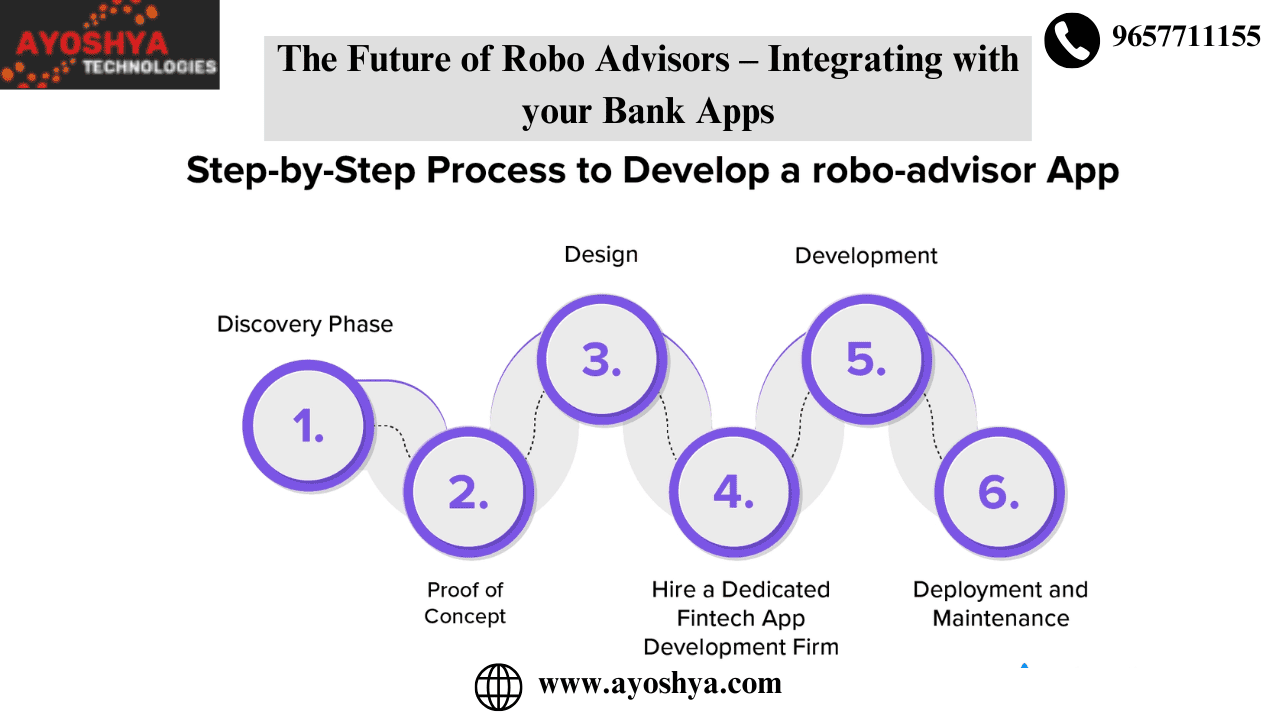



 Start Learning Now