SAP & Oracle partner and support companies

Loading

hana migration ayoshya
SAP

What is SAP HANA Migration?

The SAP ERP software is powered by the SAP HANA in-memory database. It organizes, analyzes, and provides real-time data on massive volumes of data using random-access memory (RAM). An ERP system that operates in real time is SAP S/4HANA. What is SAP HANA Migration It is quicker and more effective than its predecessor and was created for businesses that want to use the cloud. Additionally, it only makes use of the SAP HANA database.

What is involved in a SAP HANA migration?

Since the initial release of the database in 2010, SAP HANA has operated completely under the Linux® operating system. This means that businesses using other operating systems will need to switch to Linux, the operating system used by the 500 fastest supercomputers in the world, in addition to their current traditional ERP system.

For SAP HANA and SAP S/4HANA to guarantee stability, performance, greater security, flexibility, and availability at scale, Linux can offer a reliable foundation. The mandatory migration to SAP HANA and SAP S/4HANA in 2027 will help businesses become more agile and competitive as they modernize and create new ways to use these platforms. A column-based in-memory database called SAP HANA can be set up either on-premises or in the cloud. Performance-and reliability-wise, SAP HANA beats earlier databases, enabling companies to streamline and improve business processes while boosting ROI across the whole SAP environment.

Most new SAP product versions now rely on SAP HANA, which has grown in significance to SAP’s overall strategy in recent years. As a result, companies are moving from their present databases to SAP HANA. With the help of this guide, you may plan and carry out your technology migration to the SAP HANA platform. Its objective is to outline an organization’s migration strategies, procedures, and security measures to SAP HANA.

Why does SAP S4 HANA data need to be migrated?

Prior versions of S/4HANA relied on databases that were outsourced, whereas the latest version employs an in-memory database. The entire data set must be transferred from the old database to the new S/4HANA.

As a consequence, we use SAP HANA to transfer all of the data to the new system. In addition to overcoming the limitations of current databases, we will be able to synchronize and connect all of the data. I believe you have a solid grasp of how SAP HANA Migration functions.

What is SAP S/4HANA, exactly?

a new SAP ERP feature, a better iteration, or a replacement. See SAP S/4HANA in action here. It makes use of an in-memory database and is created on the cloud. The outsourcing databases used by earlier SAP versions, such as SAP R/3 and SAP ECC, had a number of drawbacks. Performance issues, sluggishness, and outdated reports are just a few examples of this. The need for S/4HANA resulted from this.

Three Steps to Simplify the Migration to SAP S/4HANA

Use these three steps to overcome the most common S/4HANA migration challenges:

  • Prioritize using value stream management to distribute resources based on the enhanced end-user experience. Do not automatically assume that your most difficult initiatives are also the ones with the greatest impact.
  • Long before your move, start developing a strong business case. If you put off making a decision, you will end up paying the price in the form of technical debt, lost market share to rivals, and a hurried, underfunded migration process.
  • Get in touch with Panaya to find out how we can make the transition to S/4HANA easier for you and guarantee a speedier return on your IT investments.

What should one take into consideration before moving?

Choose the suitable migration tools and Linux platform. Do you not know how to evaluate something? Use this checklist to make an informed choice and learn more about your database migration alternatives. Take into account the needs of your business. Through the SAP user interface or indirectly through the services SAP offers to other programs, enterprises can access SAP. Migration messes up a lot of these processes. Examine your company’s operating processes to ascertain which ones are being used and which are not. Include users and business experts in the review process to reduce the risk to crucial business processes. To ensure minimal production loss before and after the move, request requirements and ideas beforehand and act on them.

Make a choice regarding the use of IT automation. Not only during the conversion process but also after you’ve switched to SAP S/4HANA, automation can be a helpful tool. The benefits of automation are explained by SAP Insider’s research, from migration to optimization. Comparison of on-site vs. cloud deployment Choosing between an on-premises and a cloud platform is one of the most crucial decisions to be made while transitioning to HANA. Use SAP HANA Enterprise Cloud, a SAP private cloud service, if you want to deploy on the cloud. This platform comes with a license for the SAP HANA software, a minimal cloud infrastructure, and a selection of SAP cloud services. One of the top cloud service companies that provides the platform is Microsoft Azure. Check to see if your team has the knowledge required to run SAP S/4HANA on Linux. To ensure that your company’s system administrators can install, operate, and optimize SAP products on Red Hat® Enterprise Linux, think about providing training. Every day, new changes are implemented.

As with any big software project, it is easy to underestimate the amount of labor necessary to implement a certain feature. Risk is decreased with the use of DevOps and continuous delivery techniques. Divide your system into smaller components and launch it as soon as you can to start gathering feedback. Select a platform for your SAP workloads that will help modernize your entire IT environment. Along with your migration needs, take into account how you might use your environment in the future. Think about SAP’s alternatives. Consider standardizing on the same platform and tools for both SAP and non-SAP apps if your software stack is full and homogeneous. Create an infrastructure that can be expanded to benefit your entire business.

oracle cloud ayoshya
SAP

What is an Oracle Cloud?

Oracle has remained a major vendor of enterprise IT databases for the past 40 years. It was the third-largest software company and ranked no. 82 in the Fortune 500 listings of US companies by total revenue in 2018. In addition to selling technology, it offers cloud services to companies. Its cloud architecture acts as the essential building block and offers a wide range of processing options, reliable storage, speedy networking, AI-driven analytics, and robust security. The development of the Oracle cloud, which has brought a new level of integration, has allowed employees to focus on useful work.

Through a global network of managed data centers, Oracle Cloud, a cloud computing service offered by Oracle Corporation, provides storage, servers, applications, networks, and services.

Oracle Cloud provides Data as a Service (DaaS), Infrastructure as a Service (IaaS), Software as a Service (SaaS), and Platform as a Service to enable the development, integration, deployment, and expansion of cloud-based applications (PaaS).

On this platform, a wide number of databases, programming languages, tools, and frameworks are supported in addition to Oracle-specific, open-source, and outside software and systems. SaaS, IaaS, DaaS, and PaaS are the four basic subcategories of cloud computing.

Let’s clarify the foundations first.

Software Services (SaaS)(What is Oracle Cloud)

Customers access programs and releases hosted online by other parties using the Software as a Service (SaaS) method of software distribution.

Key characteristics: 

  • Users are not required to upgrade, install, or even monitor software because SaaS providers handle all software administration.
  • High data security in the cloud; equipment failure does not result in data loss.
  • Resources can simply be scaled based on the needs of the service.
  • Practically any device with an internet connection can be used to access the programs.

Platforms That Use Services (PaaS)(What is Oracle Cloud?)

Platform as a Service provides a platform for the creation, distribution, and use of applications without the trouble of setting up and maintaining the infrastructure, such as servers, storage, networks, or operating systems. It does, however, have control over the configurations for both the deployed apps and the application hosting environment.

Key features: The main advantages of PaaS include speeding up provisioning, improving scalability, increasing automation, standardizing deployments, and eliminating repetitive tasks.

  • This includes integration of IaaS services.
  • There are disruption and security risks.
  • really approachable
  • minimizes downtime and data loss.
  • assures a speedy recovery.
  • It enables quick scaling.
  • an improvement in the developer’s productivity and standards.
  • Users can easily navigate the coding environment.

Services for Infrastructure (IaaS)(What is Oracle Cloud)

Oracle Cloud Infrastructure’s Infrastructure as a Service (IaaS) offers high-performance computing and storage capacity in a scalable overlay virtual network that is only accessible from your on-premises network.

Key characteristics:

Computing: We can satisfy various workloads and performance requirements thanks to the company’s virtual machine instances. In addition, they offer the ability to scale up and down without a hypervisor, as well as bare metal servers, bare metal GPU servers, and other services.

Block volumes, object storage, and archive storage are all available on the platform, along with the ability to enable database, analytics, content, and other applications using common protocols and APIs.

To support new or existing private networks with end-to-end encryption, a network with completely programmable IP addresses, subnets, routing, and firewalls is needed.

Information Services (DaaS)

This system is known as the Oracle Data Cloud (ODC). It analyzes and gathers customer data from many channels and devices under Oracle ID Graph control in order to produce cross-channel consumer understanding. Oracle’s Data as a Service (DaaS) gives you access to more than 300 million corporate data and 100 million contact records internationally, giving you the most recent, accurate information.

With Daas, also known as Social Data and Insight, you can carry out the following actions:

You can keep your company and contact information up to date by comparing and updating existing corporate data and contact records across all of your applications.

You can accomplish your business objectives by enhancing and comparing your company’s contact data with external reference data.

To improve the data’s integrity, accuracy, and completeness for better prospecting,

The following are a few benefits:

Through a shared infrastructure, Oracle streamlines performance and automates the bulk of the tasks, saving money on hardware expenses, enhancing business flexibility, and delivering enhanced productivity over the short and long term. In order to satisfy demand, it makes it easier for businesses to function more swiftly.

It provides a hassle-free, future-proof solution for moving your old workload to modern platforms, and it is easy to use. It provides a rapid method for migrating applications to the cloud, such as your ERP, analytics software, and even your current architecture.  It provides support for your business as well as scalable infrastructure, software, and hardware solutions.

oracle ayoshya
SAP

What is Oracle? and an Overview of the Database

Oracle is another name for its database. It is a relational database management system with several models. The customer can choose the database system that best matches their needs from Oracle’s RDBMS range of product versions, which include Standard Edition, Enterprise Edition, Express Edition, and Personal Edition. Oracle’s RDBMS can handle any data model. Oracle systems are scalable, secure, and have superior performance capabilities when compared to other databases on the market.

Oracle is another name for its database. It is a relational database management system with a number of models that are primarily designed for data warehousing and enterprise grid computing.

It supports SQL as a query language as a database interface. It is the most flexible and economical approach to handling data and applications. Enterprise grid computing produces enormous pools of modular, industry-standard storage and servers. This approach enables speedy provisioning of each new system from the pool of components. Since capacity can be added or reallocated from resource pools as needed, peak workloads are unnecessary.

There are now five editions of its database available, each with a different set of features.

Standard Edition One :For single-server or highly branched commercial applications that just need a few functionalities, is intended.

Standard Edition: Every feature found in Standard Edition One is present in this edition. Larger machine support and Oracle Real Application Clustering are also included.

Enterprise Edition: For mission-critical applications involving online transaction processing, this edition offers security, performance, scalability, and availability.

Express Edition: is simple to install, administer, develop, and deploy the free entry-level version.

The Personal Edition, with the exception of Oracle Real Application Clustering, provides the same capabilities as the Enterprise Edition.

A crucial feature of Oracle’s design is the division between logical and physical components. For large-scale distributed computing, also known as grid computing, this layout means that the data location is immaterial and transparent to the user, enabling a more flexible physical structure that may be added to or altered without affecting the database’s activity, data, or users.

Data networks can be incredibly flexible because of this resource sharing, with capacity that can be modified up or down to match demand without impacting service. Additionally, it makes it possible to build a robust system because of the networked storage resources. The The schema makes sure that any failure is local, preventing the database from going down in a single place.

The main benefit of Oracle DB is that it is more cost-effective in enterprise environments since it is more scalable than SQL. This implies that if a business needs a lot of databases to store data, they may be quickly and efficiently built and accessed without any downtime. Because of Oracle’s structural characteristics, which include Memory caching guarantees the greatest performance for extremely large databases. High-performance partitioning can be used to divide larger data tables into many pieces. The use of numerous backup and recovery methods is supported, such as the comprehensive Recovery Manager tool that offers incremental, hot, and cold backups and recoveries (RMAN).

Overview of the Physical Database Structures

Datafiles

Every Oracle database has one or more physical data files. All of the database information is stored in the data files. Physically, the database’s datafiles house the data of logical database structures like tables and indexes.

The following traits apply to datafiles:

  • Only one database can be attached to a datafile.
  • Datafiles can be specified with certain features to enable automatic expansion when the database reaches its limit.
  • A logical database storage container made up of one or more datafiles is called a tablespace. 

Data in a datafile is read as needed during regular database operation and saved in Oracle’s memory cache. Think about a user who wants to obtain information from a database table. If the desired data isn’t already recorded in memory by the database, it is retrieved from the relevant datafiles and done so.

Database Structures with Logic Overview

Oracle’s logical storage structures, which include data blocks, extents, and segments, provide fine-grained control of disc space utilization.

Tablespaces

Tablespaces, which are logical storage containers that group together relevant logical objects, are used to organize databases. For instance, tablespaces are used to group all application objects together in order to simplify some administrative duties.

Each database is logically divided into one or more tablespaces. In order to physically store the data of all logical structures in a tablespace, one or more datafiles are constructed for each tablespace. The total size of a tablespace’s datafiles determines how much storage it has. Every Oracle database has a SYSTEM tablespace and a SYSAUX tablespace.

Oracle automatically creates them when the database is created. The system automatically constructs a smallfile tablespace, the most typical type of Oracle tablespace. For the SYSTEM and SYSAUX tablespaces, smallfile tablespaces are created.

Bigfile tablespaces can also be built into Oracle. Rather than storing tablespaces as a collection of smaller files, this allows the Oracle Database to store them as a single, enormous file.

The ability to produce and manage extraordinarily large files on 64-bit platforms is thus made available to Oracle Database. As a result, the Oracle Database can now scale up to 8 exabytes in size. Big file tablespaces use Oracle-managed files to completely hide data files from users. In other words, you can perform operations on tablespaces rather than the underlying data files.

The Value of Oracle

One of the world’s oldest database management companies is this one. The company has consistently put business needs first and kept up with emerging technologies. As a result, new features are regularly added to its products. For instance, Oracle Cloud also offers 19C, the latest Oracle database. Oracle gives users the option to choose from a range of database editions to fit their unique requirements and provide an affordable solution.

OData in AIF
SAP

OData in AIF

What is Odata

OData is a REST-based protocol for querying and updating data. It is built on technologies like HTTP, ATOM/XML, and JSON. It is more flexible than other REST-based web services and provides a uniform way to describe the data and the data model for easy interoperability between data sources, applications, services, and clients. Similar to ODBC and JDBC, OData gives you a single way of accessing various data sources. OData in AIF.

OData in AIF (Application Interface Framework)

The SAP Application Interface Framework enables you to develop and monitor interfaces as well as execute error handling in a single framework residing in your SAP back-end system. OData in AIF.

It enables you to monitor interfaces across technologies centrally and configure alerts for the errors, mass error handling, and most importantly, empower business users. If any errors are business-related and non-technical, your business user can fix the error without involving IT. Moreover, you can develop small configurable components that can be reused across different interfaces and technologies. This can save you a lot of time if you have similar scenarios across multiple interfaces; which helps in a multi-technology framework. OData in AIF.

This blog will be focused on the configuration of the SAP Application Interface Framework to support the monitoring of error messages for OData services. For erroneous data messages, you can display the error messages and the content of the data message in the source format. Correcting the contents of the data messages, restarting, or canceling data messages of the OData service using the SAP Application Interface Framework is not yet supported.

This blog will share step-by-step documentation on activating/integrating Odata messages in AIF.
Pre-requisite:
1. You must be on the S4 Hana system
2. Have an AIF License for custom creation

Assumption:

  1. You already have a namespace and an interface created. If note, please follow the below steps:
    • Creation of Namespace:
      • Navigate to IMG activity SAP Application Interface Framework Interface Development Define Namespace.
      • Change from display to edit mode.
      • Choose New Entries and create a new entry (enter a name and description).
      • Save the new entry.
    • Creation of Interface:
      • Navigate to IMG activity SAP Application Interface Framework Interface Development Define Interfaces.
      • Enter the name of the AIF namespace created before.
      • Create a new entry. Specify the parameters for interface development.
      • Save the AIF interface.
  2. You already have an Odata Service created. OData in AIF.

Step 01: Create an interface with a raw structure

  • Create a RAW structure to get the data from Odata into AIF
    Go to Tcode SE11 -> Create a structure – ZAIF_ODATA_ROOT_STRUC, which will at least have a component of type /AIF/ODATA_STD_RAW_FLDS_S and a table type that will contain Odata structure.
  • Create an interface
    Go to Tcode /AIF/CUST -> Interface Development -> Define Interface

Step02: For the OData interface, specify the interface engines as below:

Step 3: Specify the OData services and elements, for example, entity sets, whose error logs you want to monitor using this interface. the services in Customizing of SAP Application Interface Framework under

Interface Development ->  Additional Interface Properties ->  Define OData Services .

Step 4: Define a message index table that at least includes the structure /AIF/ODATA_STD_IDX_FLDS_S. For an example of such an index table, see the template table /AIF/T_ODATA_IDX.

Add your index table to the OData interface in Customizing of SAP Application Interface Framework, under  Error Handling  Define Namespace-specific Features  Define Interface-specific Features  Message Idx Table.

Step 5: To receive up-to-date error logs of OData services in SAP Application Interface Framework, select the services in the program /AIF/ODATA_TRANSFER_JOB and schedule the program to run periodically. You can look up the available oData services in transaction /IWFND/MAINT_SERVICE.

Step 6: Check the AIF error log for message code /AIF/ERR

To conclude, AIF helps bring out different interfaces into one platform and helps save effort & time in error handling and monitoring of errors. Credit: Priya Asphlani

What Does CRM Stand For and What Does it Mean for My Business?
SAP

What Does CRM Stand For and What Does it Mean for My Business?

All businesses must focus on customer satisfaction to enjoy growth and success. Today, providing an exceptional customer experience need not be burdensome or require a massive capital investment – thanks to CRM software. What Does CRM Stand For and What Does it Mean for My Business? Here’s what CRM software means for your business and how you can leverage it in the face of the COVID-19 pandemic.

What CRM Stands For

CRM is an initialism that stands for ‘customer relationship management.’

Global research and advisory firm Gartner defines CRM as “… a business strategy that optimizes revenue and profitability while promoting customer satisfaction and loyalty.”

About CRM software and technologies, Gartner says they “…enable strategy, and identify and manage customer relationships, in person or virtually. CRM software provides functionality to companies in four segments: sales, marketing, customer service, and digital commerce.”

For small to midsized enterprises (SMEs), CRM software supports the processes associated with this integration business function. In many industries, investing in CRM is a viable strategy for differentiating your product or service offering by providing an exceptional customer experience. If you’re outgrowing your technology, it’s hard to keep your focus where it belongs: on customer relationships. That’s where CRM is vital.

What is CRM software?

CRM software or technology is a tool or system of tools that help businesses aggregate, organize, and analyze customer information data to better manage relationships with customers.

When data for potential and existing customers is collected and stored in a CRM system, tracking information across every touchpoint in a customer’s journey (details shared through forms, engagement with marketing campaigns, interactions with customer support, buying patterns) can help you cater to their needs, build better relationships, and market smarter.

What does a CRM system do?

In short, CRM (Customer Relationship Management) systems serve as a hub for organizing and making sense of valuable audience data and insights, providing all the tools needed to collect and manage information about people who are important to your business.

This function can look very different across departments. For example, CRM can:

  • help sales reps quickly see past interactions and purchases before making a phone call,
  • provide support teams with the background and contact information needed to provide great customer service, or
  • give marketers access to details that will help them target their campaigns.

Organizing and understanding CRM data insights has become a key responsibility for any customer-facing role within a company. But as the importance of audience info grows, so does the amount of details that businesses need to keep track of. With many online channels and multiple ways for customers to engage on each, data often gets siloed in different tools, making it difficult (or impossible) to get a complete picture of your customer and talk to them in a meaningful way.

That’s why businesses of all sizes and across all industries are turning to CRM tools to create a central hub for audience reports—gaining a better understanding of who their customers are and what they want, and building stronger relationships as they grow. CRM software also helps them engage with potential customers, gain time with automation, increase customer engagement and close more deals.

Why is CRM important for marketers?

As a marketer, you collect valuable information with each campaign you send and every customer interaction that results from it (including clicks, views, and purchases across new, existing, and prospective customers).

Your customer knowledge is one of the most valuable resources you have for improving your marketing and sales to grow your business. Effectively collecting and organizing your info can tell you everything you need to know about your customers’ preferences: Which products they love, what they’re looking for, the messages that tell them what they need to know, and where you’re still missing the mark.

The sooner you can begin capturing, organizing and making sense of that data through a CRM platform, the sooner you can start using it to improve customer experience and build more—and better—customer relationships.

Do small businesses need a CRM tool?

CRM isn’t just for enterprise businesses or Fortune 500 companies. Using statistics to improve customer relationships has become an essential function for businesses of all sizes and niches. In fact, there’s no better time to do contact management than when you’re just starting out.

From the moment you create an online presence for your business, you start gaining access to valuable info about your customers and potential customers. CRM can help you lay a strong foundation for building and tracking relationships with those customers, collecting data about their preferences, and setting up marketing automation processes for consistent, personalized touchpoints over time.

CRM doesn’t need to be a full-time job: Whether you have a small sales team or you’re a solo entrepreneur relying on occasional marketing campaigns to sell your brand, putting your data to work for you can help you stay on customers’ radar, find new sales opportunities and save time. It also allows you to make knowledge-based decisions about where to focus your budget to reach customers on whatever channel they prefer—so however or whenever they’re ready to make a purchase, they’ll think of you.

CRM Software Features and Benefits

Maximizing customer relationships is crucial for success. So, which processes can your business support by adopting a CRM solution? CRM covers every function you need to build customer relationships across sales, marketing, customer service, and eCommerce.

As business automation becomes more prominent, CRM is a smart way to automate many of the processes your customers expect. Business process features and benefits you can expect from adopting a CRM software solution include:

  • Sales and opportunity management – Track opportunities and activities from the first contact to deal closing.
  • Marketing campaign management – Create, manage, and analyze marketing activities.
  • Customer management – Store critical customer data in one place; synchronize and manage customer contacts stored in Microsoft Outlook.
  • Service management – Manage warranty and service contracts efficiently; enter and respond to service calls quickly.
  • Reporting and analysis – Create detailed reports on all aspects of the sales process, including sales forecasting and pipeline tracking, using time-saving templates.
  • Mobilize your sales team – Have your salespeople manage sales information while they’re servicing clients in the field.

Connecting the Dots

If you’re outgrowing your business systems, you might find it difficult to keep the focus on your customer relationships. Adopting a CRM will fix that, allowing you to focus on your customers while growing your business. Learn more about CRM features to see how your business can map these processes to support better customer relationships.

Regardless of your industry, Ayoshya Technologies offers enterprise technology solutions, including CRM software, to help businesses balance business growth while improving their customer experience. In a recent Ayoshya Technologies webinar, we outlined how an ERP solution like SAP Business One, when used with the Ayoshya Technologies Employee Portal, gives your sales team access to up-to-date customer information to provide a better customer experience. Click the link below to access the presentation recording today and find out how to improve your customer experience and differentiate your business during the pandemic.

ERP & Financial Management
SAP

ERP & Financial Management

As more ERP systems are integrating into the cloud, companies are gaining increased value in overall enterprise management systems. ERPs allow your company to coordinate and integrate with a variety of enterprise cloud applications, analytics, inventory, and warehouse management tools. Additionally, ERPs have proven invaluable in gathering and transmitting data between enterprise cloud applications to manage critical business processes via KPIs and dashboards. As technology transforms to meet the needs of modern businesses, ERP systems continuously develop to offer valuable business data, especially for financial teams and workflow management.

Why is Financial Planning Important?

Forecasting financial data is an important process because it allows management to review an organization’s current financial state by comparing actual and projected financial figures. Financial planning gathers information on a current fiscal year’s actual data and analyzes various outcomes and forecasts. Using ERP ensures your collected data is accurate, which is important as a financial forecast is only as reliable as the data gathered.

Traditionally, gathering actual data and analyzing variances is a burdensome task that shifts focus away from financial planning’s primary role of forecasting. Using an ERP system allows your company to streamline these processes, ultimately saving your financial team time. ERP software can be designed to forecast and record data, configure the actuals into financial planning models, and provide financial planning training for variance explanations. 

Accuracy

One of the most important factors in a successful business is its ability to successfully and accurately manage its financial data. ERP financial management software helps to streamline your processes, increase accuracy, and reduce costs. When financial processes are automated, analytics offers valued insight and management decisions efficiently made.

Additionally, ERP systems are used to prevent errors in accounts and observe company activity.

ERP systems concentrate overall business and financial data, allowing users to gain a comprehensive view of their business and provide insights that would have otherwise been missed.

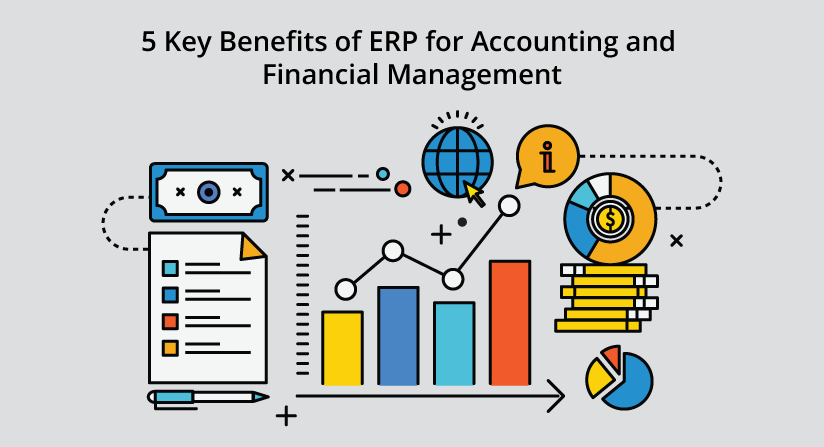
5 Key Benefits of ERP for Accounting and Financial Management

Enterprise Resource Planning (ERP) software has become an inevitable part of modern businesses. It hosts a world full of business functionalities that are designed to address inventory requirements, quality of finished products, manage production functions and oversee crucial business processes.  

The benefits of ERP systems are many but how does it benefit the accounting and financial management department in an organization?  

Let’s have a quick glance at the benefits of ERP for accounting and financial management.  

1. Integrate, and manage all your financial and accounting needs with ERP

The Finance and Accounting department in every business is indispensable. The way they work can be unique and different, but the objective is almost the same in every case. Every financial manager aims at:

  • improving the wealth, profit margin  
  • minimizing expenses 
  • promoting savings 
  • ensuring safety on investments and optimum fund acquisition 
  • increasing the value of the firm  

There are multiple things to manage. From estimation of capital requirements to disposal of surplus to management of cash and financial control, there are many activities to look after. ERP lets you unify the data and bring it all together in one place.  

An integrated ERP system improves cost accounting and allows managers to accurately define budget and allocate costs (for raw material, labor, transportation, and other overhead costs).  

Whether it is about making payments to vendors, paying wages to employees or financial forecasting, all you need is an ERP system to manage it. Also, when you have a single business management system (i.e., an ERP system) to look after multiple departments, you do not need to work in multiple systems. This indeed minimizes the cost and time spent on many tools.  

2. Manage billing, payment, and revenue on time with ERP

ERP acts as a financial management system to ensure customer payment schedules, revenue tracking and credit management across the business. ERP systems integrate a CRM (Customer Relationship Management) system to automate reminders and prevent customer complaints.  

With increased tracking capabilities and easy to use automated payment systems, billing, payments and revenue management becomes easy. It can help manage cost analysis, profit tracking, invoice tracking, budgeting, investments and more.  

3. Around the clock access to quality data and financial information 

You get the data when you need it. When processes are well organized and resources are optimally used, future business ventures are promoted and the bottom-line is enhanced. ERP software allows businesses to maintain financial measures, through having in-depth information, whenever required.  

Financial data is confidential and can’t be disclosed openly. ERP gives you the opportunity of safeguarding your information and co-author, edit and manage it as per the access you allow. Multiple reporting options and modules eliminate the need for maintaining spreadsheets and paper files.  

4. Integrated + automated data across the organization (flexibility of generating information and creating reports)

Get real-time data synchronization, improved data quality and an updated view of the organization at the push of a button with ERP.  

Generating information, consolidating it and managing the company-wide business process becomes hassle-free with an ERP system. Shared management tools and integrated financial management modules track accounting data with international standards. This means that you can select a framework in multiple languages, currencies, companies, and charts of accounts.   

ERP systems let you gather financial data from different departments to generate reports such as general ledger and other financial statements. Every piece of data is seamlessly integrated within the system and this is what makes ERP an indispensable part of every modern business.  

5. GAAP compliant ERP make business seamless

Generally, accounting software is often not GAAP compliant, whereas a full-fledged ERP solution typically is. Adopted by the US Securities and Exchange Commission, GAAP is the accounting standard which provides a standardized methodology for recording transactions and events.  

An extensive ERP solution, which is driven by a powerful engine, encourages productive financial reporting that goes well with multiple accounting standards, including GAAP. 

Summary  

The benefits of using an ERP system for accounting and financial management are empirical. A finance manager can create an estimate regarding the capital requirements and manage the overall accounting activities of the organization in a mindful way. Most business owners depend on accounting software, but they don’t understand that ERP systems are an all-in-one solution that encompasses modules for every department including finance, production, quality, sales, procurement, and more.  Also, manufacturing ERP systems make things easy and ensure the utmost data security.

SAP

SAP HANA vs SAP S/4 HANA

SAP HANA vs SAP S/4 HANA – Is there any difference between the two?

With this SAP HANA vs SAP S/4 HANA tutorial, we are going to clarify a very popular confusion that people entering the world of SAP HANA face. Some common confusions, what is the difference between SAP HANA and SAP S/4 HANA. Is S/4 HANA, a version of SAP HANA? Are both of them, the origin of the same technology? Well, there is a lot to talk about.

So, let’s start with our discussion where we will solve all your queries about the SAP HANA and S/4 HANA.

SAP HANA vs SAP S/4 HANA

Before diving into the details and drawing parallels between the two SAP products, you must first understand the basics of them from tutorial series on SAP HANA.

What is SAP HANA?

SAP HANA is an in-memory database technology that runs the SAP Landscape serving as the backend. SAP HANA is a column-oriented relational database management system (RDBMS) that serves a computing platform for many SAP applications.

SAP HANA is primarily used as a core technology or database platform in systems or environments involving business operations related to sales, HR, finance, logistics, etc. Its in-memory technology, column-based storage, OLAP and OLTP support makes data storing, retrieving, processing and analyzing 10 times faster and storage efficient than any other traditional RDBMS.

In addition to this, HANA uses main memory efficiently and leaves significantly less memory footprint than traditional systems. It uses compression techniques on data to reduce the space taken by data in column stores. As it stores important data in-memory, the real-time data analysis using SAP HANA is one of the best offer by any database technology ever.

What is SAP S/4 HANA?

Launched in February 2015, SAP S/4 HANA is SAP’s next-generation business suite designed only to run on SAP HANA. S/4 HANA stands for SAP Business Suite 4 SAP HANA. SAP S/4 HANA is the fourth business suite version coming after SAP R/3. Also, by making it solely compatible with SAP HANA system at its backend, SAP replaces the old SAP ECC/ERP system with SAP HANA. However, S/4 HANA is based around its successor i.e. ECC (ERP Control Center) solution and treats it as its core technology.

SAP S/4 HANA is a new Enterprise Resource Planning (ERP) solution with simplified data, a simple tool design, agile, easier to use, perform complex calculations, and handling greater amounts of data. It can be deployed on-premise, on-cloud or as a hybrid system.

S/4 HANA does not support batch processing for its data which makes retrieval and processing of data very fast and that too in real-time. Real-time analytics makes it possible to use S/4 HANA powered by SAP HANA to process and analyze data from the Internet of Things (IoT) or big data sources.

The Key Difference between SAP HANA & SAP S/4 HANA

To understand the basic difference between the two, read the points below.

SAP HANA is an in-memory database technology which acts as the core technology for a lot of other SAP or non-SAP applications whereas SAP S/4 HANA is a new generation ERP solution which runs on SAP HANA database architecture.

S/4 HANA is a business suite launched as a robust ERP solution having both ERP and BI capabilities utilizing HANA’s in-memory computing power. It is an in-memory version of the ERP Business Suite as it only runs on SAP HANA.

Before SAP S/4 HANA was introduced as the new generation ERP solution, SAP ECC6, Suite on HANA, etc were used as ERP business suite solutions.

There are two functional versions of SAP S/4 HANA; S/4 HANA Finance and S/4 HANA Enterprise Management(EM).

Summary

This concludes our comparative article on SAP HANA vs SAP S/4 HANA. Frankly speaking, there is no exact comparison between the SAP HANA and SAP S/4 HANA but we can differentiate the two versions of SAP Business Suite i.e. Suite on HANA and S/4 HANA. I hope you are clear SAP HANA vs SAP S/4 HANAwith your doubts regarding this and understood the difference between the two business suites.

EDI Integration with SAP IDoc
SAP

EDI Integration with SAP IDoc

Electronic data interchange (EDI) enables business users homogenize diverse structures of identical datasets (such as orders, delivery notes, invoices, inventories, price catalogs, etc.,) to speed up digital transactions with minimum error, at maximum speed, with the lowest cost.

However, in order to enable the transfer of transactional information and ultimately reap benefits, business users will need an IDoc (Intermediate Document) which is an SAP file format. These IDocs further need to be integrated with EDI messages to streamline the transfer process. And here comes the role of an integration solution.

By mapping and integrating EDI messages with SAP IDoc formats, business users can streamline their B2B data exchange processes.

Ayoshya self-service-based solution makes it easy for all business users developers to integrate EDI messages with SAP IDoc and BAPI without excessively relying on IT or developer teams.

What Are the Advantages of in Using Ayoshya for EDI to SAP Integration?

  1. Easy to connect and send/receive IDoc or BAPI data, little coding needed
  2. Integrate SAP with any on-premise or cloud EDI application
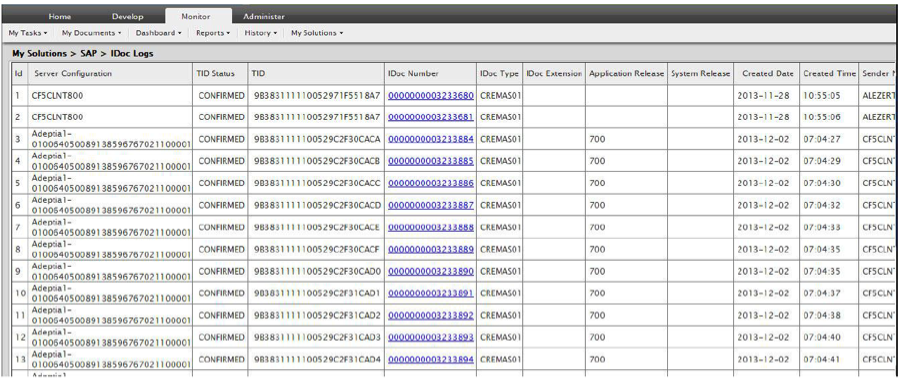
  3. Rich SAP logs dashboard that shows the status of all the transactions
  4. Certified SAP Integration partner
  5. Outbound processing of a large amount of IDocs with multiple self-registering RFC servers.
  6. Inbound processing, i.e. transfer of IDocs to an R/3 system with an RFC client.
  7. Full implementation of tRFC in both RFC server and RFC client.
  8. Graphical mapping interface with data validation
  9. Meta-driven SOA framework to rapidly build and deploy new services into production
  10. Access to EDI data dictionaries, SAP IDoc and BAPI schemas

How Can Businesses Integrate EDI with SAP IDoc?

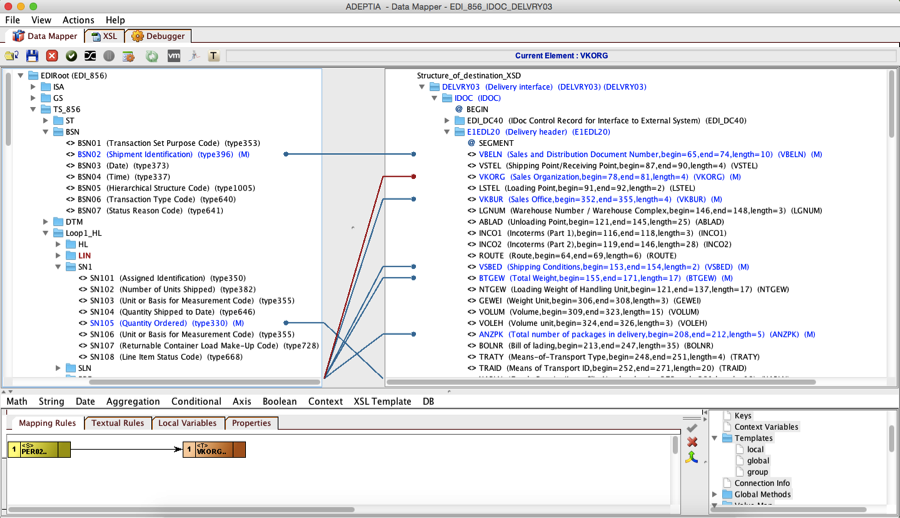
There are 2 simple steps to integrate an EDI message to SAP IDoc, in this example we will summarize the steps on how to map EDI 856 (Shipment Notice/Manifest) to SAP IDoc DELVRY03 document.

STEP 1: Map EDI to SAP IDoc

Create a mapping service between the inbound EDI to SAP IDoc. Adeptia’s AI-based graphical data mapper shows the specific EDI message schema and the IDoc schema. ayoshya SAP Adapter allows user to search for any IDoc automatically and select the particular IDoc that is needed for the SAP EDI mapping. The developer would then apply the mapping rules to convert the EDI to IDoc. This is a one-time effort since the mapping can be used in any orchestration where EDI 856 needs to be converted into SAP DELVRY03.

At run-time when the orchestration executes this data mapping service, the EDI data will be converted to IDoc.

Here’s an example of the EDI to IDoc mapping.

mapping1.png
mapping2.png

STEP 2: Deliver the IDoc to SAP through an orchestration

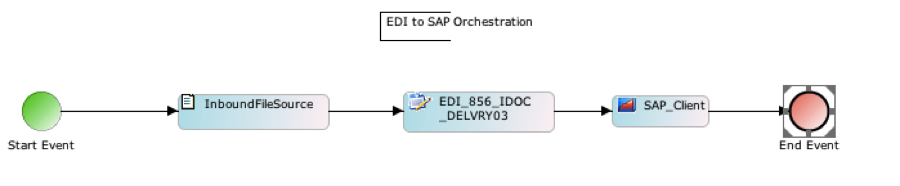
The final step is to design an orchestration that allows inbound EDI files to be delivered to SAP using the Ayoshya SAP Adapter. Here’s a sample process of EDI idoc mapping in sap where an incoming EDI file is being sent to SAP PI/XI server. The mapping service created in step 1 is embedded as a second activity in the flow. Process picks up new EDI message and converts it to IDoc and delivers it to the SAP server.

processflow.png

Run-time transactional logs are available to check the status of each transaction.

logs.png
SAP

SAP ERP Modules: COMPLETE List (SAP ERP Components)

This is the COMPLETE SAP ERP modules list.

SAP ERP modules and SAP ERP components are the same thing (SAP changed the name in 2004—more on this below).

Get the full list of SAP ERP modules and learn what they are with this detailed article.

So without further ado, let’s do this!

What Are SAP ERP Modules (SAP ERP Components)?

Imagine SAP ERP modules (now SAP components) as building blocks for SAP ERP (Enterprise Resource Planning) systems, such as:

  • SAP R/3 (SAP Real-Time Tier 3)
  • SAP ECC (SAP ERP Central Component)
  • SAP S/4HANA (SAP Business Suite 4 SAP HANA)

A company picks the building blocks to integrate into their SAP ERP system that it needs and leaves out the ones that aren’t needed.

Each building block provides technology to run other building blocks or functionality for a specific purpose such as:

  • Finance
  • Human Resources
  • Logistics

SAP ERP modules allow you to break your SAP ERP system into simpler and more manageable parts. SAP NetWeaver is both the technical foundation for the building block and a building block.

Although SAP ERP modules are now called SAP ERP components (since 2004 with the SAP R/3 upgrade to SAP ECC), for the sake of the old days and because modules sound cooler than components (don’t you think so too—leave a comment), let’s just call them SAP ERP modules.

Below SAP ERP Modules vs. SAP ERP Components, you’ll find a detailed explanation of the differences between SAP ERP modules and SAP ERP components.

First, let’s look at the difference between technical and functional SAP ERP modules:

Technical SAP ERP Modules vs. Functional SAP ERP Modules

SAP ERP modules come in two flavors:

  1. Technical SAP ERP modules
  2. Functional SAP ERP modules

Technical SAP ERP Modules

Technical SAP ERP modules make up the technical foundation of an SAP ERP system.

Technical SAP ERP modules are needed to integrate the functional SAP ERP modules.

Technical SAP ERP modules contain NO logic but serve as the environment for running functional SAP ERP modules.

Two technical SAP ERP modules are mandatory:

  • SAP NetWeaver
  • SAP ABAP

Functional SAP ERP Modules

Functional SAP ERP modules are building blocks that contain the processes and logic of specific business areas.

Functional SAP ERP modules extend an ERP system with functionality for certain business areas.

For example, three functional SAP ERP modules are:

  • CO (Controlling)
  • FI (Financial Accounting)
  • PM (Plant Maintenance)

SAP ERP Submodules

SAP ERP modules are further divided into SAP ERP submodules.

SAP ERP submodules provide additional functionality in the business area of their parent.

For example, the SAP ERP module SAP PLM (Product Lifecycle Management) offers the SAP ERP submodules:

  • Basic Data for Process Manufacturing
  • Classification
  • Document Management
  • Engineering Change Management
  • Enterprise Content Management

SAP ERP Modules vs. Software Modules

Even though SAP ERP modules are software, they are not software in a computer science sense in terms of programming.

In computer science, a software module is a functional and self-contained unit of software consisting of processing steps and data structures.

Though SAP ERP modules have processing steps and data structures. But SAP ERP modules are not functional and self-contained units. Since the functions of SAP ERP modules are intertwined or they rely on each other.

Operating an SAP ERP module always affects other SAP ERP modules. Therefore, SAP ERP modules are not self-contained and are no software modules in terms of computer science.

Maybe this is the reason because SAP changed the name from modules to components to differentiate more clearly between SAP ERP modules and software modules in a computer science way.

The complete SAP ERP Modules List

First, an overview of:

  • All technical SAP ERP modules
  • All functional SAP ERP modules

Following is the complete SAP ERP modules list including all SAP ERP modules and their submodules.

Let’s get started:

Technical SAP ERP Modules List

Here’s the complete list of all technical SAP ERP modules:

  • ABAP (Advanced Business Application Programming)
  • Basis
  • BI (Business Intelligence)
  • CA (Cross-Application Components)
  • NW (NetWeaver)

Functional SAP ERP Modules List

Here’s a list of all functional SAP ERP modules:

  • CO (Controlling)
  • CRM (Customer Relationship Management)
  • CS (Customer Service)
  • EC (Enterprise Controlling)
  • EPM (Enterprise Performance Management)
  • EHS (Environment, Health, and Safety)
  • FI (Financial Accounting)
  • HCM (Human Capital Management)
  • IS (Industry Solutions)
  • LIS (Logistics Information System)
  • MM (Materials Management)
  • PLM (Product Life Cycle Management)
  • PM (Plant Maintenance)
  • PP (Production Planning)
  • PS (Project Systems)
  • QM (Quality Management)
  • SCM (Supply Chain Management)
  • SD (Sales and Distribution)
  • SEM (Strategic Enterprise Management)
  • SRM (Supplier Relationship Management)
  • TR (Treasury)

Technical SAP ERP Modules and Their SAP ERP Submodules List

Here’s the full list of all of SAP ERP’s technical modules and their submodules:

ABAP

  • ABAP 00
  • ABAP Workbench
  • ALE
  • ALV reporting
  • ASAP methodology
  • Business Connector
  • Business Server Pages
  • Business Workflow
  • Data Dictionary
  • Dialog Programming
  • EBP
  • EDI
  • IDOCS
  • Internet Application Server
  • LSMW
  • Menu Painter
  • Mercator Report Painter
  • Report writer
  • Repository Information System
  • SAP Script
  • Screen Painter
  • Smart forms

Basis

  • ABAP Programming & Runtime Environment
  • ABAP Workbench
  • Application Link Enabling
  • Authorization System Monitoring with CCMS Workload Alert Monitor
  • Basis Services/ Communication Interfaces
  • Business Management
  • Change and Transport System
  • Client Server Technology
  • Common Program Interface Communications
  • Computer Aided Test Tool
  • Computing Center Management System
  • Controls & Control Framework
  • Customizing
  • Database Interface, Database Platforms
  • Documentation & Translation Tools
  • Electronic Data Interchange
  • Fiori
  • Front End Services
  • Gateway
  • HANA
  • Middleware
  • Network Integration
  • Object Linking & Embedding
  • Operating System Platform
  • Ready to Run R/3
  • Remote Function Calls
  • SAPUI5
  • Security
  • Upgrade General

Business Intelligence (BI)

  • BI Platform
  • BI Suite—Business Explorer
  • Business Objects
  • Data Warehousing
  • Design Build
  • Development Technologies
  • Info Cube
  • ODS Structures

Cross Application Components (CA)

  • Application Link Enabling
  • SAP Business Workflow

NetWeaver (NW)

  • Application Platform
  • Business Information Warehouse
  • Business Intelligence
  • Enterprise Portal
  • Exchange Infrastructure
  • Information Integration
  • Knowledge Management
  • Life Cycle Management
  • Master data Management
  • Mobile Engine
  • People Integration
  • Portal Content
  • Process Integration
  • Security
  • Solution Manager
  • Visual Composer
  • Web Application Server

Functional SAP ERP Modules and Their SAP ERP Submodules List

Here’s the list of all functional SAP ERP modules and submodules.

Controlling (CO)

  • Activity Based Costing
  • Cost Centre Accounting
  • Material Ledger
  • Overhead Cost Controlling
  • Product Cost Controlling
  • Profitability Analysis
  • Sales Order Costing
  • Split Valuation
  • Transfer Pricing

Customer Relationship Management (CRM)

  • Channel Management
  • CRM Enterprise
  • CRM Sales
  • E-Commerce
  • Field Applications
  • Industry Specific CRM
  • Interaction Center
  • Marketing
  • Trade Promotion Management

Customer Service (CS)

  • Controlling
  • Service Contracts
  • Service Processing
  • Workflow in Customer Service

Enterprise Controlling (EC)

  • Business Planning and Budgeting
  • Consolidation (EC-CS)
  • Executive Information System
  • Profit Center Accounting

Enterprise Performance Management (EPM)

  • Corporate Close
  • Entity Close
  • Planning, Budgeting, and Forecasting
  • Profitability and Cost Management
  • Reporting and Disclosure
  • Strategy Development and Translation

Environment, Health, and Safety (HCM)

  • Basic Data & Tools
  • Dangerous Goods Management
  • Global Label Management
  • Industrial Hygiene and Safety
  • Occupational Health
  • Product Safety
  • Waste Management

Financial Accounting (FI)

  • Accounts Payable
  • Accounts Receivable
  • Asset Accounting
  • Bank Accounting
  • Business Planning and Consolidation (BPC)
  • Closing Cockpit
  • Consolidation
  • Credit management
  • Extended Ledger
  • Financial Supply Chain Management
  • Funds Management
  • General Ledger Accounting
  • Group Risk and Compliance (GRC)
  • Joint Venture Accounting
  • Lease Accounting
  • New General Ledger
  • Real Estate Management
  • Revenue Accounting and Reporting (RAR)
  • S/4 HANA Finance
  • Special Ledger
  • Taxes
  • Travel Management

Human Capital Managment (HCM)

  • Benefits Administration
  • Compensation Management
  • Incentive
  • Information System
  • Internet Scenarios
  • Organizational Management
  • Payroll
  • Personnel Administration
  • Personnel Development
  • Personnel Planning
  • Recruitment
  • Self-Service
  • SuccessFactors
  • Talent Management
  • Time Management
  • Training and Events Management
  • Travel Management
  • Wages
  • Workflow

Industry Solutions (IS)

  • Consumer Industries
    • Agribusiness
    • Consumer Products
    • Fashion
    • Life Sciences
    • Retail
    • Wholesale Distribution
  • Discrete Industries
    • Aerospace and Defense
    • Automotive
    • High Tech
    • Industrial Machinery and Components
  • Energy and Natural Resources
    • Building Products
    • Chemicals
    • Mill Products
    • Mining
    • Oil and Gas
    • Utilities
  • Financial Services
    • Banking
    • Insurance
  • Public Services
    • Defense and Security
    • Federal and National Government
    • Future Cities
    • Healthcare
    • Higher Education and Research
    • Regional, State, and Local Government
  • Service Industries
    • Cargo Transportation and Logistics
    • Engineering, Construction, and Operations
    • Media
    • Passenger Travel and Leisure
    • Professional Services
    • Sports and Entertainment
    • Telecommunications

Investment Managment (IM)

  • Appropriation Requests
  • Automatic Settlement of Fixed Assets
  • Corporation Wide Budgeting
  • Depreciation Forecast
  • Information System
  • Investment Measures
  • Investment Programs

Logistics Information System (LIS)

  • Inventory Controlling
  • Plant Maintenance Information System
  • Production Planning and Control Information System
  • Project Information System
  • Purchasing Information System
  • Retail Information System
  • Sales Information System

Materials Management (MM)

  • Extended Warehouse Management
  • External Services Management
  • Inventory/Valuations
  • Inventory Management
  • Invoice Verification
  • Logistics (General)
  • Logistics Information System
  • Materials Planning
  • Purchasing
  • QM in MM
  • Warehouse Management
  • Workflow

Plant Maintenance (PM)

  • Customizing
  • Equipment and Technical Objects
  • Information System
  • Internet Scenarios
  • Maintenance Order Management
  • Maintenance Planning
  • Maintenance Projects
  • PM Processing
  • Preventative Maintenance
  • Service Management
  • Structuring Technical Systems
  • Work Clearance Management

Product Life Cycle Management (PLM)

  • Basic Data for Process Manufacturing
  • Classification
  • Document Management
  • Engineering Change Management
  • Enterprise Content Management

Production Planning (PP)

  • Assembly Orders
  • Capacity requirements
  • Information System
  • KANBAN
  • Make to Order
  • Master Planning
  • Plant Data Collection
  • PP – Processes
  • PP for Process Industries
  • Product Cost Planning
  • Production Orders
  • Repetitive Manufacturing
  • Sales and Operations Planning

Project Systems (PS)

  • Approval
  • Basic Data
  • Information System
  • Operational Structures
  • Project Execution and Integration
  • Project Planning
  • Results Analysis
  • Work Breakdown Structure

Quality Management (QM)

  • Certificates
  • Control
  • Inspections
  • Notifications
  • Planning
  • QM-IS
  • Test Equipment Management

Sales and Distribution (SD)

  • Billing
  • Credit Control
  • Electronic Data Interchange
  • Foreign Trade
  • Internet
  • Master Data
  • QM in SD
  • Sales
  • Sales Information System
  • Sales Support
  • Shipping
  • Special Business Transactions
  • Transportation

Supply Chain Management (SCM)

  • Advance Planning and Optimization
  • Event Management
  • Forecasting and Replenishment
  • Inventory Collaboration Hub
  • Product Development and Life Cycle Management
  • SCM Basis
  • SCM Process and Business Scenarios

Supplier Relationship Management (SRM)

  • Catalogue Content Management
  • Plan Driven Procurement
  • Self Service Procurement
  • Service Procurement
  • Spend Analysis
  • Strategic Sourcing

Treasury (TR)

  • Cash Management
  • Electronic banking
  • Funds Management
  • Information System
  • Loans Management
  • Market Risk Management
  • Treasury Management

There you go!

Some SAP ERP Modules Explained

Here are a few SAP ERP modules explained:

SAP FICO (SAP Finance and SAP Controlling)

SAP FICO helps an organization manage its financial data. SAP FICO enables organizations to keep an up-to-date version of their financials. SAP FICO in particular is designed to help companies create and maintain financial statements for analysis and reporting, as well as to assist with effective business planning and decision-making.

SAP FICO is comprised of two parts:

  • SAP FI (Finance): handles overall financial reporting and accounting
  • SAP CO (Controlling): focuses on cost planning and monitoringSAP FI and SAP CO used to be two separate modules, but now they’re so tightly integrated that they’re just talked about as one module.

SAP HCM (SAP Human Capital Management)

SAP HCM is used for recruiting, managing and developing employees.

HCM focuses on human resources as assets that need to be invested in and managed so they’re maximizing their business value. HCM is more than HR’s administrative functions and includes such strategic roles as talent management and employee engagement.

HCM also refers to the software that’s used to automate processes like development, management, and recruitment.

SAP MM (SAP Materials Management)

SAP MM allows companies to manage materials, inventory, and warehouses. SAP MM’s primary goal is to ensure the organization’s supply chain is always stable by ensuring material is kept in proper quantities and without shortfalls or gaps.

SAP MM also makes it possible for supply chain professionals and other SAP users to complete their purchases more quickly, and in a cheaper and more efficient manner, and to keep up with changes in these processes.

SAP MM is a part of logistics, and it helps manufacturers with their supply chains.

SAP PM (SAP Production Maintenance)

SAP PM helps companies maintain and support their equipment and systems.

SAP PM has three components to help with maintenance:

  • Inspections: determines the actual condition of the system or equipment.
  • Preventive maintenance: helps ensure optimal conditions for systems or equipment.
  • Repair: supports the restoring of systems or equipment.

SAP PM lets you handle your maintenance requests and take care of some of the repairs automatically. You can use it to log problems, keep track of labor and expenses, and record and settle your costs.

SAP PM automatically triggers processes in the other modules when needed. For instance, a repair activity may trigger a purchase order for a material in MM or purchasing.

SAP PP (SAP Production Planning and Control)

SAP PP helps businesses plan the manufacturing, sale and distribution of goods. As part of logistics, SAP PP plays an important part in a manufacturer’s supply chains.

SAP PP includes:

  • Bill of material
  • Capacity planning
  • Material requirements planning
  • Routings

What makes SAP PP tick is master data that is manipulated and stored in centralized master data tables.

Data in the master table is used to create transactional data, for example:

  • Creating a purchase order in MM
  • Creating a production order in PP
  • Creating a sales order in SD

Example: The SAP PP production order will use master data from SAP MM to determine the raw materials needed, which will then be used to create the SAP SD sales order.

SAP PS (SAP Project System)

SAP PS is a project management tool that lets users direct funds and resources where they’re needed, and control each stage of a project to make sure it’s timely and doesn’t break the budget.

SAP PS enables project managers to set start and end dates of their projects and break them down into discrete elements and structures.

With a work breakdown structure, projects are broken down into individual tasks and linked together hierarchically, and then by processes. As a result, work packages are created, which includes activities and their details, like dates of start and ends. Additionally, the network function lets you set up relationships between different activities.

SAP QM (SAP Quality Management)

SAP QM helps you prevent defects, make continuous process improvements, and ensure quality throughout the organization.

Benefits to the organization include:

  • Compliance with manufacturing quality regulations
  • Improved customer service
  • Reduced costs

As with any SAP ERP module, SAP QM interacts with other SAP ERP modules.

SAP QM’s main focus is quality control processes that organizations use to ensure the quality of goods through


SAP ERP For Manufacturing Industry
SAP

SAP ERP For Manufacturing Industry

Technology is advancing rapidly, and forward-thinking manufacturers are embracing the digital revolution. SAP ERP For Manufacturing Industry They are adopting new technologies in order to stay relevant, innovative and competitive. One of these important technologies is the use of SAP erps for the manufacturing industry.

All manufacturers strive to optimize their operational processes by reducing costs, improving efficiency and increasing profits. Advancements in technology have aided many manufacturers in achieving these goals.

Failure to adopt new technologies in your manufacturing business will make it significantly harder for it to thrive and grow in today’s fast-paced, digital business environment.

SAP ERP

SAP was founded in 1972 by five former IBM engineers, and is one of the largest global vendors of Enterprise Resource Planning (ERP) software.

It offers industry-specific ERP solutions that support business processes across procurement, manufacturing, service, sales, finance and human resources.

SAP ERP solutions support the following manufacturing types:

  • Discrete Manufacturing: A manufacturing process whereby finished products are distinct items capable of being easily counted, touched or seen. Discrete manufacturing involves parts like nuts and bolts, brackets, wires and individual products. Examples of products made by discrete manufacturing include furniture, toys and smartphones.
  • Process Manufacturing: A process whereby a product is created by using a formula or recipe to refine the raw ingredients. The final product cannot be broken down into its basic components. Examples of products made by process manufacturing include pharmaceuticals, paint, food and beverages.
  • Repetitive Manufacturing: In this process, goods are manufactured by following the same production sequences. This type of manufacturing process often goes hand-in-hand with automated assembly processes. Examples of products made by repetitive manufacturing include small electronic goods and car components.

SAP ERP Integrations

SAP ERP solutions integrate with the following systems:

  • Salesforce
  • Microsoft Dynamics
  • Zoho CRM
  • Oracle
  • Sage
  • NetSuite

SAP ERP’s for the Manufacturing Industry

SAP Business One

Designed for small and mid-size businesses, SAP Business One is an ERP solution that automates and streamlines key business functions in financials, operations and human resources. With SAP Business One, you will gain greater insight into your business, streamline key processes and make strategic decisions based on real-time information. SAP Business One can be deployed on cloud or on-premise and is integrated with business intelligence and the SAP HANA platform.

Key Features of SAP Business One

  • Financial management
  • Sales and customer management
  • Purchasing and inventory control
  • Manufacturing management
  • Inventory management
  • Industry-specific manufacturing capabilities

Manufacturing sectors involved in the production of new products from seized raw materials are in need of software to leverage theirs in and out operations. SAP software solution adopted by manufacturing industries automates the complete process to attain successful production. It provides a single scalable approach to attain a profitable position.

Varied functionalities like production process, inventory management, financial module, the requirement of raw materials etc are covered under integrated platform scrutinizing production process to give out effective outcomes. An automated system gives a complete solution in order to avail fast growth.

How Does ERP Help in Manufacturing? 

ERP helps in manufacturing to automate the business processes from sales order to finished goods.  It manages inventory, controls production, provides orders and demand, and gives end-to-end visibility into the production process.

At Seidor, we have over 7000 customers running SAP solutions worldwide.  When talking with executive managers from manufacturing companies, we consistently hear the same business needs they expect from manufacturing ERP software:

Manage Inventory and Bills of Material for Manufacturing

  • Handle all types of bills of materials, and multi-level bills of materials
  • Incorporate landed costs for material coming from overseas
  • Record, track and produce serial and/or batch numbers for incoming and outgoing products
  • Manage multiple units of measure
  • Conduct materials planning, purchasing and inventory forecasting projections within MRP

Manage the Production Process

  • Manage production orders electronically
  • Generate either an assembly or disassembly work order
  • Record the usage of raw materials, resources and labor
  • Generate finished goods

As a manufacturer grows, the business expands and drives additional needs or requirements.  To speed warehouse operations they look for wireless, handheld devices that are integrated into inventory systems for use in the warehouse.  To facilitate vendor orders and payments, they look for integration with EDI tools.  To expedite outbound shipping they look for integration with major shipping service providers like UPS, FedEx and USPS.  We have also seen requirements for advanced production scheduling, shop floor control, batch/lot management, WIP management and job costing.

The process to help you compare SAP ERP manufacturing solutions starts with understanding your place in the market now, and your vision for the future.  We ask questions to understand your business size, your manufacturing process, your place within your industry, and where you want your business to be.  Then we match your requirements, functions, users and investment goals to the SAP solution set to select an appropriate platform.

We apply your business principles with those we have encountered across our customer base.  Seidor has experience with providing ERP solutions within a number of manufacturing verticals, including automotive, chemicals, electronics, fabricated metals, food, furniture, lighting, machinery and equipment, and consumer goods just to name a few.

FEATURES

  • SAP is considered to be a soulful software package covering all business entities within a single software package.
  • Data about the utilization of resources are recorded inducing to analyze the demand for raw materials with ease.
  • Accounts payable and receivable are maintained effortlessly by a valid financial management system since it gathers reports from every module.
  • Daily production details are recorded enabling effective planning on a diversified process inconsistent manner.
  • Efficient maintenance of inventories tracks the supply chain of furnished products allowing to generate demand-based production.
  • The integrated solution promotes delivering quality products to customers. Pre-checking functionality exists before a product is being delivered to an ordered person.
  • Documents on overall processing are retained under a separate cloud database. The information available can be viewed by concerned organizational authorities whenever in need of it.
  • Customer relationship greatly enhanced through the SAP software package. Queries and ordering of consumers are responded quickly by sales representatives provoke to engage in long term business deals.

BENEFITS  

  • SAP software takes care of end to end processing in an automated approach avoiding disruptions from production to sales of finished products.
  • It reduces time and amount spent in doing the manufacturing of varied products by skilful planning since it gets linked with every module.
  • Software system supports for efficient implementation of resources and labour based on which firm process done in the regulatory process.
  • Feedback collected from customers helps manufacturers to upgrade areas of improvement. By doing so, the meeting of target people gets enriched.
  • Records on entire functionalities maintained in a secured mechanism do not allow for third-party intruders to access information.
× How can I help you?