SAP & Oracle partner and support companies

Loading

Relationship management software
SAP

Relationship management software:The essential guide for businesses of all sizes

What is relationship management software (RMS)?

Relationship management software

Relationship management software (RMS) is a software application that helps businesses manage their customer relationships. It does this by tracking customer interactions, managing leads and opportunities, and providing insights into customer behavior. RMS can be used by businesses of all sizes, from small businesses to large enterprises.

Benefits of using relationship management software

There are many benefits to using relationship management software, including:

  • Improved customer relationships: RMS can help businesses improve their customer relationships by providing them with a better understanding of their customers’ needs and preferences. This information can then be used to deliver personalized experiences and improve customer satisfaction.
  • Increased sales: RMS can help businesses increase sales by helping them to identify and nurture leads, track sales pipelines, and close more deals.
  • Improved operational efficiency: RMS can help businesses improve their operational efficiency by streamlining their sales and marketing processes. This can free up employees to focus on more important tasks.
  • Enhanced financial performance: RMS can help businesses improve their financial performance by providing them with insights into their sales pipeline, customer churn rates, and other key metrics. This information can then be used to make better business decisions.

What Does CRM Stand For and What Does it Mean for My Business?

Features of relationship management software

RMS typically includes a variety of features, such as:

  • Customer relationship management (CRM): CRM features allow businesses to track customer interactions, manage leads and opportunities, and store customer data.
  • Sales force automation (SFA): SFA features automate sales tasks, such as lead generation, opportunity management, and quote generation.
  • Marketing automation: Marketing automation features automate marketing tasks, such as email marketing, social media marketing, and landing page creation.
  • Customer service management (CSM): CSM features help businesses manage customer service tickets, track customer satisfaction, and provide customer support.
  • Analytics and reporting: RMS typically includes a variety of analytics and reporting features that provide businesses with insights into their sales and marketing performance, customer behavior, and other key metrics.

How to choose a relationship management software solution

When choosing a relationship management software solution, there are a few factors to consider:

  • Your business needs: What features are most important to your business? Consider your sales and marketing processes, customer service needs, and budget.
  • Your business size: Choose a solution that is scalable to your business needs. Some RMS solutions are designed for small businesses, while others are designed for large enterprises.
  • Your budget: RMS solutions can vary in price. Choose a solution that fits your budget and provides the features you need.

Tips for implementing relationship management software

Here are a few tips for implementing relationship management software:

  • Start by defining your goals: What do you want to achieve with RMS? Once you know your goals, you can choose a solution that meets your needs.
  • Get buy-in from your team: RMS will only be effective if your team is using it. Get buy-in from your team by explaining the benefits of RMS and how it can help them do their jobs better.
  • Clean up your data: Before you implement RMS, it is important to clean up your customer data. This will ensure that your data is accurate and complete.
  • Provide training: Once you have implemented RMS, provide training to your team on how to use it. This will help them to get the most out of the system.

The Impact on Business Efficiency and Growth

Streamlining Operations for Optimal Efficiency

Implementing Relationship Management Software is not just about managing relationships; it’s about optimizing business operations. By automating repetitive tasks, your team can redirect their focus towards strategic initiatives, driving overall efficiency and productivity.

Cultivating Stronger Client Relationships

Client satisfaction is the cornerstone of any successful business. Relationship Management Software empowers your team to better understand client needs, preferences, and behaviors. Armed with this insight, you can tailor your approach, anticipate needs, and deliver a personalized experience that fosters long-term client loyalty.

Driving Sustainable Growth Strategies

In the competitive business landscape, growth is not just a goal; it’s a necessity. Relationship Management Software provides the foundation for scalable growth strategies. From identifying new business opportunities to nurturing existing relationships, the software equips your business with the tools needed to thrive in an ever-evolving market.

SuccessFactors SAP: Unlocking the Power of Human Capital Management

Conclusion

Relationship management software is an essential tool for businesses of all sizes. It can help businesses to improve their customer relationships, increase sales, improve operational efficiency, and enhance financial performance. If you are looking for a way to transform your business, consider implementing a relationship management software solution.

Here are some additional tips for using relationship management software effectively:

  • Use RMS to track all of your customer interactions. This includes interactions via phone, email, social media, and in-person meetings.
  • Use RMS to segment your customers. This will allow you to send targeted messages and offers to different groups of customers.
  • Use RMS to automate your sales and marketing processes. This will free up your team to focus on more important tasks.
  • Use RMS to track your sales pipeline and close more deals.
  • Use RMS to provide excellent customer service.

By following these tips, you can use management software to improve your customer relationships, increase sales, and grow your business.
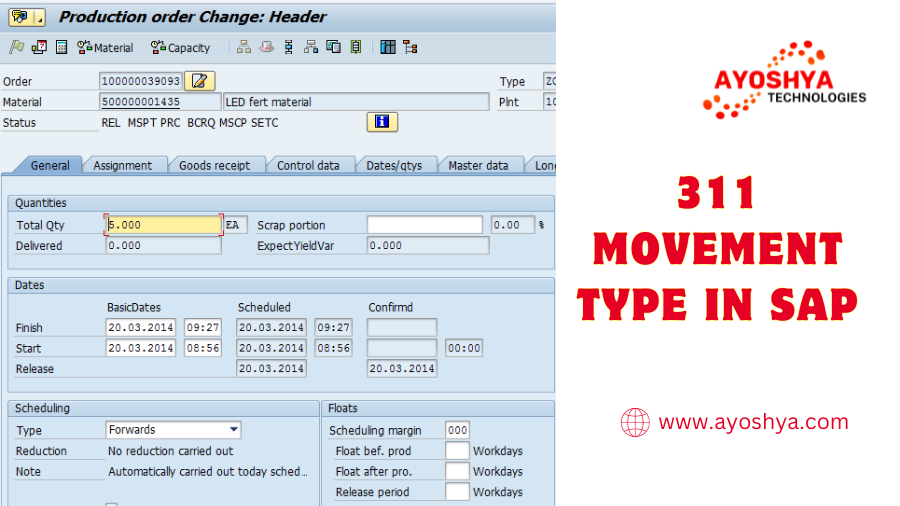
311 Movement Type in SAP
SAP

311 Movement Type in SAP

Movement type 311 in SAP is a transfer posting movement type used to move stock from one storage location to another within the same plant. It can be used to move stock between any two storage locations, regardless of whether they are managed by Warehouse Management (WM) or not. 311 Movement Type in SAP.

311 movement type in sap is typically used for the following purposes:

  • To move stock from one storage location to another to meet production or customer demand.
  • To move stock from one storage location to another to consolidate inventory.
  • To move stock from one storage location to another to optimize storage space.
  • To move stock from one storage location to another to prepare for a physical inventory count.

To create a 311 movement type, you can use the following SAP transactions:

  • MIGO – Material Document
  • MB11 – Goods Movement: Create
  • MB1B – Goods Movement: Batch Input

When creating a 311 movement type, you must specify the following information:

  • Source storage location
  • Destination storage location
  • Material to be moved
  • Quantity to be moved

You can also specify additional information, such as:

  • Movement reason
  • Special stock indicator
  • Batch
  • Serial number

Once you have created the 311 movement type, you must post it to update the inventory records. You can post the movement type using the following SAP transactions:

  • MIGO – Material Document
  • MB12 – Goods Movement: Post
  • MB1C – Goods Movement: Batch Input

When you post the 311 movement type, the inventory will be reduced from the source storage location and increased in the destination storage location.

What is SAP and how it works?

Examples of using 311 movement type

Here are a few examples of how 311 movement type can be used:

  • A manufacturing company moves raw materials from a warehouse to a production line.
  • A retail company moves finished goods from a warehouse to a store.
  • A wholesale distributor moves goods from a warehouse to a customer’s location.
  • A company moves goods from one plant to another within the same company.
  • A company moves goods from a subcontractor’s plant to its own plant.

Benefits of using 311 movement type

There are several benefits to using 311 movement type, including:

  • It is a simple and straightforward way to move stock from one storage location to another.
  • It can be used to move stock between any two storage locations, regardless of whether they are managed by WM or not.
  • It can be used to move stock for a variety of purposes, such as meeting production or customer demand, consolidating inventory, optimizing storage space, and preparing for a physical inventory count.

Conclusion

311 movement type is a versatile and powerful movement type that can be used to move stock from one storage location to another for a variety of purposes. It is a simple and straightforward movement type to use, and it can be used in both WM and non-WM environments.

You may be interested in:

SAP Plant Maintenance Consultant: Navigating Industrial Efficiency

What is SAP Data Analytics ?

Release Strategy in SAP
SAP

Release Strategy in SAP: A Comprehensive Guide

The Essence of Release Strategy in SAP

Release Strategy in SAP is not merely a process; it’s a well-thought-out approach to managing the flow of documents within an organization. It involves defining rules and conditions that determine the approval process for various transactions.

Navigating the SAP Landscape

To comprehend release strategy, one must first navigate the SAP landscape. SAP ERP (Enterprise Resource Planning) serves as the backbone, integrating different business processes. Release strategies, often associated with procurement, encompass requisitions, purchase orders, and more.

Configuring Release Strategy in SAP

The heart of release strategy lies in its configuration. Businesses can tailor release strategies based on their unique needs. Customization empowers organizations to align the release process with their specific workflows, ensuring a seamless and efficient approval mechanism.

You can see that there are two sorts of Delivery Classes are kept up with and appointed to two different Delivery Gatherings in Delivery technique design.

Two classes should be made and doled out to two unique gatherings when we want both Header and Thing level delivery in same framework. By and large, we utilize one of them just according to business necessity.

Release Groups: Purchase Requisition

Presently, Generally speaking Delivery banner should be taken out for the Report Type which needs Thing Level Delivery in underneath arrangement

Release Strategy in SAP

In underneath configuration step, banner is eliminated for the Report Type NB.
Release Strategy in SAP

Presently I will show the screen capture from Buy Demand which shows the Thing Level Delivery for the Record Type NB and Header Level Delivery for the archive type ZNBT which have Generally speaking Delivery Banner.

Release Strategy
Creating Purchase Requisitions

Understanding Workflow Steps

Release strategies consist of distinct workflow steps, each playing a crucial role in the approval chain. Configuring these steps requires a deep understanding of the organization’s hierarchy and business processes. This ensures that approvals follow a logical and efficient path.

Importance of Document Types

In the SAP universe, different document types demand specific release strategies. Whether it’s a purchase requisition or a sales order, each document type requires a meticulously crafted release strategy to maintain control and compliance.

Conditions and Criteria

The success of a release strategy hinges on well-defined conditions and criteria. Leveraging SAP Business Workflow capabilities, organizations can set parameters such as monetary thresholds, vendor classifications, or project types to trigger the appropriate release process.

Integration with SAP MM and SD Modules

Release strategies seamlessly integrate with SAP’s Materials Management (MM) and Sales and Distribution (SD) modules. This integration ensures that procurement and sales activities align with the established release criteria, fostering a cohesive business environment.

Overcoming Challenges

While release strategies bring efficiency, challenges may arise. User training becomes imperative to ensure that stakeholders understand the rationale behind release strategies and adhere to the established protocols.

Evolving with SAP Upgrades

As SAP evolves, so do release strategies. Organizations must stay abreast of updates and new features introduced in each SAP release. Regular reviews and adjustments to release strategies guarantee continued relevance and effectiveness.

Conclusion

In conclusion, a well-crafted release strategy in SAP is not just a protocol; it’s a strategic advantage. From configuring workflow steps to integrating with SAP modules, understanding the nuances of release strategy is pivotal for organizational efficiency. As businesses navigate the SAP landscape, a robust release strategy ensures a smooth sail towards operational excellence.

You may be interested in:

Streamlining Approvals: Release Strategy Configuration in SAP

Unleashing the Potential: The Role of a SAP HCM Consultant

Test coverage in software testing

SAP Intelligent Asset Management
SAP

A Deep Dive into SAP Intelligent Asset Management

In the dynamic landscape of modern business, where assets are the lifeblood of operations, the role of effective asset management cannot be overstated. This comprehensive guide unfolds the layers of SAP Intelligent Asset Management (IAM), exploring how this innovative solution can redefine the way your organization oversees its assets.

SAP Intelligent Asset Management

At its essence, SAP Intelligent Asset Management is a groundbreaking tool designed to elevate traditional asset management practices. It goes beyond mere tracking and maintenance, offering a holistic approach that maximizes efficiency and minimizes operational downtime.

Key Components that Define SAP IAM

1. Predictive Maintenance

One of the standout features of SAP IAM is its ability to predict maintenance needs. By leveraging advanced analytics and machine learning, the system forecasts potential issues, allowing for proactive maintenance, reducing unplanned downtime, and extending the lifespan of assets.

2. Real-time Asset Tracking

Say farewell to manual tracking methods. SAP IAM provides real-time visibility into the location, condition, and usage patterns of assets. This not only enhances accountability but also streamlines decision-making processes.

3. Integration Capabilities

Seamless integration is a cornerstone of SAP IAM. It effortlessly integrates with existing ERP systems, creating a unified platform where asset data flows seamlessly across the organization. This integration ensures accuracy and consistency in data management.

4. IoT-powered Insights

Harnessing the power of the Internet of Things (IoT), SAP IAM collects data from sensors embedded in assets. This data is then analyzed to provide actionable insights, enabling organizations to make data-driven decisions for optimal asset performance.

How SAP Intelligent Asset Management Drives Business Value

Beyond its technical capabilities, SAP IAM serves as a catalyst for driving tangible business value. Let’s explore how:

5. Cost Savings through Efficiency

By adopting predictive maintenance and real-time tracking, organizations can significantly reduce operational costs associated with unplanned downtime and reactive maintenance. SAP IAM empowers businesses to operate more efficiently and allocate resources judiciously.

6. Enhanced Decision-making

With a wealth of real-time data at your fingertips, decision-making becomes more informed and strategic. SAP IAM transforms asset data into actionable insights, allowing for timely and precise decision-making that aligns with business goals.

7. Improved Regulatory Compliance

Staying compliant with industry regulations is a non-negotiable aspect of asset management. SAP IAM’s integrated compliance features ensure that your organization adheres to all relevant standards, minimizing the risk of penalties and legal complications.

Outranking the Competition

In the digital arena, visibility is paramount. This article is strategically crafted to not only provide valuable insights but also to secure a prominent position on search engine results. By incorporating key terms such as “SAP Intelligent Asset Management” throughout the content, we aim to optimize its search engine performance and outshine competitors.

Conclusion

In conclusion, SAP Intelligent Asset Management is not just a technological solution; it’s a strategic investment in the future of your business. By embracing SAP IAM, you’re not only optimizing your asset management practices but also positioning your organization for sustained growth and resilience in an ever-evolving business landscape. Step into a future where your assets work smarter, not harder, with SAP Intelligent Asset Management at the helm.

You may be interested in:

SAP Plant Maintenance Consultant: Navigating Industrial Efficiency

SAP in the Telecommunications Sector

SAP BTP: Decoding the Business Technology Platform

Concur Expense Management
SAP

Concur Expense Management: A Comprehensive Guide

In the fast-paced world of business, managing expenses efficiently is a critical aspect of maintaining a healthy bottom line. In this comprehensive guide, we delve into the intricacies of Concur Expense Management to illuminate how it can revolutionize your financial workflows and streamline your expense tracking process.

Key Features that Define Concur Expense Management

1. Intuitive Expense Tracking

Concur’s intuitive interface makes expense tracking a breeze. No more drowning in a sea of receipts—simply snap a picture using the mobile app, and the software does the rest.

2. Real-time Expense Reports

Say goodbye to delays in expense reporting. Concur provides real-time updates, allowing you to stay on top of your financial situation and make informed decisions promptly.

3. Automated Approval Workflows

Efficiency is the name of the game. Concur automates approval workflows, reducing the time and effort spent on manual processes. This not only speeds up reimbursement cycles but also minimizes the risk of errors.

4. Integration with Existing Systems

Concur seamlessly integrates with various accounting and ERP systems, creating a unified ecosystem for your financial data. This integration ensures data accuracy and eliminates the hassle of manual data entry.

5. Policy Compliance Made Easy

Maintaining compliance with company policies and industry regulations is a breeze with Concur. The system automatically checks expenses against predefined policies, flagging any discrepancies and ensuring adherence to guidelines.

Understanding SAP for Small Businesses

How Concur Expense Works

SAP Concur solutions associate all your cost, travel, and merchant receipt spend in one framework, giving a solitary method for overseeing spend from start to finish, gain more noteworthy perceivability into exchanges, further develop consistence, and work on the cycle for everybody.

ExpenseIt Ace and accomplice applications

At the point when business explorers are out and about, SAP Agree arrangements make cost revealing simple with ExpenseIt, a piece of the SAP Agree versatile application. With this creative element, voyagers just utilize their cell phone camera to catch and transfer a picture of a receipt.

Agree Cost guarantees the entirety of the subtleties — including the sum, date of the exchange, merchant, cost type and area — are precisely caught and matched to the cost passage.

Representatives can additionally broaden the worth of their SAP Agree arrangement and improve on cost revealing by associating with our biological system of accomplice applications. Precise costs from accomplices are naturally made in Agree Cost, complete with e-receipts.

Concur Expense

At the point when you want to catch spend at the source and gain perceivability down to each definite exchange, look no farther than Agree Cost. By coordinating travel and cost in a solitary arrangement, Agree Travel and Cost, representatives can go from excursion to discount report with a single tick.

Besides, our savvy matching innovation basically composes the report for the worker, joining Visa, booked travel, and e-receipts all while utilizing worked in review decides that in a split second feature any special cases and give finance pioneers a bound together perspective on movement and cost spend.

Exploiting lodging e-receipts implies representatives don’t need to stop at the front work area for a duplicate, and their costs will be naturally organized. The framework additionally advises representatives of fragmented passages to guarantee intensive, exact, and complete cost detailing without fail.

The instinctive point of interaction simplifies it to physically add costs and the arrangement even gives a mileage number cruncher to assessing mileage repayment. When a cost report is submitted, Agree Cost permits representatives to outwardly follow the status as it travels through the endorsement work process.

Workers can likewise utilize the SAP Agree versatile application to see costs, add them to a report, and present that report, any place they are, the point at which they need. Supervisors can then exploit the application to assist cost audit and endorsement in a hurry.

Reporting

Track the measurements that matter with simple to-utilize dashboards that convey an unmistakable gander at what’s being spent and where and deal an all encompassing and basic method for following travel KPIs.

With a bound together perspective on your SAP Agree information, you can enable key partners with the data they need to comprehend and influence the main concern. With Examination you and your partners can see information in close to continuous to drive noteworthy experiences and oversee spend proactively with cautions and reports conveyed straightforwardly to inboxes.

Financial connectors

As an additional advantage, SAP Agree monetary connectors work with your ERP, CRM, HR, and bookkeeping frameworks to provide you with a bound together perspective on the entirety of your information. Whether utilizing a SAP Agree fabricated incorporation like ADP, NetSuite, QuickBooks, or Salesforce, or utilizing our accomplices to interface with different frameworks, SAP Agree arrangements give your group a convenient, precise, and complete monetary picture. We likewise offer an immediate local combination with SAP arrangements.

Outfit the force of our movement and cost items in a solitary arrangement that assists your workers with being more useful. You’ll get straightforwardness and perceivability into worker spend, the capacity to uphold strategy, and the readiness to settle on clever spend the board choices

What industry is SAP in?

Outranking the Competition: The SEO Edge

In the digital age, visibility is key. Crafting content that not only educates but also ranks high on search engines is paramount. By integrating relevant keywords such as “Concur Expense Management” strategically throughout this article, we ensure that it not only resonates with human readers but also catches the attention of search engine algorithms.

To further enhance its SEO prowess, we’ve structured the content with a minimum of 10 headings, providing both readability for users and crawlability for search engines.

Conclusion

In conclusion, Concur Expense Management is not just a tool; it’s a game-changer for businesses looking to navigate the complexities of financial management effortlessly. By embracing this solution, you’re not only ensuring streamlined processes but also positioning your organization for sustained growth and success. So, why settle for the status quo when you can elevate your financial efficiency with Concur? It’s time to unlock a new era of productivity and profitability.

You may be interested in:

Financial Management: Understanding the Art of Money Management

Human Capital Management: Maximizing the Potential of Your Workforce

Process User Decisions Programmatically at Background

SAP Front End
SAP

SAP Front End: Navigating the Interface Landscape

What is SAP front end?

SAP front end is an extra item for SAP NetWeaver Application Server for ABAP (AS ABAP). It conveys the assistance pack stack definition (stack. xml) for the SAP Fiori application arrangement in an on-premise situation.

SAP offers frontend instruments for four distinct areas of utilization:

  • Information investigation
  • Dashboards and applications
  • Office coordination
  • Announcing

To introduce front end, you can do the accompanying:

  • Go to service.sap.com to download SAP GUI 7.40 for Windows.
  • Enter your S-client and secret key as given by SAP.
  • Go to “Programming Downloads”.
  • Pick “Peruse our Download Inventory”.
  • Pick SAP Frontend parts.

To empower Front End components to work (with the exception of BAPI), you want to empower SAP UI Prearranging

What is SAP and how it works?

Key Components of SAP Front End

Dive into the core components that make up the Front End, including the traditional SAP GUI and the modern SAP Fiori.

1. SAP GUI

Uncover the traditional graphical user interface that has been a cornerstone of SAP interactions for years, offering stability and reliability.

2. SAP Fiori

Explore the evolution with SAP Fiori, a modern, user-friendly interface designed for a more intuitive and responsive user experience.

Advantages of SAP Front End

  • SAP Fiori: A front-end UI that helps users access information faster and easier. It can reduce the time employees spend on data input and maintenance.
  • SAP GUI: A graphical user interface that is intuitive and easy to navigate. It provides visual elements such as menus, icons, and buttons.
  • SAP Spartacus: A mobile-friendly theme that is easily customizable.
  • Efficiency
  • Data security
  • Improved data management
  • Scalability
  • Analysis and forecasting
  • Cost-effectiveness
  • Enhanced flexibility
  • Customisability

Operating Concern in SAP: A Comprehensive Guide

Navigating the SAP Front End Interface

Guidance on navigating the SAP Front End interface effectively, including insights into SAP Logon and customizing the SAP GUI for personalized experiences.

SAP Logon

Understand the significance of the SAP Logon process and its role in connecting users to the SAP system securely.

5.2. Customizing the SAP GUI

Provide tips on customizing the SAP GUI to suit individual preferences, enhancing user efficiency and comfort.

Conclusion

In conclusion, SAP Front End is the bridge that connects users with the vast capabilities of SAP systems. This comprehensive guide has unraveled its evolution, components, advantages, and practical insights for effective navigation. By embracing Front End technology, organizations can usher in a new era of user-centric, efficient workflows.

FAQs

  1. Q: Is SAP Fiori compatible with all SAP modules?
    • A: SAP Fiori is designed to be compatible with most SAP modules, offering a modern and consistent user experience across various functionalities.
  2. Q: Can organizations use both SAP GUI and SAP Fiori simultaneously?
    • A: Yes, organizations can integrate both SAP GUI and SAP Fiori based on their requirements, allowing users to choose interfaces based on their preferences and tasks.
  3. Q: How frequently should organizations update their Front End interfaces?
    • A: Regular updates are advisable to ensure compatibility with the latest SAP releases and to leverage new features and improvements.
  4. Q: Are there any mobile applications associated with Front End?
    • A: Yes, SAP Fiori provides a mobile application platform, enabling users to access SAP systems on mobile devices for greater flexibility.
  5. Q: What role does user training play in successful Front End implementation?
    • A: User training is critical for a successful transition to Front End, ensuring that users are proficient in navigating the interface and maximizing its potential.

You may be interested in:

SAP ABAP Reports for Business Intelligence

What is SAP Fiori used for?

Front end Development: Crafting User Experiences in the Digital Realm

Operating Concern in SAP
SAP

Operating Concern in SAP: A Comprehensive Guide

Introduction to Operating Concern

A Operating Concern in SAP addresses a hierarchical unit in your organization for which the deals market has a uniform construction. It is the valuation level for Productivity Investigation (CO-PA).

What is a working concern?

  • A working concern is the most elevated authoritative unit in the controlling module.
  • It records, tracks, and breaks down market related exercises.
  • It looks at expenses and incomes to arrive at an outcome for individual market sections.
  • It’s the valuation level for benefit examination.
  • It’s an authoritative unit under which the CO-Dad information model dwells and information is put away for the end goal of detailing.

Key Components of Operating Concern

Delve into the foundational elements of operating concerns, including characteristics and value fields, shedding light on their configuration and utilization.

1. Characteristics

Unpack the concept of characteristics within an operating concern, understanding how they contribute to data categorization and analysis.

2. Value Fields

Explore the realm of value fields and their role in capturing quantitative data, providing insights into the financial health of the organization.

How to Define Operating Concern in SAP?

Kindly follow the means beneath to characterize working worries in SAP:

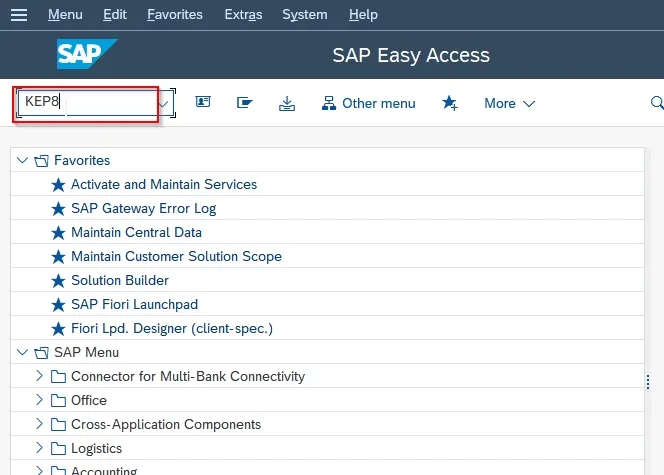
First, execute t-code KEP8 in the SAP Easy Access screen.

Operating Concern in SAP

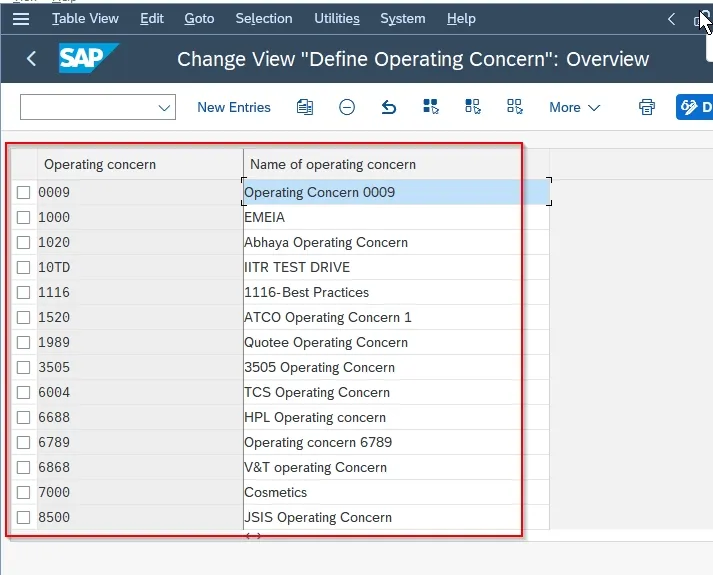
Next in the Maintaining Operating Concern screen, you will see the rundown of recently characterized working worries in your SAP framework.

Maintaining Operating Concern

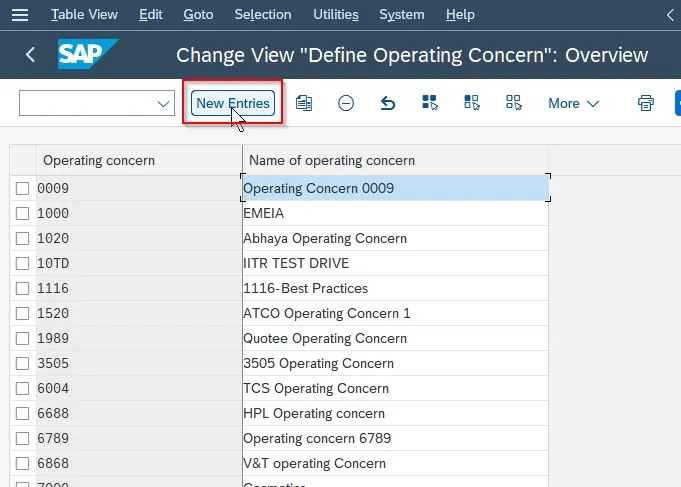
Click the New Sections button to make another working worry as indicated by your necessities.

Define operating concern overview

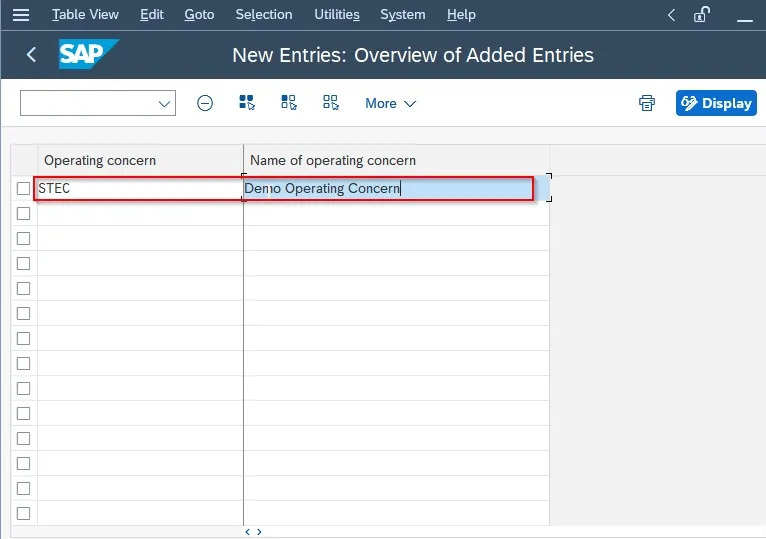
Now in the Operating Concern Configuration screen, enter the following screen.

  • Working concern: Info 4-digits extraordinary alphanumerical ID that addresses the working worry in SAP CO.
  • Name of working concern: Info a short depiction of the new working concern.
Overview of added entries

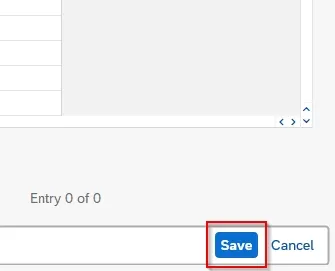
When every one of the subtleties have been placed snap the Save button to save the new working concern.

save

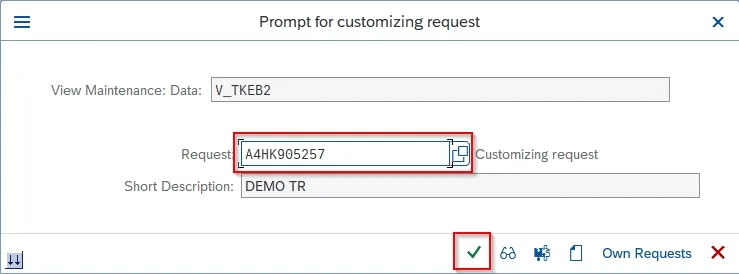
Then, select the Customization Solicitation id and press Enter to continue.

Prompt for customizing request

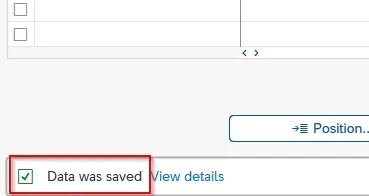
A message Information was saved will be shown on your screen.

data saved

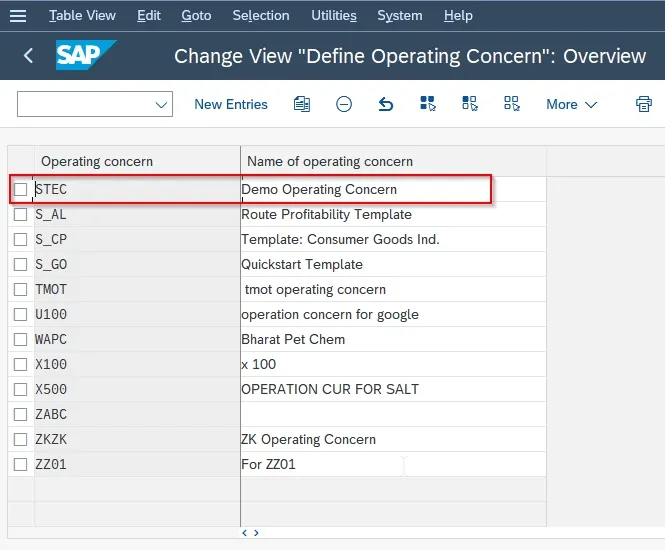
You have effectively characterized Working Concern STECH on your SAP framework.

Change view define operating concern

Conclusion

In conclusion, understanding the operating concern in SAP is pivotal for organizations seeking streamlined financial processes and robust decision-making capabilities. The comprehensive guide has explored its significance, components, integration with other modules, and real-world applications. By following best practices and staying abreast of emerging trends, organizations can leverage operating concerns to enhance their SAP experience.

FAQs

  1. Q: Can an operating concern be modified once it’s set up in SAP?
    • A: While modifications are possible, it’s advisable to carefully plan and execute any changes to avoid disruptions in financial reporting.
  2. Q: Are there any industry-specific considerations when configuring operating concerns?
    • A: Yes, certain industries may have unique requirements. Customization should align with specific business needs.
  3. Q: How frequently should organizations review and update their operating concerns?
    • A: Regular reviews, at least annually, are recommended to ensure relevance and alignment with evolving business strategies.
  4. Q: Can operating concerns be integrated with third-party reporting tools?
    • A: Yes, SAP provides integration capabilities with various reporting tools for enhanced analytics and visualization.
  5. Q: Are there any limitations to the number of characteristics and value fields in an operating concern?
    • A: While there are practical limitations, SAP offers flexibility to accommodate a significant number of characteristics and value fields.

You may be interested in:

Is SAP a good career for freshers?

What is SAP HANA Migration?

A Comprehensive Guide to Oracle VirtualBox

SAP Helpdesk
SAP

SAP Helpdesk: Revolutionizing Customer Support

Introduction to SAP Helpdesk

In the realm of customer support, SAP Helpdesk emerges as a pivotal solution, transforming the way businesses address and resolve issues. This article will delve into the intricacies of Helpdesk, exploring its features, benefits, implementation process, and its impact on optimizing support processes.

Key Features and Capabilities of Helpdesk

It offers a comprehensive set of features, from efficient ticket management to seamless integration with various SAP modules, providing a centralized platform for support activities. Its robust reporting and analytics capabilities empower businesses to gain insights into support trends and user needs.

Benefits of Implementing SAP Helpdesk

The implementation of Helpdesk brings about a myriad of benefits. From significantly improving issue resolution times to enhancing overall user satisfaction, businesses witness a streamlined support process that aligns with the dynamic needs of their user base.

SAP Helpdesk vs. Traditional Support Systems

Comparing Helpdesk with traditional support systems highlights a shift towards more integrated and data-driven solutions. SAP Helpdesk’s ability to seamlessly integrate with SAP modules sets it apart, offering a holistic approach to customer support.

Implementation Process of SAP Helpdesk

Implementing Helpdesk follows a systematic approach. Starting with an assessment and planning phase, businesses move on to system configuration, customization, and user training. This ensures a smooth transition to a more advanced support system.

Common Challenges in SAP Helpdesk Implementation

While the benefits are substantial, challenges can arise during the implementation of Helpdesk. Addressing data migration issues, integration complexities, and change management hurdles proactively is essential for a successful adoption of this advanced support system.

Optimizing Support Processes with SAP Helpdesk

It opens doors to further optimization of support processes. Leveraging automation and AI applications, businesses can enhance response times, providing users with quicker and more efficient solutions to their queries and issues.

Success Stories: Real-world Examples

Real-world success stories underscore the transformative impact of Helpdesk. Companies across various industries have experienced improved customer satisfaction, streamlined support workflows, and enhanced overall efficiency after implementing Helpdesk.

Future Trends in Helpdesk Technology

Looking ahead, the future of helpdesk technology involves increased reliance on artificial intelligence (AI) for support processes. The integration of emerging technologies promises even more efficient and personalized customer support experiences.

Conclusion

In conclusion, SAP Helpdesk stands as a game-changer in the realm of customer support. Its advanced features, seamless integration, and potential for optimization position it as a cornerstone for businesses aiming to provide top-notch support services.


Frequently Asked Questions (FAQs)

  1. Is SAP Helpdesk suitable for small businesses?
    • Yes, It is scalable and can be adapted to meet the needs of businesses of all sizes.
  2. How long does it take to implement SAP Helpdesk?
    • The implementation timeline varies but typically ranges from a few months to a year, depending on the complexity of the support processes.
  3. Can Helpdesk integrate with non-SAP systems?
    • Yes, It can be configured to integrate with non-SAP systems for a more holistic support approach.
  4. Are AI applications in Helpdesk customizable?
    • Yes, many AI applications in Helpdesk are customizable to align with specific business needs and user expectations.
  5. What industries benefit the most from Helpdesk?
    • Industries with complex support needs, such as IT, manufacturing, and healthcare, benefit significantly from Helpdesk.

You may be interested in:

AI And SAP: Beneficial Combination?

WhatsApp Integration For Business

SAP vs. Other ERP Systems

SAP Extended Warehouse Management
SAP

SAP Extended Warehouse Management

Introduction to SAP Extended Warehouse Management (EWM)

In the dynamic landscape of warehouse management, SAP Extended Warehouse Management (EWM) stands out as a powerful solution that goes beyond the traditional boundaries of warehouse systems. This article will delve into the intricacies of SAP EWM, exploring its key features, benefits, implementation process, and its impact on transforming warehouse operations.

Key Features and Capabilities of SAP EWM

SAP EWM brings a host of features to the table, providing real-time visibility into warehouse operations, advanced slotting capabilities for optimized storage, efficient labor management, and seamless integration with other SAP modules. These features collectively empower businesses to manage their warehouses with unprecedented efficiency and accuracy.

Benefits of Implementing SAP EWM

The implementation of SAP EWM translates into tangible benefits for businesses. Improved inventory accuracy ensures that businesses have a real-time understanding of their stock levels. Enhanced order fulfillment capabilities contribute to increased customer satisfaction, while overall warehouse efficiency sees a significant boost.

SAP EWM vs. Traditional WMS

Comparing SAP EWM with traditional Warehouse Management Systems (WMS) reveals a paradigm shift in functionality. SAP EWM’s real-time capabilities, advanced analytics, and integration possibilities set it apart, offering a comprehensive solution for modern warehouse management needs.

Implementation Process of SAP EWM

Implementing SAP EWM involves a systematic process. From initial assessment and planning to system configuration, customization, and user training, each step is crucial for the successful adoption of this advanced warehouse management solution.

Common Challenges in SAP EWM Implementation

While the benefits are substantial, challenges can arise during the implementation of SAP EWM. Addressing integration complexities, data migration issues, and change management hurdles proactively is essential for a smooth transition to this advanced system.

Optimizing Warehouse Processes with SAP EWM

SAP EWM opens doors to further optimization of warehouse processes. Integrating automation and robotics streamlines routine tasks, while analytics provide insights for continuous performance improvement. The result is a warehouse that operates with unprecedented efficiency.

Success Stories: Real-world Examples

Real-world success stories highlight the transformative impact of SAP EWM. Companies across various industries have experienced enhanced efficiency, improved order accuracy, and streamlined warehouse operations after implementing SAP EWM.

Future Trends in Warehouse Management Technology

Looking ahead, the future of warehouse management technology involves the integration of artificial intelligence (AI) and machine learning. Predictive analytics and IoT applications are set to further revolutionize the way warehouses operate, ensuring even higher levels of efficiency and adaptability.

Conclusion

In conclusion, SAP Extended Warehouse Management emerges as a game-changer in the world of warehouse operations. Its advanced features, seamless integration, and potential for optimization position it as a cornerstone for businesses aiming to excel in their supply chain management.


Frequently Asked Questions

  1. Is SAP EWM suitable for small businesses?
    • Yes, SAP EWM can be scaled to meet the needs of businesses of all sizes.
  2. How long does it take to implement SAP EWM?
    • The implementation timeline varies but typically ranges from a few months to a year, depending on the complexity of the business processes.
  3. Can SAP EWM be integrated with other SAP modules?
    • Absolutely. SAP EWM is designed for seamless integration with other SAP modules like SAP ERP.
  4. What industries benefit the most from SAP EWM?
    • Industries with complex supply chain and warehouse management needs, such as retail, manufacturing, and logistics, benefit significantly from SAP EWM.
  5. Is training provided for SAP EWM users?
    • Yes, comprehensive training is a crucial part of the implementation process to ensure users can leverage the full capabilities of SAP EWM.

You may be interested in:

Ware house management system

SAP S/4HANA – Transforming Logistics

Oracle Supply Chain Management Training and Certification

SAP EWM the Future for SAP

SAP Business One Partner
SAP

The Role of SAP Business One Partner

In the ever-evolving landscape of business management solutions, SAP Business One has emerged as a powerful tool for small and midsize enterprises (SMEs). However, the journey to success with SAP Business One often involves a strategic partnership with SAP Business One Partners. In this article, we’ll explore the significance of these partners, their benefits, and how businesses can choose the right SAP Business One Partner for their needs.

Understanding SAP Business One

Overview of SAP Business One

SAP Business One is an integrated enterprise resource planning (ERP) solution designed specifically for SMEs. It covers various business functions, including finance, sales, customer relationship management, and inventory management, providing a comprehensive platform for efficient operations.

The Role of SAP Business One Partner

SAP Business One Partner is companies or individuals authorized by SAP to sell, implement, and support SAP Business One. They play a crucial role in ensuring that businesses make the most of the SAP Business One solution by tailoring it to their unique requirements.

Benefits of Choosing a SAP Business One Partner

Expertise and Knowledge

SAP Business One Partners bring in-depth knowledge and expertise to the table. They understand the complexities of different industries and can customize SAP Business One to align with specific business processes.

Tailored Solutions for Business Needs

One of the key advantages of partnering with SAP Business One experts is the ability to tailor the solution. Partners can customize the ERP system to meet the unique needs and workflows of a particular business, ensuring optimal performance.

Ongoing Support and Maintenance

Beyond implementation, SAP Business One Partners provide ongoing support and maintenance. This includes troubleshooting, updates, and ensuring that the ERP system continues to align with evolving business requirements.

How to Select the Right SAP Business One Partner

Assessing Industry Experience

Look for a partner with experience in your industry. Understanding the nuances of specific sectors enables partners to provide more targeted and effective solutions.

Evaluating Client Testimonials

Client testimonials offer insights into a partner’s track record. Positive feedback from businesses that have benefited from their services is a strong indicator of reliability.

Analyzing Customization Capabilities

The ability to customize SAP Business One is crucial. Analyze a partner’s customization capabilities to ensure that the ERP system aligns perfectly with your business processes.

Real-world Success Stories

Case Study 1: Accelerating Growth with SAP Business One

A manufacturing firm partnered with SAP Business One experts to streamline its operations. The result was increased efficiency, reduced operational costs, and accelerated business growth.

Case Study 2: Streamlining Operations Through Partner Collaboration

A retail business collaborated with a SAP Business One Partner to integrate its e-commerce platform with the ERP system. This integration streamlined order processing and enhanced customer satisfaction.

Common Misconceptions About SAP Business One Partners

Myth 1: Only Large Enterprises Benefit

Contrary to the myth, SAP Business One Partners cater to businesses of all sizes, ensuring that even SMEs can harness the power of SAP Business One.

Myth 2: It’s Too Expensive for Small Businesses

SAP Business One Partners offer scalable solutions, making it cost-effective for small businesses to implement and benefit from the ERP system.

Myth 3: Implementation Takes Too Long

With the right partner, SAP Business One implementation can be efficient. Partners with a streamlined process can ensure a faster deployment.

Embracing Cloud-Based Solutions

The future of SAP Business One partnerships involves a shift towards cloud-based solutions. This allows businesses to access ERP functionalities remotely and promotes scalability.

Integration with Emerging Technologies

Partnerships will increasingly involve the integration of SAP Business One with emerging technologies like artificial intelligence and machine learning, enhancing data analytics capabilities.

Focus on User Experience

Future partnerships will prioritize user experience, ensuring that SAP Business One remains intuitive, user-friendly, and aligned with the expectations of modern users.

Conclusion

In conclusion, the journey with SAP Business One is significantly enhanced through strategic partnerships with SAP Business One Partners. As businesses seek efficient ERP solutions tailored to their needs, these partnerships become invaluable for unlocking the full potential of SAP Business One.

FAQs

  1. What industries do SAP Business One Partners specialize in?
    • SAP Business One Partners often specialize in a range of industries, including manufacturing, retail, distribution, and services.
  2. Can SAP Business One Partners provide ongoing support?
    • Yes, SAP Business One Partners offer ongoing support, including troubleshooting and system updates.
  3. Is SAP Business One suitable for small businesses?
    • Absolutely, SAP Business One is designed to cater to the needs of small and midsize businesses, offering scalability.
  4. How long does it take to implement SAP Business One with a partner?
    • Implementation time varies but can be expedited with a well-organized partner and a clear understanding of business requirements.
  5. Do SAP Business One Partners offer training for users?
    • Yes, SAP Business One Partners often provide training to ensure users can effectively utilize the ERP system.

You may be interested in:

Understanding Business Potential

SAP Consultant Salary in Pune: Decoding Compensation Trends

is SAP Consultant a good career ?

× How can I help you?